24. Safe use in a production network
In this chapter
You will learn
- to assess the blast radius of a test: which links, devices and tables each kind of test can affect
- how unknown-unicast flooding from a lab port develops step by step, and how to prevent it with learning traffic, static MAC entries, storm suppression, test VLANs and rate ramps
- how duplicate IP and MAC addresses are prevented and how MAC moves are detected
- why firewall-zone option A - the alternative to the plan's default option B - would make the TX switches part of the Enterprise firewall's failover behaviour
- how the permanent monitoring is protected from lab tests and from console mistakes
- why the TRex control ports need explicit host protection, and what a firewall failover does to streams that are addressed to a firewall MAC
- the guard rails, the change and communication rules, the golden rules, the pre-test checklist and the abort procedure
Prerequisites: Chapter 12, Chapter 14, Chapter 15, Chapter 16, Chapter 22
A traffic generator does exactly what it is told. It sends at up to 10 Gbit/s per port, to any MAC address, in any VLAN its attachment points carry, without TCP back-off and without an application that notices that something is wrong. The platform design already removes the largest structural risks: every AP is an isolated S-VLAN, the TX switches carry no production VLANs, monitoring and lab run on separate NICs and instances, and line-rate tests have their own VLANs. The risks that remain are about how tests are run. This chapter describes what a test can touch, the one failure mode that can hurt the whole fabric - unknown-unicast flooding - and the rules that keep the platform a guest in the production network rather than a load on it.
What a test can touch
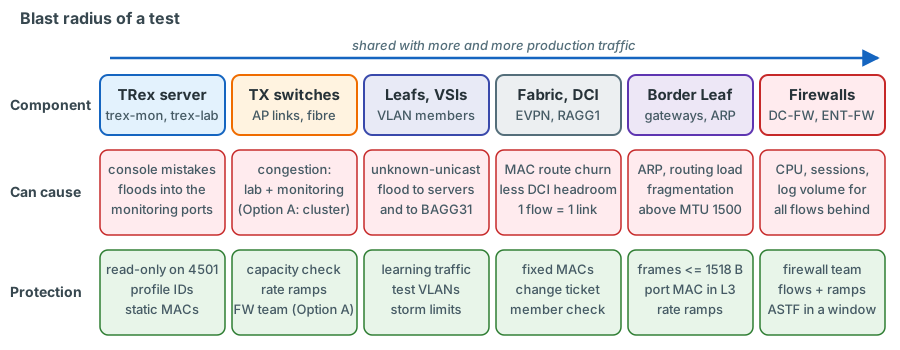
| Component | What a test can cause | Typical cause | Main protection |
|---|---|---|---|
| TRex server, control ports | Traffic started by anybody who reaches the RPC ports | Control ports without authentication on all addresses; firewalld stopped at every TRex start | Host protection (allow-list, management ACLs), check after every start |
| trex-mon itself | Monitoring outage, false loss on all streams | Console command or tool on port 4501 (reset, disconnect, the bundled ./ndr), an EMU profile reload, a flood into the promiscuous software-mode ports, lab load on shared links |
Read-only console, profile IDs, incremental EMU changes, static MAC entries, rate ramps |
| TX switches, AP links, TX-to-TX fibre | Congestion: drops for lab and monitoring frames | Lab load plus the monitoring of the same AP; RZC load on the fibre | Capacity check, ramps, agreed maxima |
| Leaf ports and VSIs | Flood to every port of the VLAN: production servers, BAGG31 to the DC firewall | Unknown destination MAC | Learning traffic, reverse stream, static MACs, test VLANs |
| EVPN control plane | MAC/IP route churn on every VTEP | Many or moving source MACs | Deterministic MACs, one MAC per port, no field engine on MACs |
| Border Leaf routing (VPN-CORE) | ARP and routing load on sw-rzk-BL; CPU load if packets must be fragmented | L3 tests at high rate, frames above the 1500-byte IP MTU | Ramps, frames of at most 1518 bytes |
| DCI 2 x 40G (RAGG1, MACsec) | Less headroom for production between the data centres | Inter-DC tests; one flow stays on one member link | Change ticket, member utilisation check |
| DC firewall, Enterprise firewall | CPU, connection table, logging volume, inspection load - for every flow through the cluster | L3-DCFW and L3-ENTFW load, ASTF | Firewall team, flows, ramps, windows |
| BAGG31, BAGG10 (firewall bonds) | Less bandwidth for production VLANs and transfer VSIs | Floods in 1314/1315 (BAGG31); firewall-zone tests cross BAGG10 twice with the default option B (once with option A) | Avoid floods, rate limits |
| IPAM, DHCP, ARP tables | Duplicate address, production host unreachable | Unreserved TRex address, DHCP scope overlap | Reservation, DHCP exclusions, pre-check |
The table maps onto the tests of Chapter 22. illustrative values The ratings below are an assessment for planning, not measurements.
| Component | Monitoring | T1 intra-DC | T1 inter-DC | T2 L3-BL | T3 DC-FW | T4 stateless | T4 ASTF |
|---|---|---|---|---|---|---|---|
| AP links, TX switches | low | high | high | high | medium | medium | medium |
| TX-to-TX fibre | low | - | high | - | - | - (option A: high) | - (option A: high) |
| VSIs (flood potential) | low | high | high | medium | high (production VLANs) | medium | medium |
| DCI | low | - | high | RZC sources: high | depends on active member | depends | depends |
| Firewalls | low | - | - | - | high | high | very high |
Unknown-unicast flooding in detail
How the flood is born
A switch that does not know the destination MAC of a frame in a VLAN sends it out of every other port of that VLAN. A VXLAN VTEP does the same at fabric scale: it floods an unknown-unicast frame to all site-facing interfaces of the VSI and replicates it once per VXLAN tunnel; every remote VTEP then floods it to its own site-facing interfaces (HPE FlexFabric 5950 EVPN Configuration Guide R630x, PDF p. 9). For a TRex lab port this means:
- p4 sends a Layer 2 test stream to a lab-client MAC that sw-rzk-TX1 has not learned in S-VLAN 3101. The TX switch floods it to the AP port and to the trex-mon trunk ports (every S-VLAN contains them).
- sw-rzk-L11 has not learned the MAC in VSI VPN-1314 either. It floods the frame to every local port of VLAN 1314 and to every VTEP of the VSI, across the DCI into RZC.
- Every Leaf and Border Leaf floods it to its local ports of VLAN 1314: production servers in that VLAN, the service instances on BAGG31 "Vlan-all" towards the DC firewall (VLANs 1314 and 1315 are mapped there on both Border Leafs), and every TRex AP that carries VLAN 1314.
- Each AP returns a copy to its TX switch in its own S-VLAN, so trex-mon receives the same flood once per AP; the copies from RZC APs also cross the TX-to-TX fibre.
illustrative values A 5 Gbit/s stream to an unknown MAC in a VLAN carried by 13 APs produces 13 copies of 5 Gbit/s in 13 S-VLANs, and each copy is offered to every active trex-mon trunk port - about 65 Gbit/s into a 10 Gbit/s port. The TX switch drops most of it, together with the monitoring frames on those ports, and the trex-mon RX cores - software mode, promiscuous - are overloaded. The result is loss on every monitoring stream, at the same time as the production VLAN carries 5 Gbit/s of traffic that nobody wants.
A flood starts whenever the destination is unknown:
- in the first moments of a test, before the destination client has sent anything;
- after MAC ageing (300 seconds by default, L2 CR PDF p. 28) when a test runs in one direction only;
- after a TX switch or Leaf has lost its MAC table (reboot, link flap, re-pinning);
- when the destination MAC is mistyped - a MAC that never exists floods for the whole test.
Watch it happen
The animation shows a lab port sending to a destination that the network has not learned yet. Watch the TX switch copy the frames to the monitoring ports as well as to the AP, and watch the Leaf flood them into the production VSI. The final steps show the two mitigations described below: learning traffic before the test, after which the same frames are forwarded as known unicast, and static MAC entries on the TX switch. Note the last message: static MACs protect trex-mon, only learning traffic protects the production VSI.
Keep steps 3 and 4 of the list above in mind while you watch: the copies that return through every other AP of the VLAN multiply the effect on the monitoring far beyond a single flooded port.
Mitigation 1 - learning traffic first, reverse traffic always
RFC 2544 already demands "learning frames" before every trial: frames whose source address is the destination address of the test frames, so that the device under test knows where to send them (RFC 2544 section 23). On this platform:
- start both directions of every Layer 2 test at a low rate (for example 100 pps) and check RX = TX for both pg_ids;
- confirm on the switches that both lab MACs are known before the first ramp step:
display l2vpn mac-address vsi VPN-1314on both Leafs (VXLAN CR PDF p. 13),display mac-address vlan 3101on the TX switch (L2 CR PDF p. 11); - keep a reverse stream running for the whole test, also in "unidirectional" tests (100 pps is enough), so that the destination MAC never ages out;
- in Layer 3 tests keep the port MAC as the source MAC (see T2 in Chapter 22).
Mitigation 2 - static MAC entries on the TX switches
A static MAC entry tells the TX switch where a lab client lives, even before it has sent anything and even after
ageing. Every lab port has a fixed MAC (02:54:52:f0:00:04 for p4 ... :07 for p7, the src_mac of the TRex
configuration, Chapter 22) whatever it is pinned to and whatever VLAN it tests, so the entries
can be prepared for the default pins and stay valid for every VLAN; only the S-VLAN in an entry follows the pin. This
is the reason the lab MAC is fixed per port: TRex answers ARP for a lab port with the port MAC, and a MAC that changed
with every re-pin would make these entries (and the firewall objects) a moving target.
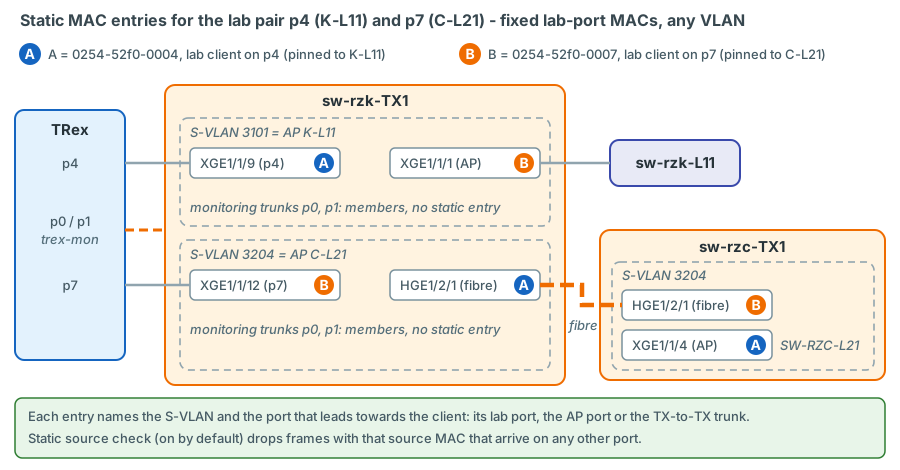
verified syntax: L2 CR PDF pp. 16-17 (mac-address static ... vlan in interface view);
interface names and S-VLANs from the TX switch design
# sw-rzk-TX1 - lab pair p4 (K-L11) <-> p7 (C-L21), any VLAN under test
interface Ten-GigabitEthernet1/1/9
 mac-address static 0254-52f0-0004 vlan 3101
interface Ten-GigabitEthernet1/1/1
 mac-address static 0254-52f0-0007 vlan 3101
interface Ten-GigabitEthernet1/1/12
 mac-address static 0254-52f0-0007 vlan 3204
interface HundredGigE1/2/1
 mac-address static 0254-52f0-0004 vlan 3204
# sw-rzc-TX1
interface HundredGigE1/2/1
 mac-address static 0254-52f0-0007 vlan 3204
interface Ten-GigabitEthernet1/1/4
 mac-address static 0254-52f0-0004 vlan 3204
| Line | What it does | Why |
|---|---|---|
Ten-GigabitEthernet1/1/9 ... 0254-52f0-0004 vlan 3101 |
p4's lab client (pinned to K-L11) sits on lab port p4 | Return traffic in S-VLAN 3101 goes only to p4 |
Ten-GigabitEthernet1/1/1 ... 0254-52f0-0007 vlan 3101 |
p7's lab client (pinned to C-L21) is reached through AP K-L11 | p4's test frames go only to the AP, never to the monitoring trunks |
Ten-GigabitEthernet1/1/12 ... 0254-52f0-0007 vlan 3204 |
p7's lab client sits on lab port p7 | Frames arriving from RZC go only to p7 |
HundredGigE1/2/1 ... 0254-52f0-0004 vlan 3204 |
p4's lab client is reached through the TX-to-TX trunk (via AP C-L21) | p7's test frames go only towards RZC |
sw-rzc-TX1 HundredGigE1/2/1 |
p7's lab client lives behind the fibre | No flooding in S-VLAN 3204 on the RZC side |
sw-rzc-TX1 Ten-GigabitEthernet1/1/4 |
p4's lab client is reached through AP C-L21 | Frames from the fibre go only to the AP |
The MAC of a lab port does not depend on the VLAN, so the same six entries cover VLAN 1314, 1315 and every other VLAN
this pair tests. The rule is one entry per lab-port MAC in the S-VLAN of its current pin - on the lab port itself and
on the ports through which that MAC is reached (AP port, TX-to-TX trunk) - and the entries move with the pin: after a
re-pin only the S-VLANs in the entries change, never the MACs. The VLAN in each entry must be one the interface belongs
to - always the S-VLAN, never the production VLAN, because the TX switch only sees S-VLANs. A lab port in Layer 3 mode
sends with its port MAC (Chapter 22, T2) - the same fixed MAC, set as src_mac in
/etc/trex/trex_lab.yaml (portattr shows it), so the entries hold for Layer 2 and Layer 3 tests alike.
Two properties of static entries matter here:
- Static source check is enabled by default: a frame whose source MAC matches a static entry but arrives on a different interface is dropped (Layer 2 - LAN Switching Configuration Guide R630x, PDF p. 24). A lab MAC that appears on the wrong port - a copy-and-paste error in a profile, a stream on the wrong lab port - is stopped at the TX switch. The flip side: after re-pinning a lab port, stale entries black-hole the lab traffic. Remove the entries of a lab port before you re-pin it, add the new ones afterwards, and save the configuration (entries that are not saved are lost at reboot, L2 CR PDF p. 17).
- Static entries act only on the TX switches. They keep floods away from the monitoring ports, but they do not teach the fabric anything: the Leafs still flood until they have learned the destination from real traffic. That is why mitigation 1 is not optional.
Mitigation 3 - unknown-unicast storm suppression
unicast-suppression limits unknown-unicast traffic on an Ethernet interface in hardware; above the threshold the
interface discards unknown-unicast frames. Known unicast is not affected.
verified syntax: L2 CR PDF pp. 98-99; L2 Configuration Guide PDF p. 45 confirm on the bench direction and threshold
| Line | What it does | Why |
|---|---|---|
interface Ten-GigabitEthernet1/1/9 |
Lab port p4 on sw-rzk-TX1 | The place where a lab flood starts |
unicast-suppression pps 1000 |
At most 1000 unknown-unicast packets per second on this interface | A mistyped or unlearned destination produces a trickle instead of 10 Gbit/s |
The documentation does not state whether the limit applies to received or to transmitted traffic on 5950 ports, so the placement must be validated on the bench: if it acts on received traffic, the lab ports are the right place; if it acts on transmitted traffic, the monitoring trunk ports are. Thresholds in kbps are rounded up to multiples of 64 (L2 CR PDF p. 99). The same command on a Leaf AP port would also cap floods into the fabric, but it is a change on a production device and its effect on traffic mapped to a VSI must be confirmed first.
Open decision: fabric-side flood limits for the test VSIs
VSIs can confine flooding: flooding disable { all | { broadcast | unknown-multicast | unknown-unicast } * }
[ all-direction | dci ] in VSI view (EVPN Configuration Guide PDF p. 41). Applied to VPN-1314/VPN-1315 on every
VTEP it would stop unknown unicast from leaving the ingress Leaf. Pros: the fabric is protected even when a test
goes wrong. Cons: a change on every Leaf and Border Leaf, different behaviour of the test VLANs, and the DC firewall
interface in those VLANs (if any) must be considered. To be evaluated with the network team; not part of the
current design.
Mitigation 4 - test VLANs for line rate
VLANs 1314 and 1315 (gateway interfaces described "Performance-Test VLAN 1314/1315" on sw-rzk-BL; VLAN descriptions
t3_1314_webserv_win and t3_1315_winserv) had no learned MACs in the February 2025 data, so a flood there reaches no servers
confirm with LVR that both are reserved for tests. They are, however, mapped to the
DC firewall on BAGG31 of both Border Leafs: a flood still loads BAGG31 and reaches the firewall if it has an interface
in those VLANs confirm with LVR.
Line-rate tests belong in these VLANs; tests in production VLANs stay at low rates unless a change approves more.
Mitigation 5 - rate ramps
Start every lab test at 1 % of line rate or less, check that every pg_id has RX = TX and that the monitoring shows no new loss, then increase in agreed steps. A flood caused by a mistake is then a 100 Mbit/s event that you stop in seconds, not a 10 Gbit/s event.
Flood indicators: loss appearing on many monitoring streams at the same time; rising rx_cpu_util in stats -g
of the read-only trex-mon console; traffic on AP ports in directions the test does not use
(display counters rate outbound interface on the TX switch, L2 CR PDF p. 43); drops on the monitoring trunk ports
(display packet-drop interface, L2 CR PDF p. 64).
Duplicate IP and MAC prevention
A TRex client answers ARP for its address (EMU on trex-mon, service mode on the lab ports). If the same address is in use by a production host, the gateway's ARP entry flips between the two and the host becomes unreachable - a production outage caused by a test tool.
- IPAM. Every TRex address is reserved before use: the 16-address monitoring pool of each VLAN (.101-.116), the lab addresses (.151 + AP index - 1, i.e. a second reservation .151-.166 in every VLAN used for lab tests, see Chapter 22) and the firewall-zone addresses. This is a prerequisite of the first test, not a later improvement.
- DHCP. Vsi-interface914 and Vsi-interface915 relay DHCP to 10.10.252.252 and 10.10.254.254 (running configuration of sw-rzk-BL). If those servers have scopes for 10.3.14.0/24 or 10.3.15.0/24, both TRex ranges must be excluded confirm with the DHCP owners; the same applies to every production VLAN under test.
- Pre-check. Before a new client goes live, its address must not appear in the gateway's ARP table:
display arp vpn-instance VPN-COREon sw-rzk-BL for 1314/1315 (L3 IP Services CR PDF p. 33); for VLANs routed by a firewall, the firewall team checks. - Deterministic MACs. 02:54:52:... is a locally administered unicast prefix and cannot collide with a
manufacturer-assigned MAC. Each monitoring client (AP and VLAN) has its own MAC; the lab ports have the fixed MACs
02:54:52:f0:00:04to:07, which can never collide with a monitoring MAC and do not change when a port is re-pinned. - No generated MACs. Never let the field engine vary the source MAC, and never use incrementing or random MACs: each new MAC is a MAC-table entry on the Leaf and a MAC/IP route on every VTEP.
- One MAC, one port. A monitoring client is only sent from the port of its EMU namespace; an ad-hoc stream uses the same port; a lab MAC appears only on its lab port. A MAC that alternates between two APs is a MAC move: the EVPN fabric re-advertises it each time with a higher sequence number (EVPN Configuration Guide R630x, PDF p. 17, "MAC mobility") and traffic is delivered to whichever AP sent last.
On the TX switches - devices that carry only TRex traffic - enable MAC-move logging, so that a move is visible in the log at once.
verified L2 CR PDF pp. 14, 24-25
| Line | What it does | Why |
|---|---|---|
mac-address notification mac-move |
Logs MAC address moves (MAC_FLAPPING messages) every detection interval | A TRex MAC that moves between ports is always a configuration error |
display mac-address mac-move shows the move records on the TX switches and, read-only, on the Leafs (L2 CR PDF p. 14).
Firewall-zone option A: the ClusterXL dependency
The plan's default, option B, has no such dependency: the firewall zone is the existing, free transfer VSI 4003, the firewall team adds a VLAN 4003 interface (VIP 10.9.90.1) on the bond that already connects both cluster members to the Border Leafs, and TRex reaches the zone through the Border Leaf attachment points K-BL and C-BL like any other VLAN. No firewall interface is connected to a TX switch - the option-A ports Ten-GigabitEthernet1/1/7 (sw-rzk-TX1) and Ten-GigabitEthernet1/1/8 (sw-rzc-TX1) are configured but shut down, and S-VLAN 3300 is defined and permitted on the trunks without an active member port - so a TX switch or fibre failure cannot touch the cluster. The rest of this section applies only if option A - the alternative - is chosen.
In option A each member of the Enterprise firewall cluster (CPF-ZV01 in RZK, CPF-ZV02 in RZC) gets a new physical
10G interface that is connected to a TX switch (AP "FW", S-VLAN 3300, stretched over the TX-to-TX fibre; on the TX
switches this needs only the cabling and undo shutdown on the pre-configured ports). ClusterXL
monitors its cluster interfaces. A failure anywhere in this non-redundant test path - a TX switch reboot, a cut or
dirty TX-to-TX fibre, an optic, a port shutdown on Ten-GigabitEthernet1/1/7 (sw-rzk-TX1) or Ten-GigabitEthernet1/1/8
(sw-rzc-TX1) - can put a member into a problem state: a failover of the production firewall, or a cluster that runs
without redundancy. With option A, the sentence "a TX switch failure never affects production" is only true once this
is solved.
Open decision: firewall-zone connection
The plan recommends option B and uses it as the default; option A - a new firewall port per member on the TX switches, the customer's original wish - remains the alternative decision. Option B - the zone uses the free transfer VSI 4003 on the existing bond BAGG10: no dependency on TX switches or fibre, but zone traffic crosses the fabric and BAGG10 (shared with transfer VSIs 4000-4002), which limits test rates. Option A needs one of two conditions: A1 - the firewall team configures the zone interface in a supported way (for their Check Point version) so that its state does not influence failover; A2 - the risk is formally accepted, and every change on the TX switches and the TX-to-TX fibre is treated as a firewall change. Details in Chapter 15 and Appendix D.
If option A is chosen and A1 is not in place:
- TX switch reboots, firmware upgrades, fibre and optic work are scheduled with the firewall team;
- the abort procedure never shuts the FW AP ports or the TX-to-TX link without the firewall team;
- an alarm "TX switch down" is also a firewall alarm.
Firewall failovers and member MACs
In February 2025 sw-rzk-BL resolved the Enterprise-firewall address 10.9.0.22 and the DC-firewall address 10.9.0.35
to MAC addresses of the active members in RZC, learned through the DCI tunnel (display arp all in the diag file):
the clusters answered with member MACs; no virtual MAC was seen confirm with the firewall
team. TRex writes the destination MAC into a stream when the stream is built. Every stream whose first hop is
a firewall therefore keeps the old member's MAC after a failover - the L3-DCFW monitoring streams in both directions,
the zone-side L3-ENTFW streams, and lab ports in Layer 3 mode behind a firewall gateway (T3, T4 in
Chapter 22). The frames go to the former active member, which no longer forwards them (or
they are flooded if it is down), until the stream is rebuilt. EMU re-resolves its gateways by itself - at once if the
cluster announces the new MAC with a gratuitous ARP request, otherwise at its next periodic query (every 60 s by
default) - but the streams do not follow.
- trex-mon. trexctl's gateway-MAC tracker (planned) polls
dgw.rmacevery 10 s and rebuilds the affected streams (eventgateway_mac_changed, information alert "Gateway MAC changed"). How fast EMU learns the new MAC depends on how ClusterXL announces it: a gratuitous ARP request is learned at once, a broadcast ARP reply is ignored and the next periodic query is needed. The plan's target of 15 s therefore needs a shorter ARP timer for the firewall VLANs or a forced query confirm on device. Until the tracker exists, a failover is an operator task: force a query where EMU still shows the old MAC (emu_arp_cmd_query ... --garp off), compareemu_show_all --4-dgwith the destination MACs of the streams and rebuild the affected streams (remove and add, as a planned change; incident I3 in Chapter 23). - Lab tests. Stop, re-resolve (
service,arp,service --off) and start again. - Cluster. A ClusterXL virtual MAC would remove the issue - a decision of the firewall team (Chapter 15). Record the behaviour during a planned failover before the firewall classes go live.
Protecting the monitoring from lab tests
| Separate | Shared |
|---|---|
| NICs (NIC1 for trex-mon, NIC2 for trex-lab) | TX switches and their configuration |
| TRex instances: prefix, ZMQ ports, memory, CPU threads, systemd units | AP links: each AP carries the monitoring of that AP and a pinned lab port |
| Consoles (4501 / 4601) | TX-to-TX fibre: monitoring of all RZC APs plus every lab stream to or from RZC |
| Fabric, DCI, firewalls | |
| Host helper services: one EMU server (4510) and one Scapy server (4507) per host |
Sharing is deliberate - the lab measures the same paths as the monitoring - but it means a lab test can disturb the monitoring in four ways, each with a rule:
- Load. A lab test near 10 Gbit/s on an AP link or on a 10G TX-to-TX fibre congests the monitoring of that AP or of all RZC APs. Keep lab rates below link capacity minus monitoring, and expect the monitoring of the APs under test to be part of the test.
- Floods. A flood reaches the trex-mon ports through every AP of the VLAN (see "Unknown-unicast flooding in detail" above). Static MAC entries and learning traffic are the protection.
- Helpers. The EMU server is a single, named daemon per host. A lab unit started with
--emuwould restart it and remove every emulated host of trex-mon; the lab units never use--emu. The Scapy server (4507) is the same kind of daemon, and every interactive stateless start restarts it unless--no-scapy-serveris given - so both lab units start with--no-scapy-server(Chapter 17). - Commands. The most likely monitoring outage is a command on the wrong console.
Console and tool discipline
- Open the monitoring console read-only:
./trex-console -p 4501 --async_port 4500 -r. - In a writable trex-mon console never use
stopwithout a profile ID,stop -a,reset,--forceordisconnect:stopwith no arguments stops every active profile of the instance,resetforce-acquires the ports, stops traffic and removes all streams, anddisconnectstops the traffic on the ports the console owns (disconnect()defaults tostop_traffic=True). Leave the console withquit.clearis harmless: it only moves the reference point of your own session; the exporter and other clients keep their counters. emu_load_profile(andemu_remove_profile) first removes all EMU namespaces and clients - every TRex host disappears from the network for a moment. Make EMU changes as incremental add and remove operations or in a window (Chapter 21).- The console tables show only the first four (
stats -s) or five (stats -l,stats --lh, TUI) pg_ids. On trex-mon, with the 176 streams of the default profile, read pg_ids and results withget_active_pgids()andget_pgid_stats()from a read-only Python client (noacquire,disconnect(stop_traffic=False)) or in Grafana. - Before every command that changes traffic, look at
stats -g: the connection line shows the port (4501 or 4601). - Never run the bundled
./ndrtool on trex-rzk-01: it always connects to the default RPC port 4501 (trex-mon) - it has no option for another port - and starts withreset()on all ports (see Chapter 22, T6). Run other TRex example scripts only if they connect explicitly to 4601.
Protecting the TRex control ports
The TRex control ports - RPC 4501/4601, publisher 4500/4600, EMU 4510, Scapy server 4507 - listen on all addresses and
have no authentication: anybody who reaches them can start traffic into production VLANs. The host firewall is
therefore part of production safety, and TRex itself switches it off: trex-cfg, which t-rex-64 runs at every
start, executes systemctl stop firewalld.service on Red Hat-family systems (trex-core scripts/trex-cfg). Every start
of trex-mon, trex-lab or trex-lab-astf - including the lab unit you start for a test - leaves a firewalld-based host
firewall stopped.
How the host is protected is an open decision of the server build (Chapter 17):
firewalld restarted after every TRex start, the nftables service with an allow-list for the management hosts,
management-network ACLs, or a patched trex-cfg. Until it is implemented, check the host firewall after every TRex
start (firewall-cmd --state) and keep the management network restricted.
Guard rails
| Guard rail | Value | Source |
|---|---|---|
| Latency streams on trex-mon | at most 120 (hard limit 128) | Monitoring design, TRex limit |
| Flow-stat streams on trex-mon | at most 600 (hard limit 1023 in software mode) | Monitoring design, TRex limit |
| Total monitoring rate | at most 50 kpps | Monitoring design |
| Rate per monitoring stream through a firewall | at most 100 pps | Monitoring design |
| Every lab start | with a duration (-d) |
This chapter |
| First step of every lab test | at most 1 % of line rate | This chapter |
| Frames on routed paths | at most 1518 bytes | IP MTU 1500 of the Vsi-interfaces |
| Source MACs | deterministic only; no field engine on MAC fields | This chapter |
Open decision: maximum lab rate without approval
Option 1 - up to 100 Mbit/s per direction in VLANs 1314/1315, intra-DC, without a change ticket (test ticket only); everything else with a change. Option 2 - up to 1 Gbit/s under the same conditions. Option 3 - every lab test needs a change ticket. A lower threshold means more paperwork; a higher one relies more on the operator's discipline. The value belongs in the operations handbook once agreed with the LVR network team.
Change management and communication
decision Proposed categories, to be agreed with LVR:
| Category | Examples | Approval | Time | Informed |
|---|---|---|---|---|
| Standard test | T1/T2 intra-DC in 1314/1315 up to the agreed rate; T5 at low rate | Test ticket | Business hours | Network on-call |
| Normal change | Inter-DC tests (DCI), tests above the agreed rate, any test in a production VLAN | Change ticket, network team | Announced window | NOC, network team |
| High-risk change | T3, T4 at load, all ASTF tests; if option A is chosen, any work on the FW AP ports | Change ticket, network and firewall teams | Maintenance window, firewall team present | NOC, firewall team, management as required |
Before the test: ticket with the test card (Chapter 22), approvals for the category, announcement to the NOC and to every team whose device is in the path, abort criteria written down and agreed.
During the test: annotation at the start (Grafana Ctrl / Cmd + click, or the annotations API), a reachable contact for the duration, a second person watching the monitoring for higher categories.
Abort criteria (examples): loss on monitoring streams that are not part of the test; firewall CPU or connection count above the agreed value; DCI member utilisation above the agreed value; MAC_FLAPPING messages on a TX switch; any production alarm or user report during the test window.
After the test: annotation at the end, post-checks, report attached to the ticket, ticket closed or follow-up created. An aborted test gets a short root-cause note before it is repeated.
The golden rules
- Know which instance you are talking to: 4501 is monitoring (read-only), 4601 is lab. Check
stats -gfirst. - On trex-mon never use
stopwithout a profile ID,stop -a,reset,--force,disconnectoremu_load_profile; leave a writable console withquit; ad-hoc monitoring streams always get their own profile ID; read-only tools never acquire ports and disconnect withstop_traffic=False. - Never run the bundled
./ndrtool on trex-rzk-01, and no other TRex example script or tool against the default port 4501. - Every lab test has a ticket, a test card with abort criteria, an annotation and a duration.
- Learning traffic first, a reverse stream all the time, static MAC entries for the lab clients - never send to a MAC you have not seen learned.
- Start at 1 % or less and ramp in steps; look at the monitoring between steps.
- Line rate only in the test VLANs 1314/1315, unless a change approves otherwise.
- Never vary MAC addresses; one MAC, one port - a lab port always sends with its fixed MAC, whatever its pin.
- Only reserved addresses; lab addresses (.151-.166) are reserved and excluded from DHCP like the monitoring pools.
- Firewall paths only together with the firewall team; ASTF only in an agreed window; after a firewall failover, streams towards a firewall MAC are rebuilt or re-resolved.
- Routed paths: frames of at most 1518 bytes; lab ports in L3 mode keep their port MAC.
- With the plan's default firewall-zone option B the TX switches and the TX-to-TX fibre are not firewall-relevant; only if option A is chosen do they become part of the firewall's failover behaviour.
- The TRex control ports have no authentication and every TRex start stops firewalld: check the host protection after every start.
- When in doubt, stop.
stop -aon the lab console costs nothing.
Pre-test checklist
- Test card complete: ID, purpose, path, instance and ports, rate plan, duration, abort criteria
- Ticket approved for its category; teams in the path informed
- No maintenance on devices in the path (change calendar)
- Monitoring healthy: no path-down streams, no unexplained loss, baseline latency
- Lab pins as planned (
display current-configuration interfaceon the TX switch lab ports) - Static MAC entries match the pins (
display mac-address static vlan <S-VLAN>) - Lab addresses (.151-.166) reserved in IPAM and excluded from DHCP; not present in the gateway ARP table before the test
- Routes and firewall rules in place (L3 and firewall tests)
- Lab console on port 4601 (
stats -g); any trex-mon console is read-only - Host protection active after the lab unit was started (TRex stops firewalld at every start)
- First step at most 1 %, every start with
-d - Abort ladder at hand; start annotation written
Abort procedure
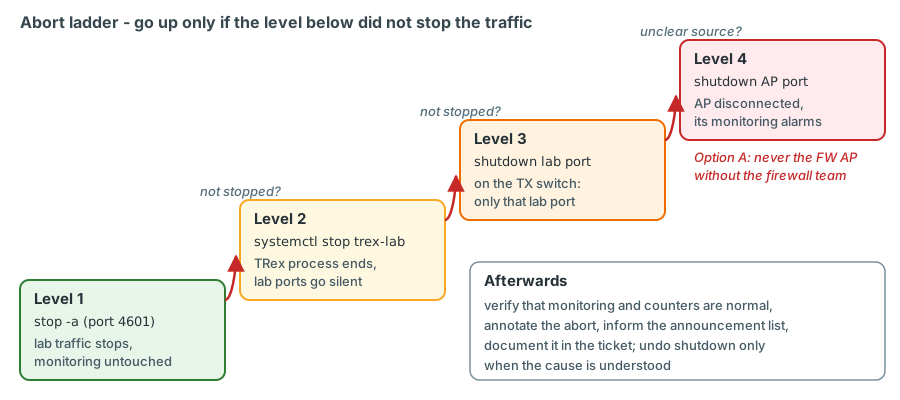
Level 1 - stop the traffic in the lab instance. In the lab console (port 4601!) stop -a; in Python
c.stop() on the lab client. Check stats -g: TX must drop to zero. For an ASTF run the command is stop.
Level 2 - stop the lab instance. If the console does not respond:
confirm on device unit names from Chapter 17
When the TRex process ends, its DPDK ports stop transmitting.
Level 3 - shut the lab port on the TX switch. If the server is unreachable or the traffic does not stop, shut the lab port. This affects only the lab port.
verified L2 CR PDF pp. 96-97
Level 4 - shut the AP port on the TX switch. If the source is unclear, shutting the AP port of the affected AP (for example Ten-GigabitEthernet1/1/1 for K-L11) disconnects everything TRex sends into that Leaf - monitoring of that AP included, so its alarms are expected. With the default option B, shutting the K-BL or C-BL AP port also cuts the zone client of that Border Leaf, but the firewall cluster is not affected. If option A is chosen, the FW AP ports are excluded from this level unless the firewall team agrees.
Monitoring instance. If trex-mon itself sends something it should not (an ad-hoc stream with a wrong rate), stop
that profile ID (stop --port 0.adhoc); as a last resort sudo systemctl stop trex-mon, which stops all monitoring
and triggers the instance-down alerts.
Afterwards. Verify that the monitoring is back to baseline and that the Leaf and firewall counters are normal,
annotate the abort, inform the people on the announcement list, record what happened in the ticket, and undo
shutdown (undo shutdown) only when the cause is understood.
Key takeaways
- A test can touch everything from the monitoring instance to the firewalls; the blast radius grows with rate, with the number of VLAN members and with every shared device in the path.
- Unknown-unicast flooding is the platform-wide failure mode: an unlearned or mistyped destination MAC turns one lab stream into copies on every port and VTEP of the VLAN and into a flood of the monitoring ports through every AP.
- Learning traffic and a permanent reverse stream protect the fabric; static MAC entries protect the TX switches and the monitoring ports - one entry per fixed lab-port MAC in the S-VLAN of its pin, moved with every re-pin; storm suppression caps mistakes; test VLANs and ramps limit the damage.
- Reserved addresses, DHCP exclusions, deterministic MACs and "one MAC, one port" prevent duplicate addresses and MAC moves.
- With the plan's default firewall-zone option B the firewall cluster does not depend on the TX switches or the TX-to-TX fibre. Only option A would make them part of the Enterprise firewall's failover behaviour, until the firewall team decides otherwise.
- The clusters answered with member MACs in February 2025: after a failover, every stream addressed to a firewall MAC loses packets until it is rebuilt or re-resolved, unless a virtual MAC is introduced. The planned gateway-MAC tracker rebuilds the monitoring streams; the 15-s recovery target is still to be confirmed.
- Most monitoring outages caused by tests will be console mistakes: read-only on 4501, profile IDs,
quitinstead ofdisconnect, incremental EMU changes, never the bundled./ndrtool. - The TRex control ports have no authentication and every TRex start stops firewalld: host protection is a design decision and a check after every start.
- Tickets, annotations, agreed abort criteria and the four-level abort ladder make a test predictable for everybody else in the network.
Check your understanding
1. A lab test from p4 is started with a mistyped destination MAC. Static MAC entries are configured for the correct MACs. What happens, and what limits the damage?
The mistyped MAC is unknown everywhere, so the static entries do not apply. sw-rzk-TX1 floods the frames in S-VLAN 3101 to the AP and the monitoring trunks, and the fabric floods them into the whole VSI for the whole test. Unknown-unicast suppression on the lab port (if validated for that direction) and the 1 % first step limit the damage; the monitoring shows loss immediately and the operator stops the test.
2. Why does a unidirectional 30-minute L2 test without a reverse stream start flooding after about five minutes?
The destination lab client never sends, so its MAC entries age out after the default 300 seconds on the TX switch and the Leafs, and EVPN withdraws the route. From then on the destination is unknown and every test frame is flooded. A low-rate reverse stream keeps the entries fresh.
3. p4 is re-pinned from K-L11 to C-L21 (S-VLAN 3204) for an intra-RZC test with p7, and the static MAC entries of the K-L11/C-L21 pair are left as they are. p4's frames disappear at the TX switch. Which feature explains this?
The entry 0254-52f0-0004 vlan 3204 on HundredGigE1/2/1 - p4's fixed MAC as it was reached through the TX-to-TX
trunk while p4 sat at K-L11 - now matches frames with that source MAC that arrive in S-VLAN 3204 from
Ten-GigabitEthernet1/1/9. With static source check (enabled by default) the switch drops frames whose source MAC
matches a static entry but arrive on a different interface. A lab port's MAC never changes, so a re-pin is always a
move of its entries: remove the old ones before re-pinning and add the new ones afterwards.
4. VLANs 1314 and 1315 have no production hosts. Is a flood in VLAN 1314 therefore harmless?
No. Both VLANs are mapped to the DC firewall on BAGG31 of both Border Leafs, so the flood loads BAGG31 (shared with production VLANs) and reaches the firewall. It also reaches every TRex AP of the VLAN and therefore the monitoring ports, and it crosses the DCI.
5. Why must the field engine never vary the source MAC of a test stream, even in a test VLAN?
Each new MAC creates a MAC-table entry on the Leaf and a MAC/IP route that is advertised to every VTEP; thousands of MACs per second would churn the EVPN control plane of the whole fabric and fill tables. MACs that move between APs are re-advertised with increasing sequence numbers. TRex clients therefore use deterministic, fixed MACs.
6. A colleague wants to reboot sw-rzc-TX1 to upgrade it. What is your answer with the plan's default firewall-zone option B, and what would change if option A were chosen?
With option B it is a measurement-only change: the monitoring of every RZC AP - including the zone client at C-BL - has a gap, so announce, annotate and silence it, and run no lab test towards RZC meanwhile; the firewall cluster is not involved. If option A were chosen, it would be a firewall-relevant change: sw-rzc-TX1 would carry the zone interface of CPF-ZV02 (Ten-GigabitEthernet1/1/8 in S-VLAN 3300, today configured but shut down) and the TX-to-TX trunk. ClusterXL monitors that interface, so the reboot could trigger a failover or leave the cluster without redundancy. Schedule it with the firewall team, unless they have made the interface non-critical (condition A1).
7. The lab console hangs during a line-rate test. What do you do?
Go up the abort ladder: sudo systemctl stop trex-lab stops the instance and its ports. If the traffic continues or
the server is unreachable, shut the lab port on the TX switch; only if the source is still unclear, shut the AP port
and accept the monitoring alarms of that AP. Then verify recovery, annotate and document.
8. After a planned failover of the DC firewall, the L3-DCFW monitoring streams show 100 % loss in both directions, while EMU already shows a new gateway MAC. L2 and L3-BL streams are fine. What happened?
The cluster answers its addresses with the MAC of the active member. The L3-DCFW streams were built with the old
member's MAC as destination, and TRex does not rewrite it: the frames reach the former active member, which no
longer forwards them. EMU has re-resolved the gateway, but the streams do not follow. Rebuild the affected streams
with the new MAC (planned: trexctl's gateway-MAC tracker polls dgw.rmac every 10 s, rebuilds them and raises the
information alert "Gateway MAC changed"); a ClusterXL virtual MAC would avoid it.
References
- HPE FlexFabric 5950 Layer 2 - LAN Switching Command Reference R630x: PDF p. 11 (
display mac-address), p. 14 (display mac-address mac-move), pp. 16-17 (mac-address static ... vlanin interface view; entries not saved are lost at reboot), pp. 24-25 (mac-address notification mac-move), p. 28 (mac-address timer, 300 s default), p. 43 (display counters rate), p. 64 (display packet-drop), pp. 96-97 (shutdown), pp. 98-99 (unicast-suppression, 64 kbps steps). - HPE FlexFabric 5950 Layer 2 - LAN Switching Configuration Guide R630x: PDF p. 15 (MAC address entry types), p. 24 (static source check), p. 45 (storm suppression).
- HPE FlexFabric 5950 EVPN Configuration Guide R630x: PDF p. 9 (VTEP flooding and head-end replication), p. 17 (MAC
mobility), p. 41 (
flooding disablefor a VSI). - HPE FlexFabric 5950 VXLAN Command Reference R630x: PDF p. 13 (
display l2vpn mac-address). - HPE FlexFabric 5950 Layer 3 - IP Services Command Reference R630x: PDF p. 33 (
display arp vpn-instance). - RFC 2544, section 23 (learning frames). https://www.rfc-editor.org/rfc/rfc2544
- TRex source (trex-core master):
scripts/automation/trex_control_plane/interactive/trex/stl/trex_stl_client.py(stopwithout ports stops all active profiles;resetforce-acquires, stops and removes streams),.../common/trex_client.py(disconnect()defaults tostop_traffic=True),.../emu/trex_emu_client.py(load_profilefirst removes the existing profile),.../console/trex_console.py(-r/--readonly),.../examples/stl/stl_ndr_bench_tool.py(default server and port,reset),scripts/trex-cfg(stops firewalld on Red Hat-family systems). - LVR running configurations (Feb 2025): sw-rzk-BL Vsi-interface914/915 (
dhcp select relay, servers 10.10.252.252 and 10.10.254.254), BAGG31 "Vlan-all" and BAGG10 service instances on both Border Leafs; VLAN descriptions of 1314/1315; diag sw-rzk-BLdisplay arp all(10.9.0.22 and 10.9.0.35 resolved to member MACs via Tunnel5).