2. What TRex is
In this chapter
You will learn
- what TRex is, where it comes from and which release the LVR platform uses
- the four TRex modes - stateless (STL), advanced stateful (ASTF), legacy stateful (STF) and the emulation server (EMU) - and which of them the LVR platform uses where
- how the TRex server and its clients talk to each other (JSON-RPC over ZMQ, ports 4500, 4501 and 4510)
- how TRex numbers its ports, why ports work in pairs, and how port ownership protects running traffic
- the lifecycle of a test session, step by step, in the console and in Python
- why TRex was chosen over iperf, kernel pktgen, Ostinato, MoonGen, pktgen-dpdk and commercial testers
- where to find the official documentation
Prerequisites: Chapter 1
Chapter 1 defined what the platform measures. This chapter introduces the instrument. You will not build streams yet - that is chapter 4 - but after this chapter you should be able to explain to a colleague what runs on the TRex server, which program listens on which TCP port, what happens when you open the TRex console, and why a careless command can stop the permanent monitoring.
TRex in a nutshell
TRex is a traffic generator developed at Cisco and published as open source; the licence file of the trex-core repository states that the TRex server is licensed under the Apache License 2.0. It is not an appliance: it is a software package that turns a standard x86 server with suitable network cards into a traffic generator. The TRex manual puts it this way: TRex "should work on any COTS x86 server", uses DPDK, and does not need DPDK to be installed separately because it ships everything it needs.
What makes TRex interesting for LVR:
- Speed on standard hardware. The stateless guide quotes 10-22 million packets per second per CPU core; a single server scales to well beyond the 10G ports used at LVR. Chapter 3 explains how DPDK makes this possible.
- Per-stream statistics and latency. Every stream can be counted individually, and selected streams carry a sequence number and a timestamp for one-way latency, jitter, loss, reordering and duplicate detection.
- Any packet. Packets are described with Scapy, the Python packet library, so QinQ frames, VXLAN, IPv6 or deliberately malformed packets are all possible.
- Automation. Everything the console can do is available as a Python API; the server is controlled through JSON-RPC.
- Stateful traffic and host emulation. The same package can emulate thousands of TCP clients and servers (ASTF) and hosts that answer ARP and ping (EMU).
The trade-off is precision: TRex time-stamps packets in software. The stateless guide compares TRex with a commercial tester and lists latency and jitter as "Microsecond resolution (software-based)" for TRex against "Nanosecond resolution (hardware-based)" for the commercial product. For fabric paths of a few to a few tens of microseconds, microsecond resolution is sufficient for monitoring, as long as TRex's own share is known from a baseline (chapters 1 and 3).
Releases
TRex is distributed as a tar archive per release (for example https://trex-tgn.cisco.com/trex/release/v3.08.tar.gz).
There is no installer: you unpack the archive and run the programs from that directory. The LVR platform uses
v3.08 (November 2025). The release notes of the last three releases are short:
| Release | Release note |
|---|---|
| v3.08 | "Python 3.12 support (client side), older python might not work" |
| v3.07 | "Upgrade to DPDK 25.07"; "E810 supports hardware mode, not part of the regression" |
| v3.06 | net_bonding fix after the DPDK 24.03 upgrade; libarchive added to the package |
The v3.08 note is the reason the LVR server uses a dedicated Python 3.12 environment for the TRex client libraries (chapter 17).
The unpacked package contains, among other things:
| Location | Content |
|---|---|
/ (top level) |
t-rex-64 (the server start script), dpdk_setup_ports.py, trex-console |
stl/ |
Stateless example profiles, e.g. stl/udp_1pkt_simple.py, stl/imix.py, stl/flow_stats.py |
astf/ |
ASTF example profiles, e.g. astf/http_simple.py |
cfg/ |
Example configuration files |
automation/trex_control_plane/interactive/trex/ |
The Python client libraries (STL, ASTF, EMU) and the console |
The TRex modes
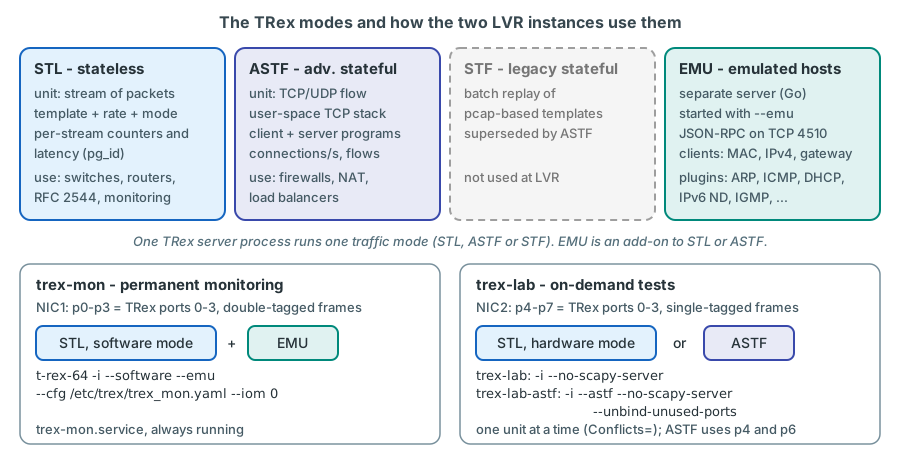
TRex can generate traffic in fundamentally different ways. They are called modes, and a TRex server process runs in exactly one traffic mode at a time. EMU is not a traffic mode but a companion server that can be added to STL or ASTF.
Stateless (STL)
In stateless mode the unit of traffic is a stream: a packet template plus a rate and a transmission mode (continuous, single burst or multi-burst), optionally a field engine program that changes fields from packet to packet, and optionally statistics collection under a packet group ID (pg_id). TRex does not care whether anybody answers; it sends exactly the packets you describe and counts what comes back. The stateless guide summarises the choice in one line: "If you are confused you probably need Stateless."
STL is the mode for switch and router testing, RFC 2544 benchmarks - and for monitoring, because every stream has a
fixed, predictable rate and its own counters. Both LVR instances use STL: trex-mon permanently, trex-lab for
line-rate tests.
Advanced stateful (ASTF)
In ASTF the unit of traffic is a flow produced by a real user-space TCP/UDP stack (BSD-based). You describe what a
client and a server "say" to each other - send a request of 100 bytes, wait for a response of 1000 bytes, close - and
TRex opens connections at the requested rate, with real handshakes, windows and retransmissions. TRex can play both the
client and the server side. ASTF measures connections per second, concurrent flows, goodput and TCP errors. It is the
mode for devices that keep per-connection state: firewalls, load balancers, NAT, proxies. ASTF has been interactive
since v2.47 (t-rex-64 -i --astf).
At LVR, ASTF is used on demand by trex-lab for stateful tests through the Enterprise firewall
(chapter 7).
Stateful (STF) - legacy
STF is the original TRex mode: a batch run (t-rex-64 -f cap2/dns.yaml -d 10) that replays flows derived from pcap
templates described in YAML files. It has been superseded by ASTF and is not used at LVR. You will still meet it in
the TRex manual, much of which was written for STF.
The emulation server (EMU)
STL and ASTF generate traffic, but they do not live on the network: a stream does not answer an ARP request for its source address, and it cannot find the MAC address of its gateway by itself. TRex-EMU fills that gap. It is a separate server process, written in Go, that emulates clients - each with a MAC address, an IPv4 address and a default gateway - inside namespaces identified by a TRex port and up to two VLAN tags. Plugins implement the protocols: ARP, ICMP, DHCP, IPv6 neighbour discovery, IGMP, DNS and more.
EMU is started together with the TRex server with the option --emu, which is used together with --software (the
EMU server needs software mode). It listens for its own JSON-RPC commands on TCP port 4510 and exchanges packets
with the TRex receive core over a ZMQ channel (IPC by default). The EMU server is a single helper service per host, so
only one TRex instance on a server can run it.
In the LVR platform
trex-mon uses EMU so that every TRex client address - for example 10.3.14.101 with MAC 02:54:52:01:05:22 at
attachment point K-L11 in VLAN 1314 - answers ARP and ping like a real host, and resolves its gateway 10.3.14.1 on
sw-rzk-BL. Because that gateway is centralised on the Border Leaf, ARP resolution from a Leaf attachment point is
confirmed during commissioning (chapter 10). Chapter 6 explains EMU in detail.
Which mode runs where at LVR
| Instance | systemd unit | Command line | Mode | Ports |
|---|---|---|---|---|
trex-mon |
trex-mon.service (always running) |
t-rex-64 -i --software --emu --cfg /etc/trex/trex_mon.yaml --iom 0 |
STL, software mode, with EMU | NIC1: p0-p3 |
trex-lab |
trex-lab.service (on demand) |
t-rex-64 -i --cfg /etc/trex/trex_lab.yaml --iom 0 --no-scapy-server |
STL, hardware mode | NIC2: p4-p7 |
trex-lab (stateful) |
trex-lab-astf.service (on demand) |
t-rex-64 -i --astf --cfg /etc/trex/trex_lab_astf.yaml --iom 0 --no-scapy-server --unbind-unused-ports |
ASTF | NIC2: p4 and p6 only |
The two lab units use the same NIC and are mutually exclusive (Conflicts= in systemd); switching trex-lab between
STL and ASTF means stopping one unit and starting the other. The ASTF unit has its own configuration file that lists
only p4 and p6: ASTF fixes the roles of the ports - even ports are the client side, odd ports the server side - so p4
becomes port 0 (client) and p6 port 1 (server) (chapter 7). Both lab units carry --no-scapy-server:
the Scapy helper server exists once per host, and every interactive stateless start without this option restarts it -
including the helper that trex-mon started. The ASTF unit also carries --unbind-unused-ports, because it uses only
two of the four NIC2 ports. The options are explained in chapter 3.
Why is trex-mon a stateless instance in software mode?
Monitoring needs streams with a constant rate and their own counters, which is exactly what STL provides. Software
mode is required by the LVR attachment-point design: the monitoring ports carry double-tagged (QinQ) frames, and
TRex supports per-stream statistics for QinQ only when it processes received packets in software (--software,
stateless guide, "Per stream statistics - Limitations"). Software mode also raises the number of loss-only streams
from 127 (X710 hardware counters) to 1023, and lets EMU see the ARP and ICMP packets it has to answer. One DP core
per port pair (c: 1) keeps the software latency measurement accurate (chapter 3).
Client/server architecture
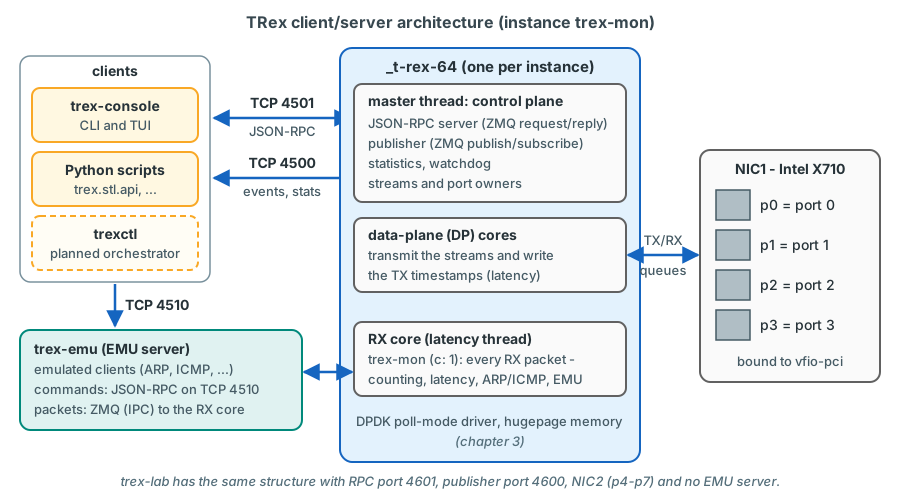
TRex is split into a server that owns the network ports and clients that tell it what to do.
The server
t-rex-64 is a shell script. It checks the configuration, binds the NIC ports to the DPDK driver, prepares hugepages,
starts helper processes (such as the EMU server) and finally runs the actual server binary _t-rex-64. With the option
-i (interactive) the server starts with no traffic at all and waits for clients. Without -i, TRex runs a batch job
(STF, or ASTF in batch form) and exits at the end. Both LVR instances always run interactively.
Inside the server process three kinds of threads work together: a master thread with the control plane
(the RPC server, statistics, the publisher), data-plane (DP) cores that transmit and - depending on the mode - also
receive packets, and one receive (RX) core for received packets that need software handling: service packets such
as ARP and ICMP, the path to EMU, captures and, in some modes, the latency packets. In trex-mon, which runs one DP
core per port pair, the RX core reads every received packet itself - the receive model that keeps its latency values
accurate. Chapter 3 looks at them in detail.
The channels
| Channel | Transport | Default port | LVR trex-mon / trex-lab | Used for |
|---|---|---|---|---|
| RPC (synchronous) | ZMQ request/reply, JSON-RPC 2.0 | TCP 4501 (zmq_rpc_port) |
4501 / 4601 | Every command: acquire ports, add streams, start, stop, read statistics |
| Publisher (asynchronous) | ZMQ publish/subscribe | TCP 4500 (zmq_pub_port) |
4500 / 4600 | Events (port state changes, errors) and periodic statistics pushed to all subscribers |
| EMU RPC | ZMQ request/reply, JSON-RPC 2.0 | TCP 4510 | 4510 (trex-mon only) | Commands to the EMU server: namespaces, clients, plugins |
| EMU packets | ZMQ, IPC by default | - | internal | Packets between the EMU server and the TRex receive core |
The RPC protocol is documented in the "TRex RPC Server" specification: JSON-RPC 2.0 messages over a ZMQ request/reply
socket, "TCP on port 4501, however this is configurable". The first call of every client (api_sync) negotiates API
versions; taking ownership of a port (acquire) takes a user name and a force flag and returns a handler for later
calls.
The clients
trex-console- the interactive command line, started from the TRex directory. It is itself a Python program built on the client API. Its options include-s(server, default localhost),-p(RPC port, default 4501),--async_port(publisher port, default 4500),--emu(load the EMU commands),--emu-server-port(default 4510),-a(ports to acquire),-r(read-only),-f(force acquire) and-u(user name).- The TUI - a full-screen live view inside the console (command
tui), with pages for the dashboard, streams, latency and utilisation. - The Python API -
trex.stl.api(classSTLClient),trex.astf.api(ASTFClient) andtrex.emu.api(EMUClient), found underautomation/trex_control_plane/interactivein the package. - Anything else that speaks JSON-RPC over ZMQ - for example the planned LVR orchestrator
trexctl. TRex also has a GUI, which LVR does not use.
This is what a console session looks like when it starts. The example is from the TRex documentation
from TRex docs ("Tutorial: Load TRex server, Simple IPv4 UDP"). The guide's start line
ends with -a; the v3.08 console no longer accepts that option and uses all acquired ports when --port is omitted,
so it is left out here:
[bash]>trex-console

Connecting to RPC server on localhost:4501                   [SUCCESS]
connecting to publisher server on localhost:4500             [SUCCESS]
Acquiring ports [0, 1, 2, 3]:                                [SUCCESS]

125.69 [ms]

trex>start -f stl/udp_1pkt_simple.py -m 10mbps

Removing all streams from port(s) [0, 1, 2, 3]:              [SUCCESS]
Attaching 1 streams to port(s) [0, 1, 2, 3]:                 [SUCCESS]
Starting traffic on port(s) [0, 1, 2, 3]:                    [SUCCESS]
Note the line "Acquiring ports [0, 1, 2, 3]": by default the console acquires all ports of the server it connects
to. On the LVR server that
default is exactly what you must avoid when you connect to trex-mon - see the next section.
Why split TRex into a server and clients?
The packet path must be fast, predictable and written in C++ on top of DPDK; the logic that describes traffic must be flexible, scriptable and easy to change, which favours Python. An RPC interface separates the two: the server keeps the streams and counters, clients come and go. Several clients can watch the same server at the same time, scripts can automate tests (the stateless guide quotes about 1 ms per start/stop/read cycle), and the server keeps running - and transmitting - when a client disconnects.
Production impact
The TRex RPC protocol identifies users by name only; there is no password and no encryption, and the control ports
listen on all addresses. Anyone who can reach an RPC port (4501, 4601, 4510) can stop or change the monitoring, the
publisher ports (4500, 4600) expose the statistics, and the Scapy helper listens on 4507. A host firewall cannot be
taken for granted either: the
setup script trex-cfg, which t-rex-64 runs at every start, stops firewalld on Red Hat-family systems. How the
TRex ports are protected - for example an nftables allow-list for the management hosts plus ACLs in the management
network - is therefore an explicit design decision of the server build
decision (chapter 17). The LVR clients (console,
exporter, trexctl) run on the server itself and connect to localhost.
Ports, port pairs and ownership
Port numbering
Each TRex instance numbers its own ports from 0, in the order of the interfaces list in its configuration file. The
LVR documents use server-wide names p0-p7 for the eight physical ports, so the same physical port has two names:
| Physical port | NIC | Instance | TRex port number | Role |
|---|---|---|---|---|
| p0 | NIC1 | trex-mon | 0 | monitoring trunk (active) |
| p1 | NIC1 | trex-mon | 1 | monitoring trunk (active) |
| p2 | NIC1 | trex-mon | 2 | monitoring trunk (reserve) |
| p3 | NIC1 | trex-mon | 3 | monitoring trunk (reserve) |
| p4 | NIC2 | trex-lab | 0 | lab port, pinned to an attachment point |
| p5 | NIC2 | trex-lab | 1 | lab port, pinned to an attachment point |
| p6 | NIC2 | trex-lab | 2 | lab port, pinned to an attachment point |
| p7 | NIC2 | trex-lab | 3 | lab port, pinned to an attachment point |
Tip
Always name the instance together with the port number - "trex-lab port 2 (p6)" - in tickets, reports and chat.
"Port 2" alone is ambiguous on a server with two instances. The ASTF unit trex-lab-astf numbers its two ports
differently again: p4 is port 0 and p6 is port 1.
Port pairs
TRex groups its ports in pairs: ports 0 and 1, ports 2 and 3 and so on (the configuration calls them dual_if). The pairing does not
restrict where traffic may go - a stream can leave port 0 and come back on port 3 - but it determines three things:
- CPU cores. Each pair gets its own set of data-plane cores; a core always serves both ports of its pair.
- Memory locality. Each pair is assigned to a NUMA node (CPU socket).
- Profile direction. Traffic profiles receive a
directionargument: 0 for even ports, 1 for odd ports, so that a profile loaded on both ports of a pair can send in opposite directions.
In trex-mon, p0/p1 form the active pair and p2/p3 the reserve pair; in trex-lab, p4/p5 and p6/p7 are the two pairs
(trex-lab-astf has a single pair, p4/p6).
Ownership: acquire, force, read-only
Several users can be connected to one TRex server at the same time. To protect running traffic, TRex enforces ownership per port:
- A client must acquire a port before it may change anything on it (add streams, start, stop, change attributes).
The server records the user name of the owner; the TUI shows it in the
ownerrow. - Only one client session owns a port at a time. Other clients can still connect and read statistics - reading does not need ownership.
- Force acquire takes a port away from its current owner. The previous owner's next command on that port fails.
- A client releases its ports when it is done, or when it disconnects.
The Python API and the console implement these rules with a few details that matter in practice:
| Action | Effect on the port |
|---|---|
acquire(ports, force=False) / console acquire |
Takes ownership; fails if another user owns the port, unless force is set |
reset(ports) (Python) |
Force-acquires the ports - even from another owner - then stops traffic, removes all streams, clears the statistics in this client's view (the server counters keep running, chapter 5), switches promiscuous mode and service mode off and removes captures |
console reset |
The same, but only for ports the console session already owns |
release(ports) / console release |
Gives up ownership; running traffic continues |
disconnect() (Python) |
By default stops the traffic on the ports the client owns and releases them (stop_traffic=True, release_ports=True) |
disconnect(stop_traffic=False, release_ports=True) (Python) |
Releases the ports and leaves the traffic running without an owner - this is how trexctl apply ends (chapter 18) |
Leaving the console (quit) |
Disconnects without stopping traffic and releases the ports |
Starting the console with -r |
Read-only: acquires nothing; statistics can be viewed (use stats -a to include ports you do not own) |
Starting the console with -f |
Force-acquires the requested ports |
Production impact
The monitoring streams of trex-mon normally run without an owner: trexctl apply provisions them and then
releases the ports without stopping the traffic (disconnect(stop_traffic=False, release_ports=True)); the next
apply or update re-acquires them with force=True. While another session holds the ports (an apply in progress, a
colleague's console), a plain trex-console stops with "Failed to acquire all required ports" - that is the
protection working. While nobody holds them, a plain console acquires them silently, and from then on every stop,
reset or default disconnect() from your side hits the monitoring. Never use -f, acquire --force or
reset against trex-mon, and never call reset() or a default disconnect() from a Python script connected to
trex-mon: each of them can stop or remove the monitoring streams (reset() takes the ports by force; a default
disconnect() stops the traffic on every port the script owns). To look at trex-mon, start the console
read-only: ./trex-console -p 4501 --async_port 4500 --emu -r.
Port attributes and service mode, briefly
Two port settings appear in almost every LVR procedure and are explained properly in chapter 4 and chapter 6:
- Promiscuous mode. A TRex port normally accepts only frames addressed to its own MAC address. The monitoring ports
must accept frames for the MAC addresses of the emulated clients, so they run in promiscuous mode
(
portattr --prom on, orset_port_attr(..., promiscuous=True)). - Service mode. In normal mode TRex ignores received packets except for counting and latency. In service mode - fully or filtered by packet type - packets such as ARP and ICMP are passed to software, where EMU or the client can answer them.
Lifecycle of a test session
Every interaction with TRex follows the same sequence, whether you type it in the console or a script runs it:
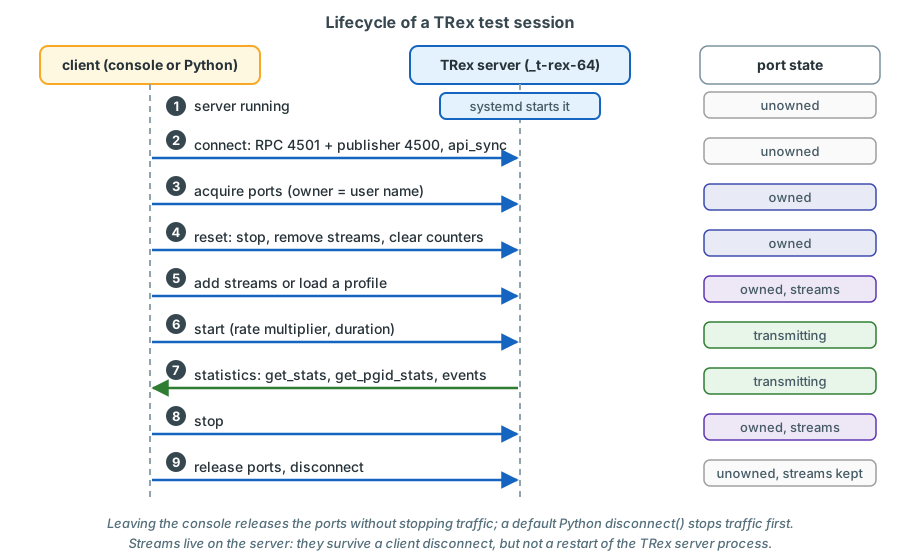
- Start the server. At LVR the systemd units do this; you do not start
t-rex-64by hand on the production server. - Connect. The client opens the RPC and publisher channels and synchronises API versions.
- Acquire the ports you want to use.
- Reset them: stop anything left over, remove old streams, clear the counters (as this client sees them).
- Add streams - directly, or by loading a profile file.
- Start transmission, optionally with a rate multiplier and a duration.
- Read statistics while the traffic runs and after it stops.
- Stop the traffic.
- Release the ports and disconnect.
The example below runs this sequence on trex-lab during a bench test, with trex-lab port 2 (p6) and port 3 (p7)
connected back-to-back by a DAC - a setup without any connection to the production network. It uses the example
profile stl/udp_1pkt_simple.py that ships with TRex.
$ cd /opt/trex/current
$ ./trex-console -p 4601 --async_port 4600 -a 2 3   # trex-lab, ports 2 and 3

trex>reset --port 2 3                 # stop, remove streams, clear counters
trex>portattr --port 2 3 --prom on    # accept every frame on the looped ports
trex>start -f stl/udp_1pkt_simple.py -m 1kpps --port 2 -d 30
trex>stats                            # global and per-port counters
trex>tui                              # live view; q returns to the prompt
trex>stop -a
trex>release -a
trex>quit
confirm on the bench commands only, no recorded output
# STLClient, STLStream, STLPktBuilder, STLTXCont, STLFlowStats, Ether, IP, UDP
from trex.stl.api import *

c = STLClient(server="127.0.0.1", sync_port=4601, async_port=4600)  # trex-lab
try:
    c.connect()
    c.reset(ports=[2, 3])          # acquire (force), stop, remove streams, clear
    c.set_port_attr(ports=[2, 3], promiscuous=True)

    pkt = STLPktBuilder(pkt=Ether() / IP(src="16.0.0.1", dst="48.0.0.1") /
                            UDP(sport=1025, dport=12) / ("x" * 64))
    stream = STLStream(packet=pkt,
                       mode=STLTXCont(pps=1000),
                       flow_stats=STLFlowStats(pg_id=2001))  # counted as pg_id 2001
    c.add_streams(stream, ports=[2])

    c.start(ports=[2], duration=30)
    c.wait_on_traffic(ports=[2])   # block until the 30 s are over

    fs = c.get_pgid_stats([2001])["flow_stats"][2001]
    print("TX", fs["tx_pkts"]["total"], "RX", fs["rx_pkts"]["total"])
except STLError as e:
    print(e)
finally:
    c.disconnect()                 # stops traffic and releases ports
sketch - validate on the bench
Two details are worth noticing. First, the console was started with -a 2 3, so it acquired only the two looped ports
and left ports 0 and 1 of trex-lab to whoever else might be using them. Second, the Python script ends with a plain
disconnect(), which stops the traffic - correct for a test, wrong for a script that is meant to leave monitoring
streams running.
The addresses 16.0.0.1 and 48.0.0.1 are the ones the TRex examples always use. They are fine here because the two ports are connected directly with a DAC; the LVR streams use real addresses from reserved pools - chapter 4 explains where 16.0.0.0 and 48.0.0.0 come from and why (The TRex example addresses).
Alternatives, and why TRex
| Tool | What it is | Strengths | Why not for the LVR platform |
|---|---|---|---|
| iperf / iperf3 | Client/server throughput tester using the operating system's sockets | Simple; real TCP behaviour; UDP loss and jitter | Needs an end host in every VLAN; kernel stack limits small-packet rates; no one-way latency without clock synchronisation; no per-path streams at scale |
| Linux kernel pktgen | Packet generator module inside the Linux kernel | High transmit rates without extra software | Transmit-oriented; no per-stream receive statistics or latency measurement; configured through /proc |
| Ostinato | Packet crafter and traffic generator with GUI and controller/agent design | Comfortable GUI; per-stream loss, latency and jitter; QinQ and VXLAN | High rates (Turbo add-on) and the Python API are commercial licences; smaller automation ecosystem |
| MoonGen | Lua-scriptable DPDK packet generator from academia | Very flexible; hardware timestamping on supported NICs | A framework for writing generators rather than a ready tool; no host emulation or stateful TCP |
| pktgen-dpdk | DPDK's own packet generator application | Line rate; interactive CLI and Lua scripting | Statistics mainly per port, latency measurement more basic than TRex's per-stream model; no host emulation or stateful TCP |
| Commercial testers (Keysight/Ixia, Spirent) | Dedicated hardware test systems | Nanosecond hardware timestamps; full protocol emulation; vendor support | Cost for a permanent multi-port installation; licences per port and feature; less suitable as an always-on monitoring probe |
TRex was chosen because it combines everything the LVR requirements ask for in one free package on standard hardware:
- Monitoring and testing with one tool. Permanent low-rate latency and loss streams (STL), line-rate throughput tests (STL hardware mode) and stateful firewall tests (ASTF) run on the same server and NICs.
- Per-stream one-way latency, jitter and loss with sequence numbers - 128 latency streams per instance plus up to 1023 loss-only streams in software mode.
- QinQ support in software mode, which the multiplexed attachment-point design depends on (chapter 12).
- Host emulation (EMU) so that TRex clients answer ARP in many VLANs at once.
- A complete Python API for orchestration and for exporting statistics to InfluxDB.
- Open source on HPE hardware with Intel X710 NICs, following the documented TRex installation of MAN Truck & Bus that LVR provided as a reference.
The costs are equally clear: microsecond rather than nanosecond timestamps, community support instead of a vendor hotline, and a server that needs careful tuning (cores, hugepages, NIC binding). This course exists to make the last point manageable.
How the LVR platform uses TRex
In the LVR platform
- One server, two instances.
trex-rzk-01in Kalk runstrex-mon(NIC1, permanent monitoring) andtrex-lab(NIC2, on-demand tests). They have separate configuration files, cores, memory, ZMQ ports and systemd units, so a lab test never restarts the monitoring (chapter 3). - trex-mon sends double-tagged streams through
sw-rzk-TX1to all attachment points in both data centres; EMU provides the client addresses. 74 latency streams and 102 loss-only streams - about 176 streams and 20.6 kpps - run permanently. - trex-lab ports are pinned to one attachment point each and send single-tagged frames at up to line rate, or run ASTF sessions.
- trexctl, the planned orchestrator, will turn an inventory (attachment points, VLANs, address pools) and
profiles (which pairs, which rates) into EMU clients and TRex streams, start and stop them, and export the
statistics to InfluxDB. It does not exist yet - it is specified in the plan and still has to be developed.
Until it exists, everything is done with the native tools introduced here: the TRex console and short Python
scripts using
trex.stl.apiandtrex.emu.api. Chapter 18 describes trexctl and the native equivalents side by side.
Documentation map
The official documentation lives at https://trex-tgn.cisco.com/trex/doc/. It is extensive but uneven: some guides were written for early releases and have been extended piecemeal. Where a guide and the current source code disagree, the source code on GitHub is authoritative.
| Document | URL (below https://trex-tgn.cisco.com/trex/doc/) |
Use it for |
|---|---|---|
| TRex manual | trex_manual.html |
Installation, hardware, NICs, configuration file (section "Platform YAML"), command-line options, STF |
| Stateless guide | trex_stateless.html |
STL concepts, console, profiles, field engine, per-stream statistics and latency, service mode, capture |
| ASTF guide | trex_astf.html |
Advanced stateful mode, profiles, counters |
| EMU guide | trex_emu.html |
The emulation server, namespaces, clients, plugins |
| Python API (stateless) | cp_stl_docs/index.html |
STLClient, streams, statistics structures (e.g. get_pgid_stats) |
| Python API (ASTF, EMU) | cp_astf_docs/index.html, cp_emu_docs/index.html |
ASTFClient, EMUClient |
| NDR benchmark | trex_ndr_bench_doc.html |
The no-drop-rate search tool |
| RPC specification | trex_rpc_server_spec.html |
The JSON-RPC commands behind every client |
| Release notes, FAQ | release_notes.html, trex_faq.html |
What changed in which release |
| Source code | https://github.com/cisco-system-traffic-generator/trex-core (and trex-emu) |
The final answer when the documentation is unclear |
Key takeaways
- TRex is an open-source (Apache 2.0) traffic generator from Cisco that runs on standard x86 servers using DPDK. LVR uses release v3.08, whose client side supports Python 3.12 (older Python versions might not work).
- Modes: STL sends packet streams with per-stream statistics and latency; ASTF runs real TCP/UDP sessions; STF is the legacy batch mode; EMU is a companion server that emulates hosts (ARP, ICMP, ...).
trex-mon= STL in software mode with EMU (NIC1, permanent);trex-lab= STL hardware mode or ASTF (NIC2, on demand, one unit at a time).- The server owns the NIC ports; clients control it with JSON-RPC over ZMQ: RPC port 4501, publisher port 4500, EMU port 4510 (trex-lab: 4601/4600).
- Each instance numbers its ports from 0; ports form pairs (0 and 1, 2 and 3) that share data-plane cores and a NUMA node.
- Ports must be acquired before they can be changed;
reset()and force-acquire take ports away, a default Pythondisconnect()stops traffic, quitting the console does not. Use the read-only console fortrex-mon. - A session always runs: connect - acquire - reset - add streams - start - read statistics - stop - release.
- trexctl is planned, not existing; native console and Python are what work on day one.
Check your understanding
1. A colleague wants to test TCP connection rates through the Enterprise firewall. Which TRex mode and which LVR systemd unit does that need?
Advanced stateful mode (ASTF), because only ASTF opens real TCP connections with handshakes and per-connection
state, which is what a firewall's session handling reacts to. At LVR this runs on the lab NIC with
trex-lab-astf.service; starting it stops trex-lab.service (stateless) because of Conflicts=, as both use NIC2.
2. What is the difference between port 4501 and port 4500 on the TRex server?
4501 is the synchronous RPC channel: a ZMQ request/reply socket carrying JSON-RPC 2.0 commands such as acquire,
add streams, start and get statistics. 4500 is the asynchronous publisher: a ZMQ publish/subscribe socket on which
the server pushes events and periodic statistics to all subscribed clients. trex-lab uses 4601 and 4600.
3. You open ./trex-console -p 4501 --async_port 4500 --emu and get \"Failed to acquire all required ports\". What does it mean and what should you do?
Another session - a trexctl apply or update in progress, or a colleague's console - owns the ports of trex-mon
at that moment. The error is the ownership protection working as intended. If you only want to look, restart the
console with -r (read-only). Do not use -f: force-acquiring would take the ports away from that session.
Remember that between applies the monitoring streams run without an owner, so a plain console would acquire the
ports without any error - the read-only flag is the safe habit in both cases.
4. A script connects to trex-mon, reads get_pgid_stats() and ends with c.disconnect(). What happens to the monitoring?
If the script did not acquire any ports, nothing: reading statistics needs no ownership, and disconnect() can
only stop traffic on ports the script owns. If the script acquired (or reset) the monitoring ports, the default
disconnect(stop_traffic=True, release_ports=True) stops the monitoring streams. A read-only exporter must never
acquire ports. The one tool that does acquire them, trexctl apply, ends with
disconnect(stop_traffic=False, release_ports=True) so that the streams keep running without an owner; if the
monitoring stops because the TRex server itself was restarted, the exporter's supervisor thread re-applies the
active profile (chapter 18).
5. Why is \"port 2\" an ambiguous statement on the LVR server?
Each TRex instance numbers its own ports from 0 in the order of its interfaces list. Port 2 of trex-mon is the
physical port p2 on NIC1 (a reserve monitoring trunk); port 2 of trex-lab is p6 on NIC2 (a lab port pinned to an
attachment point). Always name the instance as well.
6. Why does trex-mon use software mode although the X710 NIC could count streams in hardware?
The monitoring ports carry double-tagged QinQ frames, and TRex supports per-stream statistics for QinQ only in software mode. Software mode also allows up to 1023 loss-only streams instead of 127 and passes ARP and ICMP to EMU. The price - a lower total receive rate - does not matter for a monitoring load of about 20 kpps.
7. What would happen if the EMU server were not started with trex-mon?
The streams could still be transmitted, but the emulated client addresses would not answer ARP requests and the L3 streams would have no resolved gateway MAC address. The fabric would not learn or keep the TRex client addresses, routed classes would fail and L2 streams could be flooded. EMU is what lets the TRex clients behave like real hosts.
References
- TRex manual, https://trex-tgn.cisco.com/trex/doc/trex_manual.html - "Hardware recommendations" (COTS x86 server,
DPDK), "Obtaining the TRex package", "Platform YAML (--cfg argument)", "Command line options" (
-i,--astf,-f,-d) - TRex stateless guide, https://trex-tgn.cisco.com/trex/doc/trex_stateless.html - "High level functionality" (10-22 Mpps per core), "IXIA IXExplorer vs TRex", "RPC Architecture", "Stateful vs Stateless", "TRex package folders", "Tutorial: Load TRex server, Simple IPv4 UDP" (console excerpt), "Tutorial: Source and Destination MAC addresses" (promiscuous mode), "Port service mode", "Tutorial: Per stream statistics - Limitations"
- TRex ASTF guide, https://trex-tgn.cisco.com/trex/doc/trex_astf.html - "Feature overview", "Stateful(STF) vs Advance Stateful (ASTF)", interactive mode from v2.47
- TRex EMU guide, https://trex-tgn.cisco.com/trex/doc/trex_emu.html - "High level functionality", "TRex Architecture with TRex-EMU", "Tutorial: ZMQ transport layer"
- TRex RPC server specification, https://trex-tgn.cisco.com/trex/doc/trex_rpc_server_spec.html - "Transport Layer", "RPC Server Port State Machine", "API Synchronization", acquire
- TRex release notes, https://trex-tgn.cisco.com/trex/doc/release_notes.html - releases 3.06, 3.07, 3.08
- TRex Python API:
STLClient(constructor,acquire,release,reset,connect,disconnect,get_pgid_stats) - https://trex-tgn.cisco.com/trex/doc/cp_stl_docs/ - trex-core source (master):
LICENSE(Apache 2.0 for the TRex server),scripts/t-rex-64,scripts/trex-cfg(systemctl stop firewalld.serviceon Red Hat-family systems),scripts/automation/trex_control_plane/interactive/trex/console/trex_console.py(console options, acquire on connect,disconnect(stop_traffic = False)on exit),.../trex/stl/trex_stl_client.py(reset,acquire),.../trex/common/trex_client.py(disconnectdefaults),.../trex/emu/trex_emu_client.py(EMUClient, port 4510),scripts/general_daemon_server(helper server ports),scripts/dpdk_setup_ports.py(run_servers: the EMU and Scapy servers as named helpers per host;should_scapy_server_run),src/main_dpdk.cpp(options--no-scapy-serverand--unbind-unused-ports) - Ostinato, https://ostinato.org/ (features, Turbo add-on, Python API licensing); MoonGen, https://github.com/emmericp/MoonGen; Pktgen-DPDK, https://github.com/pktgen/Pktgen-DPDK