21. Scenarios - monitoring lifecycle
In this chapter
You will learn
- how to bring up the permanent monitoring from an empty TRex instance to a verified, baselined and alerting system, and how to derive thresholds from a 7-day baseline (S1)
- how to add a production VLAN with loss-only streams and a budget check (S2)
- how to add a new attachment point, including the TX switch, the TX-to-TX trunk and the Leaf (S3)
- how to retire a VLAN or an AP without leaving stale state behind (S4)
- how to raise stream rates for a maintenance window and restore them - and why latency streams need a different method than flow-stat streams (S5)
- which Comware, TRex and Grafana checks prove that each step worked
Prerequisites: Chapter 12, Chapter 13, Chapter 14, Chapter 16, Chapter 18, Chapter 20
The permanent monitoring is brought up once, then baselined, extended with VLANs and attachment points, temporarily intensified for maintenance windows and eventually trimmed again. This chapter walks through these five lifecycle steps. Every scenario has the same parts: Goal - What you set and why - How it works (on the wire and inside TRex) - Step by step (Comware, TRex, Grafana) - What you should see - Rollback / cleanup - Risks.
Native method and planned tooling
trexctl does not exist yet. The native method uses a read-write TRex session of the platform administrator, a
stream table that lists every stream, and two TRex profile files. In the examples these are
/data/trexctl/state/stream-table.csv, /opt/trexctl/profiles/raw/lvr_mon_emu.py and
/opt/trexctl/profiles/raw/lvr_mon_streams.py - example names, kept in the platform git repository. The planned
trexctl commands appear in a second tab.
The building blocks used in every scenario
One stream table, one profile file, many profile ids
TRex can run several independent profiles on the same port, addressed as <port>.<profile id> - for example
0.l2inter - and each can be started, updated and stopped without touching the others (TRex stateless guide, "Dynamic
multiple profiles"). The monitoring uses one profile id per stream group and port:
| Profile id | Kind | Streams | Rate per stream | On port 0 | On port 1 |
|---|---|---|---|---|---|
l2intra |
latency | 22 (VLAN 1314) | 200 pps | RZK pairs (10) | RZC pairs (12) |
l2inter |
latency | 12 (VLAN 1314) | 200 pps | RZK to RZC (6) | RZC to RZK (6) |
l3bl |
latency | 8 (1314 to 1315) | 200 pps | RZK sources | RZC sources |
l3dcfw |
latency | 8 (production VLAN A to B) | 50 pps | RZK sources | RZC sources |
l3entfw |
latency | 8 (1314 to the firewall zone, VLAN 4003) | 50 pps | RZK sources, zone client at K-BL (4) | RZC sources, zone client at C-BL (4) |
dscp |
latency | 16 (BE, EF, AF41, CS1; 256 B) | 100 pps (L2), 50 pps (L3-ENTFW) | K-L11 and the zone client at K-BL (12) | C-L21 (4) |
loss1315 |
flow-stat | 34 (VLAN 1315) | 100 pps | RZK sources (16) | RZC sources (18) |
lossA, lossB |
flow-stat | 34 each (production VLANs) | 100 pps | RZK sources | RZC sources |
Total: 74 latency streams (about 10 400 pps) and 102 flow-stat streams (about 10 200 pps) - 176 streams, about 20.6 kpps (Chapter 16). Following the planned inventory, p0 holds the RZK clients - including the firewall-zone client at K-BL (10.9.90.106, VLAN 4003) - and p1 the RZC clients, including the zone client at C-BL (10.9.90.113) (Chapter 18); a stream is sent from the port that holds its source client.
Why one profile id per group and port
A latency stream cannot be changed in place (S5), and a pg_id must be unique across all profiles. Groups let you
re-create or retire exactly one set of streams - for example only the RZK intra-DC streams in 0.l2intra - while
every other measurement keeps running.
The profile file reads the stream table and returns the rows for the port and group TRex asks for. TRex calls
get_streams() once per port with port_id, and passes the console's -t key=value tunables as keyword arguments:
import csv
from trex.stl.api import *
from scapy.layers.l2 import Dot1Q                     # (1)!

TABLE = '/data/trexctl/state/stream-table.csv'

class LvrMonitoring(object):
    def get_streams(self, direction=0, port_id=0, group='', pps='', **kwargs):  # (2)!
        streams = []
        with open(TABLE) as f:
            for r in csv.DictReader(f):
                if int(r['port']) != port_id or r['group'] != group:
                    continue
                latency = r['kind'] == 'latency'
                pkt = (Ether(src=r['src_mac'], dst=r['dst_mac']) /
                       Dot1Q(vlan=int(r['svlan'])) / Dot1Q(vlan=int(r['cvlan'])) /
                       IP(src=r['src_ip'], dst=r['dst_ip'], tos=int(r['tos'], 0), ttl=64) /
                       UDP(sport=int(r['sport']), dport=int(r['dport']),
                           chksum=0 if latency else None))                    # (3)!
                pad = max(0, int(r['size']) - len(pkt)) * b'\x00'
                rate = float(pps) if pps else float(r['pps'])                 # (4)!
                if latency:
                    fs = STLFlowLatencyStats(pg_id=int(r['pg_id']))
                else:
                    fs = STLFlowStats(pg_id=int(r['pg_id']))
                streams.append(STLStream(name=r['name'],
                                         packet=STLPktBuilder(pkt=pkt / pad),
                                         mode=STLTXCont(pps=rate),
                                         flow_stats=fs))
        return streams

def register():
    return LvrMonitoring()
trex.stl.apire-exportsEther,IP,TCPandUDPfrom Scapy, but notDot1Q.- TRex requires defaults for all arguments of
get_streams();directionandport_idcome from TRex,groupandppsfrom-t group=...,pps=...;**kwargsabsorbs the rest. - The TX core writes the latency signature into every packet without recalculating the UDP checksum, so latency
streams are built with checksum 0 ("not computed", legal for UDP over IPv4); devices that verify UDP checksums, such
as firewalls, would otherwise drop them.
Nonelets Scapy compute the checksum for the flow-stat streams. ppsoverrides the table rate - used in S5.
sketch - validate on the bench Stream API from the TRex stateless guide; loading
mechanism (get_streams(direction, port_id, **kwargs)) from trex-core trex_stl_streams.py. On the wire TRex also
sets bit 0 of the TOS byte of every statistics stream (EF 0xB8 leaves as 0xB9; the DSCP is unchanged) and rewrites the
IPv4 ID - expect both in captures (Chapter 5).
Each row of the stream table is one unidirectional stream: pg_id, name, group, kind, port, APs, MACs, S-VLAN,
C-VLAN, IP addresses, UDP ports, TOS, size, rate. For L3 classes the destination MAC is the gateway MAC resolved by EMU;
the apply script fills it in before the L3 groups start. The MAC is fixed in the stream from then on: if the resolved
gateway MAC changes - for example the firewall member MAC after a cluster failover - the affected streams must be
re-created with the new MAC (incident I3 in Chapter 23). The planned trexctl does this
with its gateway-MAC tracker: it polls dgw.rmac every 10 s and rebuilds the affected streams (event
gateway_mac_changed). The same table gives the exporter its Grafana tags.
| Native action | Planned trexctl command |
|---|---|
| Check stream table and budget | trexctl inventory validate, trexctl plan -p monitoring-default |
| Load EMU and start all groups | trexctl apply -p monitoring-default (idempotent; it releases the ports afterwards without stopping the traffic, like quit) |
| Status table, EMU table | trexctl status --watch, trexctl emu show |
| Change the rate of a group | trexctl update --group l2-inter-dc --pps 1000 |
| Stop a profile, annotate | trexctl stop -p <profile>, trexctl annotate "..." |
S1 - Bring-up of the permanent monitoring and the 7-day baseline
Goal
All 176 planned streams run with RX = TX, every client that needs a gateway has resolved it, Grafana shows every stream. After seven undisturbed days, thresholds are derived from the measured baseline and notifications are switched on.
What you set and why
| Setting | Value | Why |
|---|---|---|
| Port attributes | --prom on, --mult on |
A TRex port receives only frames for its own MAC unless promiscuous; the streams use emulated client MACs. EMU needs multicast |
| Service mode | service --emu (filtered) |
Only EMU-relevant packets go to EMU; measurement traffic is counted at full speed |
| EMU namespaces | one per (port, S-VLAN, C-VLAN), e.g. {vport 0, tci [3101, 1314], tpid [0x8100, 0x8100]} |
The key is the port plus both tags, outer first; each AP and VLAN is its own Layer 2 domain |
| EMU clients | one per AP and VLAN, ipv4_dg = VLAN gateway, plugins arp, icmp |
The fabric must ARP for TRex addresses; L3 streams need the gateway MAC |
| Addressing | IP = pool start + (AP index - 1); MAC = 02:54:52:<index>:<VLAN high>:<VLAN low> |
Predictable and readable: K-L11 in VLAN 1314 = 10.3.14.101, 02:54:52:01:05:22 |
| Streams | 74 latency + 102 flow-stat, profile ids as above | Latency budget is 128 per instance; loss coverage uses the large flow-stat budget |
The default profile needs 28 clients for VLANs 1314/1315 and the zone (13 fabric APs x 2 VLANs + the two zone clients in VLAN 4003 at K-BL and C-BL) plus 13 per production VLAN.
Service-mode mask
In the Python API, set_service_mode(ports, enabled=False, filtered=True, mask=...) takes a bit mask built from the
constants defined in the TRex client (NO_TCP_UDP_MASK, DHCP_MASK, TRANSPORT_MASK, ...); the console's
service --emu combines several of them. confirm on the bench that the chosen
filter leaves the counters of the UDP monitoring streams intact.
How it works
- EMU comes up. Each client announces itself with a gratuitous ARP; each namespace resolves its gateway once. The
ARP request of K-L11 in VLAN 1314 leaves p0 as
[S 3101][C 1314],sw-rzk-TX1pops the S-tag on XGE1/1/1,sw-rzk-L11maps tag 1314 into VSIVPN-1314and floods it;sw-rzk-BLanswers from Vsi-interface914 (10.3.14.1). The request of a Leaf AP reaches the gateway through a VXLAN tunnel - whether the centralised gateway answers it is the first gate of the bring-up (step 3). RZC requests cross the DCI, because the VPN-CORE gateways exist only onsw-rzk-BL. - Streams run. An L2 stream K-L11 to K-BL leaves p0 with destination MAC
02:54:52:06:05:22, crosses the fabric, returns through XGE1/1/6 (S-VLAN 3110) and reaches p0, where the K-BL client's MAC was learned. TRex counts it by pg_id; for latency streams the RX core also reads timestamp and sequence number (Chapter 5, Chapter 14). - Learning settles. Every client transmits continuously, so its MAC stays learned on the TX switch (aging 300 s), in the VSIs and in EVPN; only the first frames of a new stream may be flooded.
Flooding on the TX switch can show up as duplicates
If a destination MAC is unknown in an S-VLAN, the TX switch floods the frame to every member port that is up - p0
and p1, both trex-mon. TRex then counts it twice (RX above TX, dup on latency streams). Brief duplicates after a
start are normal; lasting ones mean a MAC is not learned on the TX switch. confirm on the
bench
Step by step
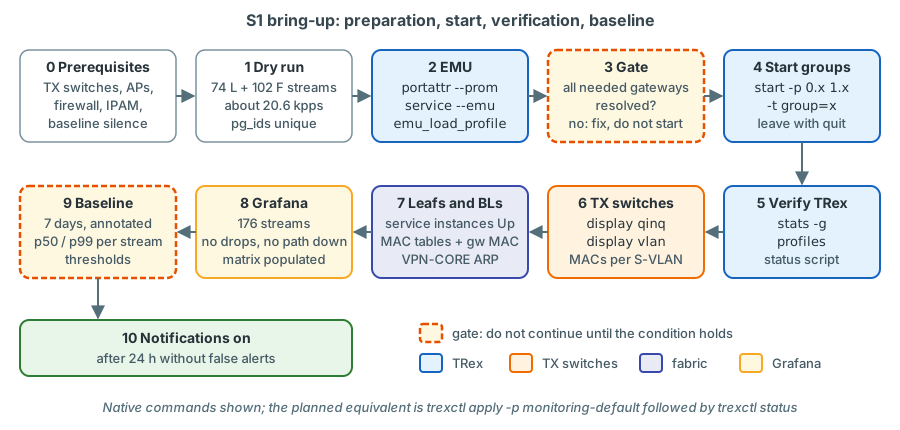
Step 0 - prerequisites.
- TX switches configured and verified (Chapter 12, Appendix B)
- AP ports carry VLANs 1314/1315 and the production VLANs (Chapter 13)
- Firewall zone active (Chapter 15): VLAN 4003 interface on the Enterprise firewall, VLAN 4003 with service instance 4003 on the K-BL and C-BL AP ports, routing and rules; DC-FW rules for L3-DCFW
- Pools reserved in IPAM; DHCP scopes in 1314/1315 (relay on Vsi914/915) exclude
.101-.116 -
trex-mon, InfluxDB, Grafana and the exporter running; alert notifications silenced for the baseline week
Step 1 - dry run. Before anything is sent: 74 latency rows (guard rail 120, limit 128), 102 flow-stat rows (guard rail 600), rate sum about 20.6 kpps (guard rail 50 kpps), no firewall stream above 100 pps, all pg_ids unique.
The generator script prints counts per kind and group and the rate sum; review the table with the network team.
start ... --dry loads the streams of a new profile id and validates them without transmitting.
Step 2 - EMU provisioning (platform administrator):
$ ./trex-console -p 4501 --async_port 4500 --emu
trex> portattr -a --prom on
trex> portattr -a --mult on
trex> service --emu
trex(service-filtered)> emu_load_profile -f /opt/trexctl/profiles/raw/lvr_mon_emu.py
trex(service-filtered)> emu_show_all
verified TRex EMU guide (console commands) and stateless guide ("Port service mode").
The EMU profile builds EMUNamespaceKey, EMUNamespaceObj and EMUClientObj objects and returns an EMUProfile
(Chapter 6).
Part of trexctl apply -p monitoring-default; inspect with trexctl emu show.
Step 3 - gate: gateway resolution. Every source client of an L3 stream (VLAN 1314 at L3-BL and L3-ENTFW sources,
VLAN 1315 at L3-BL destinations for the reverse direction, production VLANs for L3-DCFW, the two zone clients in VLAN
4003) must report dgw.resolve = true:
trex(service-filtered)> emu_show_client_info -p 0 --vlan 3101 1314 --tpid 0x8100 0x8100 --mac 02:54:52:01:05:22 --json
verified console options of show_client_info (trex-core trex_emu_client.py,
parsing_opts.py). The JSON contains "dgw": {"resolve": true, "rmac": "..."}; rmac is the gateway MAC for the L3
streams. For all clients at once:
import csv
from trex.emu.api import *

emu = EMUClient(server='127.0.0.1', sync_port=4510)
emu.connect()
for r in csv.DictReader(open('/data/trexctl/state/emu-clients.csv')):   # port, svlan, cvlan, mac, needs_gw
    if r['needs_gw'] != 'yes':
        continue
    ns_key = EMUNamespaceKey(vport=int(r['port']), tci=[int(r['svlan']), int(r['cvlan'])],
                             tpid=[0x8100, 0x8100])
    dgw = emu.get_info_clients([EMUClientKey(ns_key, Mac(r['mac']).V())])[0].get('dgw') or {}
    print(r['mac'], r['svlan'], r['cvlan'], 'resolved' if dgw.get('resolve') else 'UNRESOLVED', dgw.get('rmac'))
sketch - validate on the bench (TRex EMU guide; trex-core trex_emu_client.py;
the namespace key must match exactly how the profile created it). Do not start an L3 group with unresolved source clients;
first find the cause - VLAN missing on the AP port, firewall interface down, wrong gateway in the inventory.
Centralised gateway: ARP from a Leaf AP
The VPN-CORE gateways 10.3.14.1 and 10.3.15.1 exist only on sw-rzk-BL, so the ARP request of a client behind a
Leaf AP reaches them through a VXLAN tunnel. The HPE EVPN guide requires ARP flood suppression on the VTEPs when a
network contains a centralised EVPN gateway, because a gateway with remote ARP learning disabled does not answer ARP
requests for its MAC that arrive through tunnels (HPE FlexFabric 5950 EVPN Configuration Guide R630x, PDF p. 28).
The LVR VSIs have no arp suppression enable, and remote ARP learning is at its default (enabled); in February 2025
the ARP table of sw-rzk-BL held entries learned through the DCI tunnel, but none through the RZK Leaf tunnels.
confirm on device in this gate that the K-L11 client (and one RZC Leaf client)
resolves 10.3.14.1. If it does not, the fallbacks are arp suppression enable in VSI view on the Leafs
(VXLAN Command Reference R630x, PDF pp. 5-6; default disabled; a production change) or running the L3 classes
from the Border Leaf APs - both need a decision with the network team.
Step 4 - start the groups after writing the gateway MACs into the stream table:
trex(service-filtered)> start -f /opt/trexctl/profiles/raw/lvr_mon_streams.py -p 0.l2intra 1.l2intra -t group=l2intra
trex(service-filtered)> start -f /opt/trexctl/profiles/raw/lvr_mon_streams.py -p 0.l2inter 1.l2inter -t group=l2inter
trex(service-filtered)> start -f /opt/trexctl/profiles/raw/lvr_mon_streams.py -p 0.loss1315 1.loss1315 -t group=loss1315
trex(service-filtered)> profiles
trex(service-filtered)> quit
The same for l3bl, l3dcfw, l3entfw, dscp, lossA, lossB. -t must be the last option of start:
everything after it is handed to the profile as tunables, so options such as --force go before it. Leave with
quit, never disconnect (Chapter 20). verified TRex stateless
guide "Dynamic multiple profiles"; -t (argparse.REMAINDER) and -p PORT.PROFILE from trex-core
parsing_opts.py, start_line() in trex_stl_client.py.
Step 5 - verify on TRex (read-only console): stats -g shows about 20.6 kpps TX and the same RX; profiles shows
every profile id in state TX. stats -s / stats -l show only the first four or five pg_ids, so use the status script
of Chapter 20 for the full table, and the tui latency view (l, h for the histogram) to watch
a few streams live.
Step 6 - verify on the TX switches:
verified L2 CR PDF p. 277, p. 193, p. 11.
display qinqlists the AP ports and the pinned lab ports, nothing else.display vlan 3101: XGE1/1/1 untagged, the monitoring trunks XGE1/1/21-24 tagged and - by default - the pinned lab port XGE1/1/9 (p4 is pinned to K-L11) also untagged. Only one untagged port per S-VLAN may face a Leaf or a Border Leaf; pinned lab ports face TRex.display mac-address vlan 3101: the K-L11 clients - Comware writes02:54:52:01:05:22as0254-5201-0522- on XGE1/1/21 (p0); on XGE1/1/1 the MACs arriving from the fabric: remote TRex clients, thesw-rzk-BLgateway MAC and, in production VLANs, broadcasting production hosts.
Step 7 - verify on Leafs and Border Leafs:
<sw-rzk-L11> display l2vpn service-instance interface Ten-GigabitEthernet1/3/1
<sw-rzk-L11> display l2vpn mac-address vsi VPN-1314
<sw-rzk-L11> display evpn route mac vsi VPN-1314
<sw-rzk-BL> display arp vpn-instance VPN-CORE
verified VXLAN CR PDF pp. 15-16, p. 13; EVPN CR PDF p. 23; L3 IP Services CR PDF p. 33.
- Service instances 1314 and 1315 are
Upand owned byVPN-1314/VPN-1315. 0254-5201-0522is local (stateDynamic, Link ID/Name = AP port); the other TRex clients have stateEVPNbehind a tunnel interface, anddisplay evpn route maclists their type-2 routes.- On the RZC Leafs (example
SW-RZC-L21)display l2vpn mac-address vsi VPN-1314must also listec9b-8b67-37b8, the gateway MAC of Vsi-interface914/915 onsw-rzk-BL, behind a tunnel. In February 2025SW-RZC-L21had no EVPN entry for it, whilesw-rzk-L11andsw-rzc-BLhad one. A Leaf that does not know the gateway MAC floods the routed streams of its AP as unknown unicast: they still arrive, but every other RZC AP in VLAN 1314 delivers a copy to TRex, which counts duplicates. confirm on device for every RZC Leaf AP before thel3blandl3entfwgroups start. - The VPN-CORE ARP table of
sw-rzk-BLcontains the TRex addresses that take part in routed streams. For the firewall zone also checkdisplay ip routing-table vpn-instance VPN-CORE 10.9.90.0 24on both Border Leafs (L3 IP Routing CR PDF p. 26): the route learned from the firewall, or - until the firewall advertises the zone - the VPN-CORE default route via 10.9.0.22.display l2vpn mac-address vsi VPN-4003onsw-rzk-BLshows the zone client0254-5206-0fa3on the K-BL AP port Ten-GigabitEthernet1/3/6 and the MAC of the active firewall member - onBridge-Aggregation10or, when CPF-ZV02 is active, behind the DCI tunnel.
Step 8 - verify in Grafana. Overview: 176 streams, no path down, no drops. Latency matrix: every planned cell
populated. Tags (class, src_ap, dst_ap, src_vlan, dc_pair) correct.
Step 9 - 7-day baseline. Let the system run undisturbed for seven days with notifications silenced; annotate every event so it can be excluded. Then derive the baseline per stream from the one-minute data:
from(bucket: "trex_longterm")
  |> range(start: -7d)
  |> filter(fn: (r) => r._measurement == "trex_stream" and r._field == "lat_avg_us")
  |> group(columns: ["class", "src_ap", "dst_ap", "src_vlan", "dst_vlan", "tos"])
  |> quantile(q: 0.99)
Repeat with q: 0.5, for jitter_us and for the interval maximum lat_max_us; query sub-ranges if the week contained
annotated events (sketch - validate in the Data Explorer; field and tag names follow
the planned data model of Chapter 18). Record the results in the operations handbook:
| Class / pair type | Median | p99 | p99 interval max | p99 jitter | Threshold | Notes |
|---|---|---|---|---|---|---|
| L2 intra-RZK / intra-RZC | intra-RZC includes 2 x TX-to-TX fibre | |||||
| L2 inter-DC | DCI + 1 x TX-to-TX fibre | |||||
| L3-BL (RZK / RZC sources) | RZC sources cross the DCI to the gateway | |||||
| L3-DCFW, L3-ENTFW | one baseline per active member location | |||||
| DSCP | must equal BE within jitter |
Starting values proposed by the design: L2 intra-DC 3 x baseline, L2 inter-DC 2 x, L3-BL 3 x, firewall classes 3 x with an absolute ceiling of 2 ms, jitter 10 x, each sustained for two minutes (Chapter 19). Tune them to the observed spread.
Step 10 - enable notifications. Remove the baseline silence, watch 24 hours for false alerts, hand over to operations.
What you should see
illustrative values Intra-DC fabric streams in the tens of microseconds; inter-DC streams higher by the DCI fibre (about 5 µs per km) plus the TX-to-TX fibre; firewall paths tens to hundreds of microseconds. Intra-RZC streams sit consistently above their intra-RZK counterparts by two one-way TX-to-TX fibre delays - a calibration value, not a fault. L3-BL from RZC sources is slower than from RZK sources. EF, AF41 and CS1 equal their BE reference (the same pair, size and rate with TOS 0x00) within jitter.
Rollback / cleanup
stop -p 0.* 1.* --remove and emu_remove_profile in a read-write session - or restart trex-mon, which starts empty.
The AP ports and firewall objects can stay; MAC and ARP entries of the clients age out.
Risks
| Risk | Avoidance |
|---|---|
| Pool address used by a real host or leased by DHCP | Reservation and DHCP exclusion before step 2; watch for ARP conflict messages in display logbuffer on sw-rzk-BL |
| First frames flooded into production VSIs (for 1314/1315 also to the DC firewall on BAGG31) | Low rates; EMU gratuitous ARP; learning settles within seconds |
| L3 group started with a wrong gateway MAC | Gate step 4 on step 3 |
S2 - Adding a production VLAN to the monitoring
Goal
A further production VLAN is measured for loss between all fabric APs, with the same pairs as VLAN 1315 (34 flow-stat
streams); latency streams only if the budget allows and there is a reason. Worked example: VLAN 1395
(t3_1395_ngfw-test) - VLAN and VSI VPN-1395 exist on sw-rzk-L11, SW-RZC-L21 and both Border Leafs, it is carried
to the DC firewall on BAGG31, and no Leaf port uses it today. confirm with LVR that it
may be used; subnet, gateway and pool come from IPAM.
What you set and why
| Item | Value | Why |
|---|---|---|
| IPAM / DHCP | 16 addresses <POOL-1395>, excluded from any DHCP scope |
One address per AP index; no duplicates |
| Firewall objects | TRX-mon-1395 only if the VLAN will be used in L3-DCFW |
L2 streams in one VLAN are bridged in the fabric; the DC firewall only sees the TRex ARP and broadcast traffic |
| AP ports | port trunk permit vlan 1395 + service instance 1395 on all 13 fabric APs |
The VLAN must reach every AP of a pair |
| TX switches | no change | They only know S-VLANs; the C-tag passes transparently |
| Clients | MAC 02:54:52:<index>:05:73 (1395 = 0x0573), IP = pool start + index - 1 |
Deterministic, as in S1 |
| Streams | group loss1395: 22 intra-DC + 12 inter-DC flow-stat streams at 100 pps |
10 ms loss resolution from the large flow-stat budget |
Budget check (default 74 / 102 / about 20.6 kpps): loss only gives 74 latency, 136 flow-stat, about 24.0 kpps. Adding latency on the 12 L2 inter-DC streams of the VLAN would give 86 / 136 / about 26.4 kpps. Both are within the guard rails (120 / 600 / 50 kpps).
Open decision: latency streams for production VLANs
Loss only (default): the latency budget stays free for tests and further VLANs; fabric latency is already measured on VLAN 1314 over the same Leafs. Selected latency streams (for example the 12 L2 inter-DC streams): useful if the VLAN's traffic takes a different path; costs 12 of the remaining latency streams. Decide per VLAN and document the reason in the profile.
How it works
Nothing changes on the TX switches: a VLAN 1395 client at K-L11 sends [S 3101][C 1395], XGE1/1/1 pops the S-tag, the
Leaf maps tag 1395 into VPN-1395. The loss-only streams are L2 and never leave the VSI. The VLAN's own broadcast and
unknown-unicast traffic, however, now reaches every AP and therefore trex-mon - twice, on p0 and p1 - and costs RX CPU.
Step by step
1. Preparation: ticket, IPAM reservation, DHCP exclusion, information to the firewall team.
2. Pre-checks on every device with an AP:
<sw-rzk-L11> display vlan 1395
<sw-rzk-L11> display l2vpn vsi name VPN-1395
<sw-rzk-L11> display current-configuration interface Ten-GigabitEthernet1/3/1
verified L2 CR PDF p. 193; VXLAN CR PDF pp. 17-18; Fundamentals CR PDF p. 179. Not every VSI
exists on every Leaf - VPN-724 and VPN-171, for example, exist on sw-rzk-L11 but not on SW-RZC-L21 (running
configurations, February 2025). A missing VLAN or VSI on a Leaf is a fabric change under the LVR standard - plan it
separately.
3. Map the VLAN on each AP port (example sw-rzk-L11, AP K-L11):
system-view
interface Ten-GigabitEthernet1/3/1
 port trunk permit vlan 1395
 service-instance 1395
  encapsulation s-vid 1395
  xconnect vsi VPN-1395
  quit
 quit
save force
verified pattern of the existing server ports (sw-rzk-L11 XGE1/3/3, running configuration
February 2025); VXLAN CR PDF p. 42, p. 24, p. 54; L2 CR PDF pp. 205-206; Fundamentals CR PDF p. 189.
| Line | What it does | Why |
|---|---|---|
port trunk permit vlan 1395 |
Adds 1395 to the permitted list (repeated commands add up) | 1314/1315 stay permitted |
service-instance 1395 |
Creates Ethernet service instance 1395 | One instance per VLAN, as on every server port |
encapsulation s-vid 1395 |
Matches frames with outer tag 1395 | On the Leaf the C-VLAN is the only tag |
xconnect vsi VPN-1395 |
Binds the instance to the VSI | Access mode VLAN: tag removed into the VSI, added towards the AP |
Check with display l2vpn service-instance interface Ten-GigabitEthernet1/3/1: SrvID 1395, owner VPN-1395, state Up.
4. Inventory and stream table: add VLAN 1395 (prefix, gateway, pool start, gateway owner DC-FW), add it to the 13
APs, generate the 34 rows of loss1395 with new pg_ids from the flow-stat range, re-run the budget check, commit with
the ticket number. Planned: trexctl inventory validate, trexctl inventory render-leaf --ap K-L11 (prints the snippet of
step 3), trexctl plan -p monitoring-default.
5. Add the EMU clients incrementally. emu_load_profile first removes all namespaces and clients (trex-core
trex_emu_client.py, _start_profile()), which briefly removes every TRex host from the network. Add only what is new:
from trex.emu.api import *

VLAN, GW = 1395, '<GW-1395>'                  # DC firewall VIP from IPAM
POOL = Ipv4('<POOL-1395-START>')
APS = [('K-L11', 1, 0, 3101), ('K-L12', 2, 0, 3102), ('K-L21', 3, 0, 3103), ('K-L31', 4, 0, 3104),
       ('K-L41', 5, 0, 3105), ('K-BL', 6, 0, 3110), ('C-L11', 7, 1, 3201), ('C-L12', 8, 1, 3202),
       ('C-L13', 9, 1, 3203), ('C-L21', 10, 1, 3204), ('C-L22', 11, 1, 3205), ('C-L23', 12, 1, 3206),
       ('C-BL', 13, 1, 3210)]                 # (AP, index, TRex port, S-VLAN)

emu = EMUClient(server='127.0.0.1', sync_port=4510)
emu.connect()
for ap, idx, port, svlan in APS:
    ns_key = EMUNamespaceKey(vport=port, tci=[svlan, VLAN], tpid=[0x8100, 0x8100])
    emu.add_ns(EMUNamespaceObj(ns_key=ns_key))
    emu.add_clients(ns_key, [EMUClientObj(mac=Mac('02:54:52:%02x:%02x:%02x' % (idx, VLAN >> 8, VLAN & 0xff)).V(),
                                          ipv4=POOL[idx - 1].V(), ipv4_dg=Ipv4(GW).V(),
                                          plugs={'arp': {}, 'icmp': {}})])
sketch - validate on the bench (add_ns, add_clients, client plugins: TRex EMU
guide, trex-core trex_emu_client.py).
6. Start the group: start -f /opt/trexctl/profiles/raw/lvr_mon_streams.py -p 0.loss1395 1.loss1395 -t group=loss1395.
Planned: trexctl apply -p monitoring-default (re-apply adds only what is new; it re-acquires the ports with
force=True and releases them again without stopping the traffic).
7. Verify. profiles: loss1395 in state TX on both ports; stats -g up by about 3.4 kpps. TX switch
display mac-address vlan 3101: also 0254-5201-0573 on XGE1/1/21. Leaf display l2vpn mac-address vsi VPN-1395: local
client on the AP port, remote clients behind tunnels. Grafana: series with src_vlan=1395, RX = TX.
What you should see
illustrative values 34 new streams at 100 pps, RX = TX within a minute; rx_cpu_util
slightly higher, depending on the VLAN's broadcast traffic.
Rollback / cleanup
stop -p 0.loss1395 1.loss1395 --remove; emu.remove_ns([...]) for the 13 namespaces; on each AP port
undo service-instance 1395 and undo port trunk permit vlan 1395; revert inventory and stream table in git.
Risks
| Risk | Avoidance |
|---|---|
| Pool addresses in use or leased | Reservation and exclusion before step 5; ARP conflict logs |
Busy VLAN floods broadcasts into trex-mon at 13 APs |
Prefer quiet test VLANs; watch rx_cpu_util |
| VLAN or VSI missing on a Leaf | Pre-check in step 2 |
| On a Leaf that runs spanning tree for the VLAN, the AP port first passes listening/learning (about 30 s) | Not expected on the examined switches (spanning tree globally disabled); check display stp brief on the other Leafs |
S3 - Adding a new attachment point
Goal
A new Leaf pair joins the monitoring with its own AP. Worked example: a hypothetical new RZC Leaf pair sw-rzc-L31 - the
RZC case is the complete one, because the S-VLAN must also cross the TX-to-TX trunk to reach the TRex server.
What you set and why
| Item | Value | Why |
|---|---|---|
| AP code / index | C-L31, index 15 (1-13 fabric APs, 14 reserved for the firewall AP of option A) |
The index drives MAC and IP; never reuse a retired index |
| S-VLAN | 3207 (next free in 3201-3210; 3210 is C-BL) | Each AP needs its own isolated S-VLAN |
| TX switch port | sw-rzc-TX1 XGE1/1/9 (first spare port; XGE1/1/8 is the option-A firewall port - configured in S-VLAN 3300 but shut down) |
Spare ports are shut down |
| Leaf port | free 10G SFP+ port on IRF member 1 of sw-rzc-L31 (<PORT>) |
Single link by design; note the member |
| Clients | 02:54:52:0f:05:22 / 10.3.14.115, 02:54:52:0f:05:23 / 10.3.15.115, plus production VLANs |
Index 15 = 0x0f |
| Pairs | L2 intra: C-L31 with C-BL; L2 inter-DC: C-L31 with an RZK Leaf AP, e.g. K-L12 | Same pattern as the other Leafs |
The 16-address pool limits the AP index
IP = pool start + (index - 1) with 16 addresses (.101-.116): index 16 is the last one that fits. A seventeenth AP
needs larger pools in every monitored VLAN.
Budget: +4 latency streams (VLAN 1314 intra and inter-DC, both directions), +12 flow-stat streams (VLAN 1315 and two production VLANs), about +2 kpps: 78 / 114 / about 22.6 kpps.
How it works
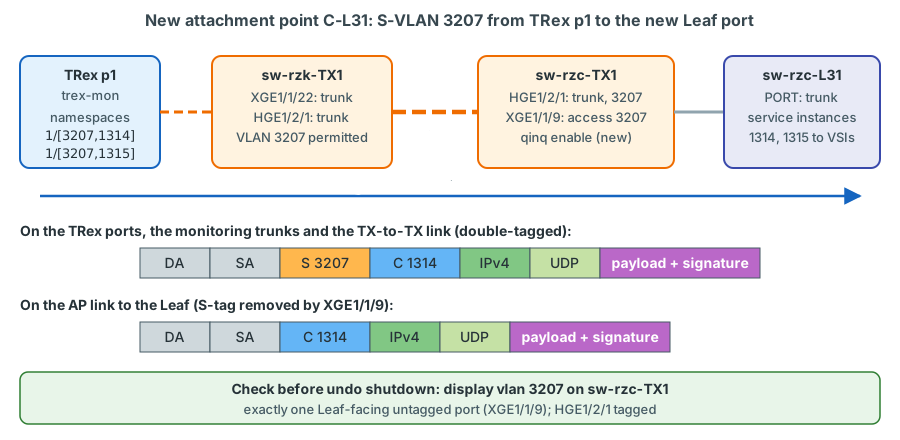
The new namespaces live on p1 ({vport 1, tci [3207, 1314]}, ...). Frames leave p1 as [S 3207][C 1314], cross
sw-rzk-TX1 (XGE1/1/22, then HGE1/2/1) and the TX-to-TX link, and leave sw-rzc-TX1 XGE1/1/9 without the S-tag. With
exactly one AP port in S-VLAN 3207, the new Leaf can never be bridged to another Leaf through the TX switch
(Chapter 12).
Step by step
1. Physical work. Confirm the Leaf port is free (display interface brief,
display current-configuration interface <PORT>); HPE-coded optics on the Leaf side; patch and label both ends
(TRX C-L31 / sw-rzc-L31 <PORT>); record the labels in the inventory.
2. sw-rzc-TX1: S-VLAN, AP port (still shut down), TX-to-TX trunk:
system-view
vlan 3207
 name TRX-AP-C-L31
 quit
interface Ten-GigabitEthernet1/1/9
 description TRX AP C-L31 --> sw-rzc-L31 <PORT>
 port link-type access
 port access vlan 3207
 qinq enable
 shutdown
 quit
interface HundredGigE1/2/1
 port trunk permit vlan 3207
 quit
save force
verified L2 CR PDF p. 200 (vlan), p. 197 (name), p. 42 (description), pp. 204-205
(port link-type), p. 202 (port access vlan), p. 278 (qinq enable), p. 96 (shutdown), pp. 205-206
(port trunk permit vlan); Fundamentals CR PDF p. 189. Port names follow the reference module layout
confirm on device.
| Line | What it does | Why |
|---|---|---|
port access vlan 3207 + qinq enable |
PVID 3207; every incoming frame gets this S-tag, which is removed on egress | Production VLAN tags pass transparently |
shutdown |
Keeps the port down until step 4 | Nothing is bridged before the S-VLAN is checked |
port trunk permit vlan 3207 on HGE1/2/1 |
Carries the S-VLAN over the TX-to-TX link | RZC APs reach TRex only through this trunk |
3. sw-rzk-TX1: create VLAN 3207 with the same vlan/name commands and add port trunk permit vlan 3207 on
HGE1/2/1 and on the monitoring trunks XGE1/1/21-24, then save force. In the reference configuration the ranges 3201-3210
already exist and are permitted, so this confirms the state; it becomes essential for S-VLANs outside the planned ranges.
4. Verify the S-VLAN path before any link comes up: display vlan 3207 on both TX switches and display qinq on
sw-rzc-TX1. On sw-rzc-TX1, XGE1/1/9 must be the only untagged member, HGE1/2/1 tagged; on sw-rzk-TX1, HGE1/2/1
and XGE1/1/21-24 tagged. A second Leaf-facing access port in VLAN 3207 means two Leafs bridged outside the fabric - stop
and correct it.
5. The Leaf AP port (verified pattern of sw-rzk-L11 XGE1/3/3; VXLAN CR PDF pp. 24,
42, 54; L2 CR PDF pp. 42, 76, 204-206):
system-view
interface <PORT>
 port link-mode bridge
 description TRX AP C-L31 --> sw-rzc-TX1 XGE1/1/9 (TRex attachment point)
 port link-type trunk
 undo port trunk permit vlan 1
 port trunk permit vlan 1314 to 1315
 service-instance 1314
  encapsulation s-vid 1314
  xconnect vsi VPN-1314
  quit
 service-instance 1315
  encapsulation s-vid 1315
  xconnect vsi VPN-1315
  quit
 quit
save force
Add the production VLANs as in S2; check first that the VSIs exist (display l2vpn vsi name VPN-1314).
6. Bring the link up and verify: on sw-rzc-TX1, undo shutdown on XGE1/1/9 and save force; then
display interface brief and display lldp neighbor-information list on sw-rzc-TX1, and
display l2vpn service-instance interface <PORT> on the Leaf (L2 CR PDF p. 96, p. 56, p. 355; VXLAN CR PDF pp. 15-16).
7. Inventory, clients, streams.
Add the AP (index 15, DC rzc, ports, S-VLAN 3207, VLANs) to the inventory, generate the new rows, add the namespaces on port 1 as in S2 step 5, then re-create only the groups that changed:
trex(service-filtered)> start -f /opt/trexctl/profiles/raw/lvr_mon_streams.py -p 1.l2intra --force -t group=l2intra
--force on a running profile id stops it, removes its streams, loads the new rows and starts it again - a gap well
under a second for that group only; --force stands before -t. Re-create the port 0 groups with new RZK-sourced
streams (K-L12 to C-L31) the same way. verified start --force and
-p PORT.PROFILE: start_line() in trex-core trex_stl_client.py.
8. Verify end to end. display mac-address vlan 3207: on sw-rzc-TX1 the TRex clients (0254-520f-0522, ...) on
HGE1/2/1 and Leaf-side MACs on XGE1/1/9; on sw-rzk-TX1 the clients on XGE1/1/22. Leaf: the local client and the
gateway MAC ec9b-8b67-37b8 in display l2vpn mac-address vsi VPN-1314 (S1 step 7); the new clients resolve their
gateway (S1 step 3) before the AP is added to a routed group. Grafana: streams with src_ap=C-L31 or dst_ap=C-L31,
RX = TX.
What you should see
illustrative values The new intra-RZC streams show the same level as the other intra-RZC Leaf streams. A clearly higher value points to a longer path inside RZC - understand it before it becomes the baseline.
Rollback / cleanup
shutdown on sw-rzc-TX1 XGE1/1/9 isolates the AP immediately; then follow S4.
Risks
| Risk | Avoidance |
|---|---|
| The PVID of the new port duplicates another AP's S-VLAN: two Leafs bridged outside the fabric, a Layer 2 loop through the stretched VLANs | Step 4 before undo shutdown |
| Wrong Leaf port (an existing server port) | Configuration and LLDP check before patching |
| Non-HPE optics on the Leaf | HPE-coded transceivers on production switches |
S4 - Retiring a VLAN or an AP cleanly
Goal
A VLAN or an AP leaves the monitoring without orphaned streams or EMU clients, without service instances pointing at nothing, without alert rules waiting for data, and without identifiers that could later mix old and new history.
What you set and why
The order is streams, EMU, network, records. Removing a service instance first would turn the measurement into "path down" alarms; removing EMU clients before the streams would leave routed streams without ARP answers. Retired AP indexes, S-VLANs and pg_ids stay reserved: the index determines MAC and IP, and a reused pg_id would continue somebody else's history.
How it works
Without traffic, the client MACs are no longer refreshed: they age out of the TX switch and Leaf tables (300 s, L2 CR PDF
p. 28), EVPN withdraws the routes, routing devices let the ARP entries expire. Historical data stays until its retention
ends (90 days raw, 730 days in trex_longterm).
Step by step
| Step | Retire VLAN 1395 | Retire AP C-L31 |
|---|---|---|
| 1 | Ticket, annotation, silence src_vlan=1395 |
Ticket, annotation, silence src_ap=C-L31 / dst_ap=C-L31 |
| 2 | stop -p 0.loss1395 1.loss1395 --remove |
Remove the AP from all pairs (decide on replacement partners); re-create the changed groups with start ... --force |
| 3 | emu.remove_ns([...]) for the 13 namespaces of VLAN 1395 |
emu.remove_ns([...]) for the namespaces with S-VLAN 3207 on port 1 |
| 4 | Wait five minutes; display l2vpn mac-address vsi VPN-1395 shows no 0254-52xx-0573 entries |
Wait five minutes; no 0254-520f-... entries |
| 5 | Each AP port: undo service-instance 1395, undo port trunk permit vlan 1395 |
TX switch and Leaf port as below |
| 6 | Inventory and stream table in git; pg_ids reserved; IPAM, DHCP exclusion, firewall objects cleaned up | Inventory, cabling records; index 15, S-VLAN 3207 and pg_ids reserved; optics back to spares |
Planned: change the inventory and profile, then trexctl plan and trexctl apply.
TX switch port of the retired AP:
system-view
interface Ten-GigabitEthernet1/1/9
 shutdown
 undo qinq enable
 undo port access vlan
 description spare (was TRX AP C-L31)
 quit
save force
verified L2 CR PDF p. 96, p. 278, p. 202, p. 42. VLAN 3207 and its trunk permits stay, marked
"retired" in the inventory. On the Leaf, remove the service instances (undo service-instance 1314, VXLAN CR PDF p. 42)
and the permitted VLANs, or restore the saved pre-change interface block. default in interface view (L2 CR PDF p. 41)
restores the defaults in one step, but the guide warns that it may not restore every command and may interrupt services:
check the result with display this.
What you should see
The retired streams end at the annotation and do not come back; no new alerts; no 0254-52 MACs of the retired
combination after the aging time; display l2vpn service-instance no longer lists the removed instances.
Rollback / cleanup
Re-run S2 or S3 with the reserved identifiers (same index, S-VLAN and pg_ids); the history continues where it stopped.
Risks
| Risk | Avoidance |
|---|---|
| Leaf mapping removed before the streams | Keep the order |
| Alert rules or dashboards that name the VLAN or AP explicitly | Review them in step 6 |
default leaves configuration behind |
display this |
S5 - Temporarily raising rates for a maintenance window
Goal
During a maintenance window, selected groups run at 1000 pps, so that loss is measured with 1 ms resolution (outage = lost packets / pps); afterwards the original rates are restored exactly. Procedure M1 in Chapter 23 builds on this.
What you set and why
Raise only the groups whose paths cross the element under maintenance; firewall groups stay at 50 pps (at most 100 pps
without the firewall team's agreement); the total must stay at or below 50 kpps. Example for a DCI window: on top of the
default of about 20.6 kpps, l2inter from 200 to 1000 pps (12 streams, +9 600 pps) and the VLAN 1315 loss streams from
100 to 500 pps with -m 5 (34 streams, +13 600 pps) give about 44 kpps - allowed. The same loss streams at 1000 pps
(+30 600 pps) would exceed 50 kpps, and so would raising l2intra, l2inter and l3bl together. Port halves help:
0.l2intra alone (10 streams, +8 000 pps) covers work in Kalk. The latency RX load stays far below the TRex guidance of
5 Mpps.
How it works - two kinds of streams, two methods
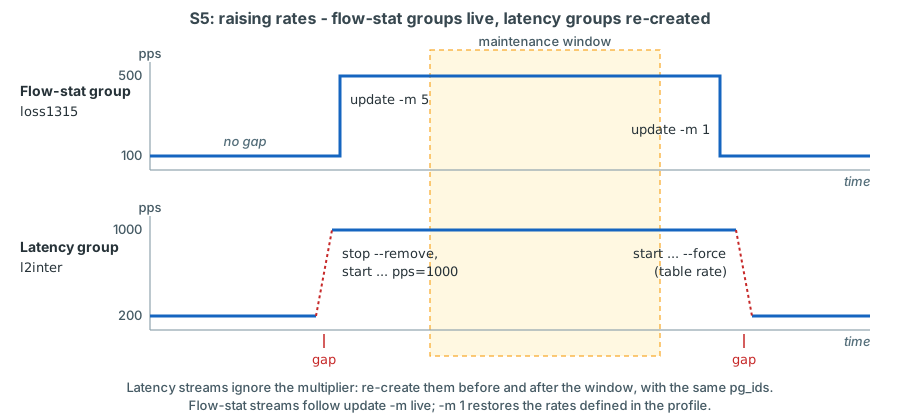
The TRex multiplier changes the rates of a running profile without re-creating its streams - but not for latency streams: "Global multiplier does not apply to this type of stream ... To change the rate of a latency stream, manually edit the profile file" (TRex stateless guide, "Per stream latency/jitter/packet errors - Limitations"). Latency streams are processed in software by the RX core, and TRex protects that core from accidental overload.
| Stream kind | Method | Effect |
|---|---|---|
Flow-stat, e.g. loss1315 |
update -p 0.loss1315 1.loss1315 -m 5 - a multiplier without unit is a factor on the profile's rates (100 to 500 pps); restore with -m 1 |
Live, no gap, counters continue |
Latency, e.g. l2inter |
Re-create the group at the new rate with the same pg_ids (stop --remove, then start ... -t ...,pps=1000, or start ... --force) |
Short gap for that group; its counters restart |
Why the same pg_ids, and why the old streams must go first
A pg_id must be unique across all profiles (TRex stateless guide, "Dynamic multiple profiles"), so the new streams can only be added after the old ones are removed. Keeping the pg_ids keeps the Grafana series continuous. TRex versions each pg_id internally, so re-created streams count from zero confirm on the bench; the exporter must treat a decreasing counter as a restart, not as negative loss.
Step by step
1. At least 15 minutes before the window (so the re-creation gap is outside it): annotate, check the budget.
2. Raise the rates:
trex(service-filtered)> stop -p 0.l2inter 1.l2inter --remove
trex(service-filtered)> start -f /opt/trexctl/profiles/raw/lvr_mon_streams.py -p 0.l2inter 1.l2inter -t group=l2inter,pps=1000
trex(service-filtered)> update -p 0.loss1315 1.loss1315 -m 5
trex(service-filtered)> profiles
start ... --force combines the first two lines. In the Python API the same steps are stop(),
remove_all_streams(), add_profile(file, ports='0.l2inter', port_id=0, group='l2inter', pps=1000), start() and
update(ports=[...], mult='5'). verified stop --remove, start --force,
update -p PORT.PROFILE -m: trex-core trex_stl_client.py, parsing_opts.py ("no suffix will provide an absolute
factor"). confirm on the bench how update reacts on a profile id with only
latency streams (no effect expected).
trexctl update --group l2-inter-dc --pps 1000
trexctl update --group l2-coverage-1315 --pps 500
# convergence measurement with automatic restore and report (Chapter 23):
trexctl test convergence --group l2-inter-dc,l3-bl --pps 1000 --duration 3600
For latency groups trexctl update has to re-create the streams with the same pg_ids, because the multiplier does
not apply to them. There is no loss-only group for the inter-DC pairs alone: the loss-only streams are grouped per
VLAN (l2-coverage-1315, l2-coverage-prod), so the VLAN 1315 group is raised as a whole - the same 34 streams as
loss1315 in the native tab, +13 600 pps. Together with l2-inter-dc at 1000 pps (+9 600 pps) the total is about
44 kpps, inside the 50 kpps guard rail; l2-coverage-prod at 500 pps would add another 27 200 pps (68 streams) and
exceed it.
3. Verify before the window: in Grafana tx_pps is 1000 for every stream of l2inter and 500 for loss1315,
rx_pps follows, no drops; the Overview total matches the calculation; display counters rate outbound interface
Ten-GigabitEthernet1/1/21 on sw-rzk-TX1 shows the higher rate towards p0 (L2 CR PDF pp. 43-44).
4. After the window, restore:
trex(service-filtered)> start -f /opt/trexctl/profiles/raw/lvr_mon_streams.py -p 0.l2inter 1.l2inter --force -t group=l2inter
trex(service-filtered)> update -p 0.loss1315 1.loss1315 -m 1
Planned: trexctl update --group l2-inter-dc --pps 200 and trexctl update --group l2-coverage-1315 --pps 100.
Annotate "rates restored"; check the Overview total.
What you should see
illustrative values The latency group shows a gap of a fraction of a second to a few seconds, then 1000 pps per stream with unchanged latency values; the flow-stat group changes from 100 to 500 pps without a gap; the Overview total rises to about 44 kpps.
Rollback / cleanup
Step 4 is the rollback. When in doubt, re-create every group from the stream table with start ... --force - the table
is the reference for the normal state.
Risks
| Risk | Avoidance |
|---|---|
| Rates never restored | Annotation with planned end, handover note; planned convergence runner restores automatically |
| Budget or firewall guard rail exceeded | Calculate first; raise only affected groups or port halves |
| New latency streams added before the old ones are removed | Fails on duplicate pg_ids - remove first or use --force |
Assuming update -m changed a latency group |
Check tx_pps per stream in Grafana |
Key takeaways
- The monitoring is one stream table, one profile file and one TRex profile id per group and port; groups are started, re-created or retired independently.
- Bring-up order: prerequisites, dry run, EMU, gateway gate, streams, verification on TRex, TX switches, Leafs and Grafana, seven days of baseline, thresholds, notifications.
- The gateway gate is also a fabric check: the centralised gateway on
sw-rzk-BLmust answer ARP from Leaf APs, and the RZC Leafs must know its MACec9b-8b67-37b8- otherwise routed streams fail or arrive as flooded duplicates. - Latency streams are built with UDP checksum 0; a resolved gateway MAC is fixed in the streams until they are re-created.
02:54:52:01:05:22appears as0254-5201-0522in Comware tables: AP index 1, VLAN 0x0522 (1314).- A new production VLAN touches IPAM, DHCP, the AP ports and the inventory - never the TX switches - and gets loss-only streams by default.
- A new AP needs an isolated S-VLAN on the AP port, the monitoring trunks and, for RZC, the TX-to-TX trunk; verify one Leaf-facing port per S-VLAN before the link comes up.
- Retire in the order streams, EMU, network, records; keep retired indexes, S-VLANs and pg_ids reserved.
update -mchanges flow-stat streams live but not latency streams; latency groups are re-created with the same pg_ids, outside the maintenance window.
Check your understanding
1. The two L3-BL streams sourced at C-L13 show RX = 0; all other L3-BL streams are fine. Which bring-up step would have caught this, and what do you check?
Step 3, the gateway gate. The VLAN 1314 client at C-L13 has probably not resolved its gateway, so its streams carry
a wrong destination MAC. Check emu_show_client_info for that client (port 1, tags 3203/1314), the service instance
for 1314 on the C-L13 AP port, and whether the ARP request reaches sw-rzk-BL and is answered there
(display arp vpn-instance VPN-CORE) - the centralised gateway receives it through a VXLAN tunnel.
2. Why does adding VLAN 1395 need no TX switch change, while adding AP C-L31 does?
The TX switch only pushes and pops the outer tag per AP and passes the inner (production) tag transparently. A new VLAN is a new inner tag on existing S-VLANs; a new AP is a new Layer 2 domain that needs its own S-VLAN, QinQ access port and trunk permits.
3. Why should the VLAN 1395 clients not be added by loading an updated EMU profile with emu_load_profile?
emu_load_profile removes all existing namespaces and clients before loading. For a moment every TRex host disappears,
ARP requests go unanswered and routed streams may lose their resolution. add_ns / add_clients add only the new
clients.
4. In S3 step 4, display vlan 3207 on sw-rzc-TX1 shows two Leaf-facing untagged ports. What do you do?
Do not bring the new port up. Two AP ports in one S-VLAN would bridge two Leafs outside the fabric - a Layer 2 loop for every stretched VLAN they share. Correct the PVID of the wrong port first.
5. After update -p 0.l2inter 1.l2inter -m 5 Grafana still shows 200 pps. Why, and what is the correct method?
l2inter holds latency streams, and the multiplier does not apply to them. Re-create the group at the new rate with
the same pg_ids (stop --remove, then start ... -t group=l2inter,pps=1000, or start ... --force), outside the
maintenance window because of the short gap.
6. Can l2intra, l2inter and l3bl be raised to 1000 pps together?
No: (22 + 12 + 8) x 800 = 33 600 pps on top of about 20.6 kpps gives about 54 kpps, above the 50 kpps guard rail. Raise only the groups or port halves whose paths cross the maintained element.
7. Why should AP index 15 not be given to another Leaf after C-L31 is retired?
The index determines the client MACs and IPs. A new Leaf with index 15 would reuse 02:54:52:0f:... and the same
addresses, mixing its history, MAC-table records and cached ARP entries with the old AP's.
References
- TRex stateless support guide, https://trex-tgn.cisco.com/trex/doc/trex_stateless.html - "Dynamic multiple profiles", "Per stream latency/jitter/packet errors" (128 latency streams, multiplier does not apply, 5 Mpps), "Port service mode".
- TRex EMU guide, https://trex-tgn.cisco.com/trex/doc/trex_emu.html - console commands,
portattr --prom/--mult,dgw.resolve/dgw.rmac, profile structure. TRex STL Python API, https://trex-tgn.cisco.com/trex/doc/cp_stl_docs/api/client_code.html -add_profile,remove_all_streams,start,stop,update. - trex-core (master),
scripts/automation/trex_control_plane/interactive/trex/:stl/trex_stl_client.py(start_line,stop_line,update_line),utils/parsing_opts.py,stl/trex_stl_streams.py(load_py),stl/api.py,emu/trex_emu_client.py(_start_profile,add_ns,add_clients,remove_ns,get_info_clients). Server side:src/stx/stl/trex_stl_fs.cpp(IPv4 ID and TOS bit 0 of statistics streams, latency signature),src/bp_sim.h(TOS_GO_TO_CPU). - HPE FlexFabric 5950 Layer 2-LAN Switching Command Reference R630x (PDF pages):
display mac-address11,mac-address timer28,default41,description42,display counters rate43-44,display interface brief56,port link-mode76,shutdown96,display vlan193,name197,vlan200,port access vlan202,port link-type204-205,port trunk permit vlan205-206,display qinq277,qinq enable278,display lldp neighbor-information355. - HPE FlexFabric 5950 VXLAN Command Reference R630x:
arp suppression enable5-6,display l2vpn mac-address13-15,display l2vpn service-instance15-17,display l2vpn vsi17-18,encapsulation s-vid24,service-instance42,xconnect vsi54. EVPN Configuration Guide R630x: centralised EVPN gateway and ARP flood suppression, PDF p. 28. EVPN CR:display evpn route mac23. L3 IP Services CR:display arp vpn-instance33. L3 IP Routing CR:display ip routing-table26. Fundamentals CR:display current-configuration179,save189. - LVR running configurations and diagnostic output (February 2025):
sw-rzk-L11XGE1/3/3 (service-instance pattern); VSIsVPN-1314andVPN-1395onsw-rzk-L11,SW-RZC-L21and both Border Leafs;VPN-724andVPN-171onsw-rzk-L11only;undo stp vlan ... 1082 to 1399 enableonsw-rzk-L11; EVPN MAC entries forec9b-8b67-37b8onsw-rzk-L11andsw-rzc-BLbut not onSW-RZC-L21; ARP entries ofsw-rzk-BLlearned through the DCI tunnel. - InfluxDB OSS v2 documentation, Flux
quantile().