7. Advanced stateful mode (ASTF)
In this chapter
You will learn
- why stateless streams cannot measure what limits a stateful firewall: connection setup rate, concurrent sessions, the TCP state machine, inspection and NAT
- how ASTF works: a user-space TCP/UDP stack for every flow, TRex as client and server at the same time, templates
from pcap files or
ASTFProgram, the tuple generator, connections per second and the multiplier-m - how to estimate the number of concurrent flows - in TRex and in the firewall - before you start a test
- how to run an ASTF profile from the console and from Python, and how to read the key counters
- how the LVR stateful test through the Enterprise firewall is built:
trex-lab-astfwith its own two-port configuration, client side p4 via AP K-L11, server side p6 in the firewall zone (pinned toFWZ= AP K-BL with VLAN 4003 in the default option B), single addresses or routed ranges - which switch and firewall changes the test needs and how to run it safely in a production network
Prerequisites: Chapter 3, Chapter 4; useful: Chapter 6 (for the contrast) and Chapter 15 (the firewall test zone).
The permanent monitoring of LVR is stateless: fixed UDP streams that measure latency and loss of the forwarding path. LVR also asked for occasional stateful tests through the firewall. The question there is different - not "how fast is the path" but "how many connections per second and how many open sessions can the Enterprise firewall handle, and what happens to throughput when it works hard". Answering it needs TRex's second traffic engine, the Advanced Stateful mode (ASTF). As the support person you will prepare, run and interpret these tests together with the firewall team, so this chapter explains both the mechanism and the LVR-specific setup.
Why stateless traffic cannot test a stateful firewall
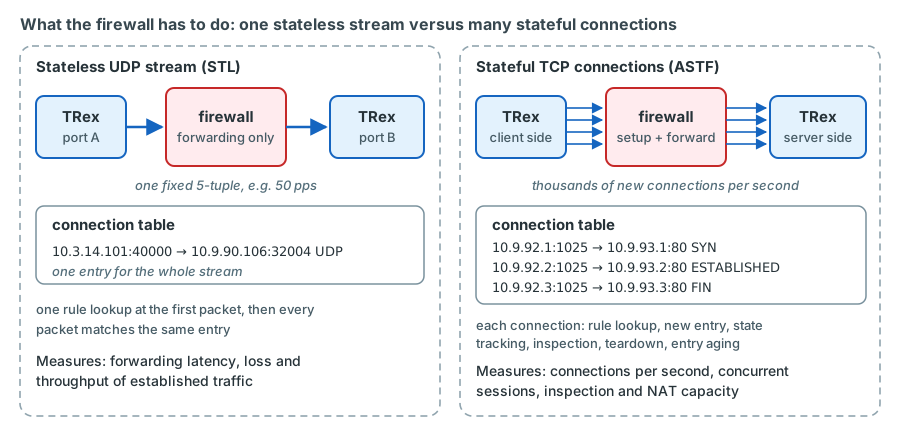
A stateful firewall such as the Check Point cluster CPF-ZV01/ZV02 (ENT-FW) does most of its expensive work once per connection, not once per packet:
- Connection setup. The first packet (a TCP SYN) is checked against the rule base; if accepted, an entry is created in the connection table, possibly with NAT and inspection state. This "slow" work limits the connections per second (CPS).
- State tracking. Every following packet is matched to the entry and checked against the TCP state machine (handshake, sequence and window, FIN/RST). Packets that do not fit the state are dropped.
- Inspection. Threat-prevention features look into the payload and need reassembled, realistic application data.
- Teardown and aging. After FIN or RST - or after an idle timeout - the entry stays for a while and is then removed. The number of entries in the table is the concurrent sessions figure, limited by memory.
A stateless TRex stream with a fixed 5-tuple, like every LVR monitoring stream, creates exactly one session in the firewall. After the first packet everything is per-packet forwarding. That is exactly what the monitoring wants (one stable session per stream) and exactly why it says nothing about firewall capacity.
| What limits a firewall | What creates the load | Stateless (STL) | ASTF |
|---|---|---|---|
| Connections per second | New, valid connections that complete the handshake | No: no handshake, no responses | Yes: every flow is a real TCP connection |
| Concurrent sessions | Connections that stay open for their lifetime, plus closed ones the firewall still holds | Only one per 5-tuple | Yes: CPS x lifetime |
| TCP state checks | Correct SYN/SYN-ACK/ACK, sequence numbers, FIN | TCP packets without a handshake are dropped as out of state | Yes: BSD-based TCP stack |
| Inspection | Realistic, bidirectional application data | Fixed payload, one direction | Yes: request/response programs, e.g. HTTP |
| Throughput under load | Many short flows, ACK clocking, retransmissions | Only a constant packet rate | Yes: TCP congestion control and retransmission |
| NAT | Port allocation per connection | Limited | Yes (not used at LVR: the test runs without NAT) |
Why not just vary the ports of a stateless stream?
The field engine of STL can change source ports packet by packet, which does create many UDP sessions. But nothing answers them: there is no handshake, no response traffic, no TCP state, no realistic application payload and no reaction to loss. The firewall's connection handling is loaded in an unrealistic way and the result cannot be compared with real users. ASTF runs a complete TCP stack on both ends, so the firewall sees the same conversation as with real clients and servers.
How ASTF works
A TCP stack per flow, on both sides
In ASTF mode TRex contains its own user-space TCP and UDP implementation. It started from the BSD 4.4-Lite TCP code and has carried the current FreeBSD TCP logic since v2.96 (ASTF guide, FAQ). The stack is event driven and runs lock-free on every data-plane core, which lets one server scale to millions of active flows, connection rates in the order of millions per second and around 200 Gbit/s (ASTF guide, "Feature overview"). For LVR the limit is the 10G port, not TRex.
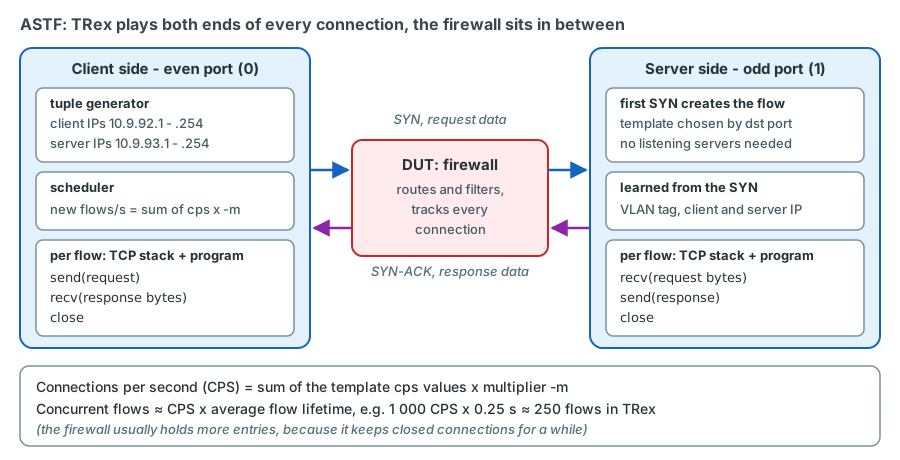
TRex plays both ends of every connection. Ports work in pairs: the even port of a pair (0, 2, ...) is the client side, the odd port (1, 3, ...) the server side. The client side opens connections, the device under test (here: the firewall) forwards them, and the server side of the same TRex answers. Counters are aggregated per side: "client" means all even ports, "server" all odd ports.
Templates and L7 programs
What happens inside a connection is described by a template: a client program and a server program. There are two ways to define them:
- From a pcap file:
ASTFCapInfo(file=..., cps=...). TRex analyses the recorded TCP conversation and derives both programs and the TCP parameters from it. The example profileastf/http_simple.pyuses a recorded HTTP browsing session this way. - Programmatically:
ASTFProgram()with commands such assend(buf),recv(bytes),delay(usec),wait_for_peer_close()andreset(), combined intoASTFTCPClientTemplateandASTFTCPServerTemplate.
The programs do not implement HTTP. The client sends N bytes and waits for M bytes; the server waits for N bytes and sends M bytes. TCP itself checks sequence numbers and checksums, so a corrupted or missing segment is still detected.
The server side needs no listening servers configured in advance. When a SYN arrives whose destination IP is in the
server range, TRex chooses the template by the destination port (or by an ASTFAssociationRule) and creates the
flow. Two templates therefore need different destination ports - the guide's example overrides the port of the second
template - or an association rule that separates them, for example by server IP range.
The tuple generator
Client and server addresses come from the tuple generator sketch - validate on the bench (the same calls as in the LVR profile below):
ip_gen_c = ASTFIPGenDist(ip_range=["10.9.92.1", "10.9.92.254"], distribution="seq")
ip_gen_s = ASTFIPGenDist(ip_range=["10.9.93.1", "10.9.93.254"], distribution="seq")
ip_gen = ASTFIPGen(glob=ASTFIPGenGlobal(ip_offset="1.0.0.0"),
                   dist_client=ip_gen_c, dist_server=ip_gen_s)
Two details matter for LVR:
- The offset. Every additional port pair gets the addresses shifted by
ip_offset(default "1.0.0.0"): the first pair uses the ranges as written, the second pair 11.9.92.x and so on (ASTF guide, 2.3.30 "Tutorial: Generating GTPU traffic on more than 2 ports"; TRex manual, "Clients/Servers IP allocation scheme"). With exactly one port pair in use the offset has no effect - one reason why the LVR ASTF configuration contains only two ports. - Source ports. Each client IP has about 64 000 source ports. With hardware RSS they are divided among the
data-plane cores of the port pair (ASTF guide, "Multi core support"). When the pool runs out, the counter
err_c_tuple_errcounts flows that could not be opened and the guide advises adding more client addresses.
Rate, multiplier and concurrent flows
Each template has a cps value. The multiplier given at start time scales all of them:
CPS = sum of the template cps values x multiplier -m
So a profile with one template of cps=10 started with -m 50 opens 500 connections per second. In ASTF -m is a pure
number (unlike the stateless -m 10mbps or -m 50%), and update -m sets a new absolute multiplier while the test is
running.
How many connections are open at the same time is not configured; it follows from the rate and the lifetime of a flow (Little's law). The ASTF guide says the same in its FAQ: the active flows derive from the RTT and the responses of the network under test.
Concurrent flows ≈ CPS x average flow lifetime
For example, 1 000 CPS with flows that live 0.25 s gives about 250 concurrent flows in TRex
illustrative values. The firewall usually holds more: it keeps an entry for some time
after the FIN, so its table size is roughly CPS x (flow lifetime + hold time after close). If the firewall slows down,
flows live longer and the concurrency grows on both sides - one reason why you ramp the rate slowly. ASTF has a built-in
ramp: the global tunable scheduler.rampup_sec (3-60 000 s) raises the rate linearly, once per second, to the target
(ASTF guide, "Tunables reference").
Addresses, VLANs and MACs
The two sides learn their Layer 2 information differently (ASTF guide, "Client clustering configuration"):
- Client side. Uses the port configuration: source MAC (NIC MAC or
src_mac), IPv4 (ip), destination MAC resolved fromdefault_gw, and the port VLAN (vlan) - the TRex manual states that all traffic of a port with avlansetting is sent with this tag. Alternatively an ASTF topology (ASTFTopology,add_vif(...)with source MAC and optional VLAN,add_gw(...)) defines several client MACs or VLANs on one port; the guide notes that such virtual interfaces do not answer ARP. QinQ is not supported in ASTF - one VLAN tag at most. - Server side. Learns the VLAN tag and the IP addresses from the incoming SYN and answers with source and
destination IP swapped. For the MACs the guide describes two behaviours - using the port's own MAC and its resolved
default gateway, or reflecting the MACs of the incoming packet; the tunable
ip.dont_use_inbound_macselects the first. At LVR both give the same result, because the SYNs reach the server port from the firewall, which is also the port's default gateway. Consequence for the design: the server address range must be routed by the network to the IP of the server port.
The guide also warns that a TRex port behaves like a trunk with all VLANs allowed: a switch that floods a SYN of another VLAN to the server port would get an answer. At LVR the lab ports are QinQ access ports on the TX switch, so a lab port only ever sees the traffic of the one AP it is pinned to.
In the LVR platform
Because QinQ is not supported in ASTF, the lab ports p4-p7 are pinned to one AP each on sw-rzk-TX1 (access port
in the AP's S-VLAN with QinQ enabled). TRex sends single-tagged frames with the production VLAN, and the TX switch
adds the S-tag. TRex could also combine ASTF with EMU clients (ASTF guide, "TRex emulation client clustering"),
but EMU needs software mode, and the EMU server exists only once per host - a lab instance started with --emu
would restart the EMU server of trex-mon and remove all monitoring hosts. The lab instance runs ASTF in hardware
mode with RSS on the X710, so LVR uses port addresses or routed ranges instead of emulated clients.
Running ASTF
Starting the server
ASTF is a server mode: t-rex-64 -i --astf --cfg <file>. A running TRex instance is either stateless or ASTF, never
both, because the NIC is set up differently - ASTF configures all receive queues and RSS, stateless mode filters and
counts in hardware (ASTF guide, FAQ "Why do I need to reload TRex server again with different flags ..."). At LVR this
is why the lab instance exists as two of the server's three systemd units, trex-lab (stateless) and trex-lab-astf
(ASTF), declared with Conflicts= so that only one of them runs. trex-lab-astf starts with its own configuration
file, --cfg /etc/trex/trex_lab_astf.yaml - the third configuration file beside trex_mon.yaml and trex_lab.yaml -
which lists only the two ports of the firewall test (see "The lab instance in ASTF
mode" below). planned unit - validate on the bench
# ExecStart of trex-lab-astf.service (all units: Chapter 17)
/opt/trex/current/t-rex-64 -i --astf --cfg /etc/trex/trex_lab_astf.yaml --iom 0 --no-scapy-server --unbind-unused-ports
Two options in this line are LVR-specific. --unbind-unused-ports is needed because the file uses only two of the four
ports of NIC2: TRex refuses to start while another port of the same X710 is still under the Linux i40e driver, and
this option makes it unbind p5 and p7 instead of exiting with an error (Chapter 3)
confirm on the bench. --no-scapy-server keeps the unit away from the Scapy helper,
which exists once per host; an ASTF start would not start it anyway, and both lab units carry the option.
sudo systemctl start trex-lab-astf      # stops trex-lab because of Conflicts=
./trex-console -p 4601 --async_port 4600
The RPC ports 4601/4600 are the planned ports of the lab instance (the monitoring instance keeps 4501/4500). On this
console the ports carry the instance-local numbers of trex-lab-astf: port 0 is p4 (client side), port 1 is p6
(server side).
Console
verified syntax from the trex-core ASTF console (trex/astf/trex_astf_client.py,
start_line and update_line; options in trex/utils/parsing_opts.py):
trex>portattr
trex>start -f astf/http_simple.py -m 100 -d 60
trex>stats -a
trex>update -m 200
trex>stop
| Command | Meaning |
|---|---|
start -f FILE -m MULT -d SEC |
Load the profile and start it; -m multiplies the template CPS, -d limits the time during which new flows are opened - afterwards TRex waits for the open flows to close |
start ... -t ARGS |
Pass tunables to the profile |
start ... --clients 0 / --servers-only |
Generate only from client port 0 (p4 in trex-lab-astf) / only act as server |
start ... --nc |
Do not wait for the flows to close at the end of the duration |
update -m MULT |
New absolute multiplier while running |
stats -a / stats --za |
ASTF counters without / with zero lines |
stats -g, stats -p, stats -l |
Global, port and latency statistics |
tui, then t |
Live ASTF counter table (l for latency) |
stop |
Stop the traffic (for a graceful end prefer the duration -d) |
portattr |
Port status, including whether the default gateway is resolved |
Do not use --nc through a production firewall
By default TRex waits until all flows have terminated gracefully (TRex manual, "Command line options"). With
--nc the test ends at the end of the duration without waiting; connections that are still open can then stay in
the firewall's table until its timeouts expire.
The ASTF guide shows what the counter table looks like during a run of astf/http_simple.py with -m 1000
from TRex docs (ASTF guide, 2.3.2 "Tutorial: Run TRex with simple HTTP profile";
excerpt, lines omitted):
                 |   client    |   server    |
---------------------------------------------------------------
m_active_flows   |       39965 |       39966 | active flows
m_est_flows      |       39950 |       39952 | active est flows
m_tx_bw_l7_r     |  31.14 Mbps |   4.09 Gbps | tx bw
m_rx_bw_l7_r     |   4.09 Gbps |  31.14 Mbps | rx bw
tcps_connattempt |       73936 |           0 | connections initiated
tcps_accepts     |           0 |       73924 | connections accepted
tcps_connects    |       73921 |       73910 | connections established
tcps_closed      |       33971 |       33958 | conn. closed (includes drops)
tcps_sndbyte     |    18406329 |  2270136936 | data bytes sent
tcps_rcvbyte     |  2269941776 |    18403590 | bytes received in sequence
tcps_rcvackbyte  |    18468679 |  2222057965 | tx bytes acked by rcvd acks
tcps_rcvoopack   |           0 |           0 | *out-of-order packets received
Read it like this: the client initiated 73 936 connections, the server accepted 73 924 and both sides established
almost all of them - the small differences are connections in flight. About 40 000 flows are open on each side. The
download (server m_tx_bw_l7_r, 4.09 Gbit/s) equals what the client receives, the upload matches in the other
direction, and the client's acknowledged bytes agree with the bytes the server received within a fraction of a percent
(data in flight). The * marks error counters - here zero.
Python
The same in a script, following the ASTF guide's automation example (ASTFClient, load_profile, start,
wait_on_traffic, get_stats) sketch - validate on the bench:
from trex.astf.api import *

c = ASTFClient(server='127.0.0.1', sync_port=4601, async_port=4600)   # trex-lab-astf
c.connect()
c.reset()
c.load_profile('/etc/trex/astf/lvr_fw_http_routed.py')
c.clear_stats()
c.start(mult=10, duration=300)      # 10 x template cps for 300 s; nc=False: graceful end
c.wait_on_traffic()
stats = c.get_stats()
cl, sv = stats['traffic']['client'], stats['traffic']['server']
print('attempted', cl.get('tcps_connattempt'), 'established', cl.get('tcps_connects'),
      'accepted by server', sv.get('tcps_accepts'))
has_errors, errors = c.is_traffic_stats_error(stats['traffic'])
if has_errors:
    print('error counters:', errors)
for w in c.get_warnings():
    print('warning:', w)
c.disconnect()
Reading the counters
ASTF reports dozens of counters per side; the console and the JSON API omit counters that are zero, and the console marks
error counters with * (ASTF guide, "Counters reference"). For a firewall test these are the ones that matter:
| Counter (console name) | Side | Meaning in a firewall test |
|---|---|---|
m_active_flows |
both | Open flows (established and not yet established) - the TRex view of concurrency |
m_est_flows |
both | Established flows |
m_tx_bw_l7_r, m_rx_bw_l7_r |
both | Application bytes per second sent and received - the goodput |
tcps_connattempt |
client | Connections initiated; its rate is the offered CPS |
tcps_accepts |
server | SYNs that reached the server side and created a flow |
tcps_connects |
both | Connections established (handshake completed) |
tcps_closed |
both | Connections closed, including drops |
tcps_rexmttimeo* |
both | Retransmission timeouts - packets lost, including SYNs |
tcps_sndrexmitpack* |
both | Data segments retransmitted |
tcps_conndrops* |
both | Connections given up before they were established (embryonic drops) |
tcps_drops* |
both | Established connections dropped |
err_no_template* |
server | SYN for a destination port or IP without a template |
err_cwf* / err_no_syn* |
client / server | Packets that match no flow: a late packet after TRex closed the flow (client), a first packet without SYN (server) |
err_c_tuple_err |
client | Flows not opened because the client address pool was exhausted |
err_c_nf_throttled, err_s_nf_throttled |
client / server | Flows not opened because the TRex flow table was full |
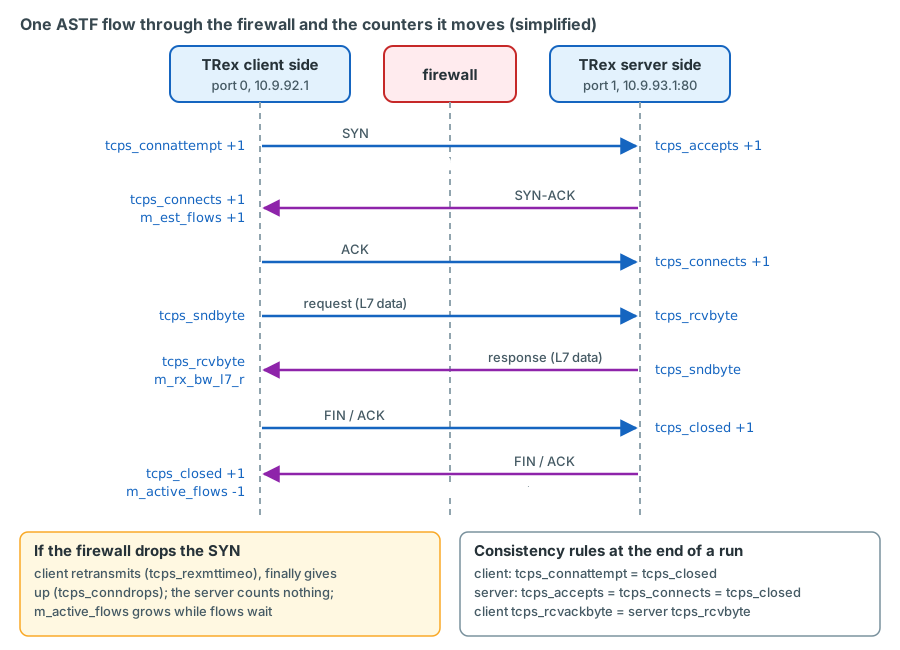
The guide gives consistency rules for a completed run: on the client side tcps_connattempt = tcps_closed and
tcps_connects <= tcps_closed; on the server side tcps_accepts = tcps_connects = tcps_closed; and the client's
tcps_rcvackbyte equals the server's tcps_rcvbyte (and vice versa). When the numbers do not add up, the difference
tells you where packets were lost:
| Pattern | Most likely meaning |
|---|---|
Client tcps_connattempt grows, server tcps_accepts stays 0 |
SYNs never reach the server port: firewall rule, route, ARP for the server address, anti-spoofing |
Server accepts, client tcps_connects stays low |
SYN-ACKs do not come back: return route, asymmetric path, firewall drop on the return side |
tcps_conndrops and tcps_rexmttimeo rise with the rate |
The firewall drops new connections under load (setup rate limit, protection features, full table) |
m_active_flows keeps growing although the rate is constant |
Flows do not finish: responses or FINs are lost or delayed - stop and investigate |
| Retransmissions rise and goodput falls while CPS is stable | Forwarding loss or queueing in the path, e.g. firewall CPU saturation |
err_c_tuple_err > 0 |
The client address pool is too small for the rate (typical with a single client address) |
ASTF at LVR: stateful tests through the Enterprise firewall
The lab instance in ASTF mode
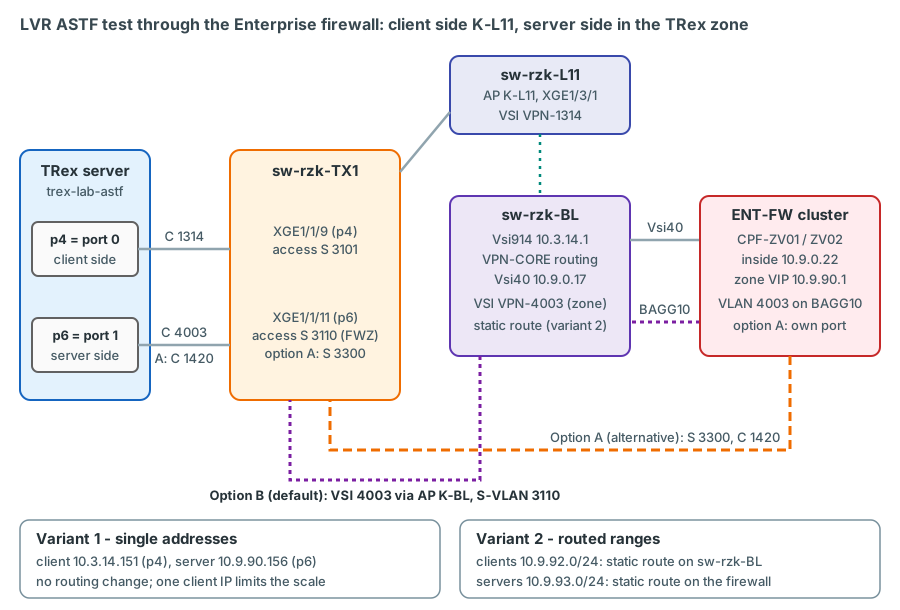
The test uses two lab ports: p4 as the client side, pinned to AP K-L11 (S-VLAN 3101, planned TX switch port
XGE1/1/9, TRex sends VLAN 1314), and p6 as the server side, pinned to the firewall zone FWZ. With option B,
the plan's default (see the decision below), FWZ is AP K-BL with VLAN 4003: TX switch port XGE1/1/11 is a QinQ
access port with PVID 3110, the S-VLAN of K-BL, and TRex sends VLAN 4003.
ASTF roles are fixed: in every port pair the even TRex port is the client side and the odd port the server side, and
TRex numbers the ports of an instance from 0 in the order of its interfaces list. The regular lab configuration
trex_lab.yaml lists p4 to p7, so p6 would be lab port 2 - a client port. trex-lab-astf therefore uses its own
configuration that lists exactly these two ports, p4 first: port 0 = p4 (client side), port 1 = p6 (server side). Both
ports keep their default pins, so the ASTF test needs no change on the TX switch. The file
sketch - validate on the bench:
- version: 2
  port_limit: 2
  interfaces: ['<PCI address of p4>', '<PCI address of p6>']   # (1)!
  prefix: lab
  zmq_pub_port: 4600
  zmq_rpc_port: 4601
  port_info:
    - src_mac: '02:54:52:f0:00:04'   # (2)!
      ip: 10.3.14.151            # (3)!
      default_gw: 10.3.14.1
      vlan: 1314
    - src_mac: '02:54:52:f0:00:06'
      ip: 10.9.90.156            # (4)!
      default_gw: 10.9.90.1
      vlan: 4003
- Order matters: the first interface is TRex port 0 (client side), the second port 1 (server side). With only one
pair,
ip_offsetnever shifts the addresses. Sameprefixand RPC ports astrex-lab, which never runs at the same time. Thread layout and memory settings: see Chapter 17. - The fixed MAC of the lab port -
02:54:52:f0:00:04for p4,02:54:52:f0:00:06for p6 - the same value as intrex_lab.yaml. TRex answers ARP and runs ASTF with the port MAC, and a lab port is re-pinned to other APs over time, so the MAC belongs to the port, not to the AP: the static MAC entries on the TX switch and the firewall objects stay valid across re-pins. Only the IP below follows the pin. - Client port in VLAN 1314: lab address 10.3.14.151 (lab pool start .151 + (AP index - 1), i.e. AP index + 50
relative to the monitoring pool), gateway
sw-rzk-BLVsi-interface914. The lab addresses .151-.166 of a VLAN lie outside the monitoring pool .101-.116: they need their own IPAM reservation and DHCP exclusion before the first lab test. - Server port in the firewall zone: 10.9.90.156, the lab zone client of
FWZ(K-BL index 6 + 50 = 56), gateway = zone VIP 10.9.90.1, VLAN 4003 (option B). With option A the values are 10.9.90.164 and VLAN 1420, with the samesrc_mac. The zone subnet still awaits IPAM approval (see below). Thevlansetting also tags the port's own ARP replies, which the firewall needs to resolve 10.9.90.156.
At start-up TRex resolves default_gw by ARP; the TRex manual states that TRex exits if the gateway does not answer
and no dest_mac is configured, so check the port status (portattr) before every run. The port answers ARP for its
own address, because ASTF passes non-TCP/UDP packets to the RX core by default (ASTF guide, "Port service mode");
confirm on device that sw-rzk-BL resolves 10.3.14.151 and the firewall
10.9.90.156.
Where the server side lives: the firewall zone
Open decision: attachment of the firewall test zone
Option B - existing transfer VSI 4003 (recommended by the plan, the default). The firewall zone is the
existing, free transfer VSI 4003 (Transfer ENTFW *frei*): the firewall team adds a VLAN 4003 interface (VIP
10.9.90.1) on the bond that already connects both cluster members to the Border Leafs (BAGG10 on the switch side),
and TRex reaches the zone through the Border Leaf attachment points K-BL and C-BL like any other VLAN. Lab port p6
is pinned to FWZ = K-BL with VLAN 4003 (port access vlan 3110 on its TX switch port, plus service-instance
4003 on the K-BL AP port), and TRex tags VLAN 4003. Pro: no new firewall ports, existing redundancy, no
dependency of the cluster on the test path. Con: not a physical firewall link from the TX switch; zone traffic
crosses the fabric, and the test traffic passes the production bond BAGG10 twice (VLAN 4002 inside, VLAN 4003
zone).
Option A - direct firewall link (the alternative). A new 10G interface on each cluster member, connected to the
TX switches - sw-rzk-TX1 XGE1/1/7 and sw-rzc-TX1 XGE1/1/8, which already carry the option-A configuration (QinQ
access port, PVID 3300) but are shut down - in S-VLAN 3300, stretched over the TX-to-TX fibre; S-VLAN 3300 is
defined and permitted on the trunks of both TX switches without an active member port, so option A needs only the
firewall cabling, undo shutdown and a sub-interface in VLAN 1420 with the VIP
10.9.90.1. Lab port p6 would be pinned to S-VLAN 3300, TRex would tag VLAN 1420, and the lab zone client would be
10.9.90.164 (with p6's fixed MAC). Pro: the physical firewall link the customer originally asked for; the zone traffic does not cross
the fabric. Con: a failure in the non-redundant test path (TX switch, fibre, optic, TRex port) could affect
cluster health monitoring and cause a failover, unless the firewall team makes the interface non-critical or
formally accepts the risk.
The plan recommends option B and uses it as the default; option A - a new firewall port per member on the TX switches, the customer's original wish - remains the alternative decision. Either way, if the active member is CPF-ZV02 in Chorweiler - as in February 2025 - the test traffic also crosses the DCI. Details: Chapter 15 and Appendix D.
Variant 1: one client and one server address
The simplest test uses the port addresses themselves: client range = 10.3.14.151, server range = 10.9.90.156 decision (zone addressing awaits IPAM approval). No routing change is needed: the zone is directly connected to the firewall, VLAN 1314 is known everywhere, and VPN-CORE already reaches the zone through its default route to the ENT-FW.
The price is scale. All connections share one client IP, one server IP and one destination port, so only the source
port varies: about 64 000 possibilities, divided among the data-plane cores. In addition, a stateful firewall keeps a
closed connection for a while; reusing a source port before the firewall has forgotten the old connection can make it
drop the new SYN. A rough ceiling for the sustainable rate is therefore available source ports / firewall hold time,
for example 64 000 / 30 s ≈ 2 000 CPS illustrative values - ask the firewall team for the
real hold time. Variant 1 is good for throughput and latency under moderate connection load, not for finding the CPS
limit. Watch err_c_tuple_err.
Variant 2: routed client and server ranges
For CPS and concurrency tests TRex uses whole ranges: clients 10.9.92.1-254, servers 10.9.93.1-254 (both subnets are unused in the LVR configurations). They take the place of the ranges 16.0.0.0 and 48.0.0.0 of the TRex examples, which cannot be used in a production network (chapter 4). The network must then route these ranges to the TRex ports:
- Client range, on
sw-rzk-BL: a static route in VPN-CORE to the client port address.sw-rzk-BLredistributes static routes into OSPF 1 of VPN-CORE (import-route static), so the ENT-FW, an OSPF neighbour on Vsi40, learns the return path automatically. - Server range, on the firewall: a static route 10.9.93.0/24 via 10.9.90.156 (option A: via 10.9.90.164), configured by the firewall team. VPN-CORE needs nothing: its default route (O_ASE via 10.9.0.22) already points to the ENT-FW.
ip route-static vpn-instance VPN-CORE 10.9.92.0 24 10.3.14.151 description TRex-ASTF-clients
verified Syntax: HPE FlexFabric 5950 Layer 3 - IP Routing Command Reference R630x,
PDF pp. 89-90; identical in style to the existing VPN-CORE static routes on sw-rzk-BL (e.g. ip route-static
vpn-instance VPN-CORE 10.3.0.0 16 10.9.0.35 description zur DC-FW).
| Element | What it does | Why |
|---|---|---|
vpn-instance VPN-CORE |
Installs the route in the VRF of VLAN 1314 | The client port 10.3.14.151 lives in VPN-CORE (Vsi-interface914) |
10.9.92.0 24 |
The client range of the ASTF profile | 10.9.92.0/24 is unused and not covered by other static routes |
10.3.14.151 |
Next hop = the TRex client port | sw-rzk-BL resolves it by ARP in VLAN 1314 and sends return traffic for the whole range to p4 |
description TRex-ASTF-clients |
Marks the route | Easy to find and to remove |
Verify before the test and remove afterwards verified (Layer 3 - IP Routing Command Reference R630x, PDF p. 26 and pp. 89-90; Layer 3 - IP Services Command Reference R630x, PDF p. 33):
display ip routing-table vpn-instance VPN-CORE 10.9.92.0 24
display ip routing-table vpn-instance VPN-CORE 10.9.93.0 24
display arp vpn-instance VPN-CORE
undo ip route-static vpn-instance VPN-CORE 10.9.92.0 24 10.3.14.151
The profile for variant 2 uses an HTTP-like exchange built with ASTFProgram, so it does not depend on pcap files
sketch - validate on the bench:
from trex.astf.api import *
http_req = b'GET /lvr-astf HTTP/1.1\r\nHost: 10.9.93.1\r\n\r\n'
http_resp = b'HTTP/1.1 200 OK\r\nContent-Length: 32000\r\n\r\n' + b'x' * 32000
class LvrFwHttp():
def get_profile(self, tunables, **kwargs):
prog_c = ASTFProgram() # client: send request, wait for response
prog_c.send(http_req)
prog_c.recv(len(http_resp))
prog_s = ASTFProgram() # server: wait for request, send response
prog_s.recv(len(http_req))
prog_s.send(http_resp)
clients = ASTFIPGenDist(ip_range=["10.9.92.1", "10.9.92.254"], distribution="seq")
servers = ASTFIPGenDist(ip_range=["10.9.93.1", "10.9.93.254"], distribution="seq")
ip_gen = ASTFIPGen(glob=ASTFIPGenGlobal(ip_offset="1.0.0.0"),
dist_client=clients, dist_server=servers)
c_glob = ASTFGlobalInfo()
c_glob.scheduler.rampup_sec = 60 # linear ramp to the target rate
temp_c = ASTFTCPClientTemplate(program=prog_c, ip_gen=ip_gen, port=80, cps=10)
temp_s = ASTFTCPServerTemplate(program=prog_s,
assoc=ASTFAssociationRule(port=80))
template = ASTFTemplate(client_template=temp_c, server_template=temp_s)
return ASTFProfile(default_ip_gen=ip_gen, default_c_glob_info=c_glob,
templates=template)
def register():
return LvrFwHttp()
Started with -m 50 this opens 500 connections per second after a 60-second ramp, each downloading 32 kB over TCP
port 80. For variant 1 only the two ip_range lists change (one address each).
Firewall requirements
The firewall team implements the following in SmartConsole; object names are proposals:
| Item | Variant 1 | Variant 2 |
|---|---|---|
Client object TRX-astf-clients |
10.3.14.151 | 10.9.92.0/24 |
Server object TRX-astf-servers |
10.9.90.156 | 10.9.93.0/24 |
Service TRX-tcp |
TCP 80, 443, 8080 | same |
| Rule | TRX-astf-clients -> TRX-astf-servers, TRX-tcp, accept, above any cleanup/drop rule |
same |
| NAT | none (explicit no-NAT rule if automatic hide NAT exists for the inside networks) | same |
| Routing | nothing extra | static route 10.9.93.0/24 via 10.9.90.156; 10.9.92.0/24 learned via OSPF |
| Anti-spoofing | zone addresses already part of the zone network | the zone interface must accept 10.9.93.0/24 and the inside interface 10.9.92.0/24, otherwise the packets are dropped as spoofed confirm on device |
| Inspection | decision: measure forwarding only (exclude TRex objects from Threat Prevention) or test with inspection | same |
| Logging | decide whether the rule logs; per-connection logging at hundreds or thousands of CPS loads the log infrastructure | same |
Also ask the firewall team for the TCP timeouts in effect, in particular how long closed connections stay in the table - you need the value for the concurrency estimate and for variant 1.
What the results mean
An ASTF run produces a handful of numbers. Interpret them together:
- Achieved CPS = rate of
tcps_connectson the client side, compared with the offered rate oftcps_connattempt. As long as both are equal and the error counters stay at zero, the firewall keeps up. - Establishment ratio =
tcps_connects/tcps_connattempt. A falling ratio with risingtcps_conndropsis the typical sign that the firewall's connection setup is saturated. - Concurrency =
m_active_flowson the client side; compare it with the firewall's connection-table count, which should be higher by the closed-but-held entries. - Retransmissions (
tcps_rexmttimeo,tcps_sndrexmitpack) indicate loss; they usually show up before goodput visibly drops. - Goodput =
m_rx_bw_l7_ron the client side for the download. Watch it together with the CPS: a firewall under CPU pressure can lose throughput before it starts refusing connections.
Correlate every run with the firewall side: CPU per core, connection-table size, new connections per second and drop
logs, read by the firewall team at the same time. Two LVR-specific aids help. First, trex-mon keeps running during
the test: its L3-ENTFW latency streams (VLAN 1314 to the firewall zone, 50 pps) show in Grafana in real time how the
firewall's forwarding latency reacts to the load. Second, mark start, every rate step and the stop as annotations in
Grafana (the planned trexctl annotate, until then manually), so that the firewall graphs and the TRex graphs can be
lined up later.
In the LVR platform
The planned orchestrator command trexctl test astf --profile lab-fw-http.yaml --mult 500 --duration 300 will do
all of this: stop trex-lab, start trex-lab-astf, load the profile, run it, collect m_active_flows,
m_est_flows, tcps_connattempt, tcps_connects, the error counters and goodput into InfluxDB, and restore
trex-lab afterwards. trexctl does not exist yet; until it does, use the console or the Python sketch above.
Safety and change control
Production impact
The Enterprise firewall is the hub between all VRFs of LVR. A stateful test that fills its connection table or saturates its CPU affects every inter-VRF connection of the customer, not just the test. If the active member is in Chorweiler, the test traffic also crosses the DCI (2 x 40G, shared with production). Every ASTF run through the ENT-FW therefore needs change control, a firewall engineer watching the cluster, and agreed stop criteria.
Run every test the same way:
- Change approved; maintenance window or low-traffic period agreed with the firewall team.
- Firewall objects, rule, NAT exemption, inspection decision, routes and anti-spoofing in place; static route on
sw-rzk-BLpresent (variant 2 only). - Lab ports on their default pins (p4 to K-L11, p6 to
FWZ);trex-lab-astfrunning withtrex_lab_astf.yaml;portattrshows both gateways resolved. - Stop criteria agreed, e.g. firewall CPU above an agreed threshold, connection table above an agreed share of its
capacity, any
tcps_conndrops, any production alarm illustrative values. - Start low (for example 50-100 CPS), with
scheduler.rampup_sec; raise the rate in steps withupdate -mand hold each step long enough for the concurrency to settle (several flow lifetimes plus the firewall hold time). - End the run with the duration
-d, never with--nc; wait untilm_active_flowsis back to zero and the firewall team confirms that the table has drained. After an emergencystop, tell the firewall team that open connections may remain until they time out. - Afterwards: remove the static route (variant 2), restart
trex-lab(stateless), record the results and annotations.
Lab ports share the TX switch with the monitoring trunks: unknown-unicast frames towards a lab port are flooded within
its S-VLAN, including to the trex-mon ports. Static MAC entries for the lab port MACs on sw-rzk-TX1 - one per lab
port in the S-VLAN of its current pin, which the fixed port MACs keep stable across re-pins - are one of the
mitigations - see Chapter 24 for the flooding risk and how to contain it.
Key takeaways
- A firewall's expensive work happens per connection. A stateless stream with a fixed 5-tuple is one session and measures only forwarding; ASTF creates real TCP connections and measures CPS, concurrency, state handling and goodput.
- ASTF runs a BSD-derived TCP stack per flow on both ends: even ports are the client side, odd ports the server side.
Templates come from pcap files or
ASTFProgram; the server side picks the template by destination port. - CPS = sum of template cps x
-m; concurrent flows ≈ CPS x flow lifetime; the firewall holds more entries than TRex because it keeps closed connections for a while. Ramp withscheduler.rampup_secandupdate -m. - The client side uses the port configuration (or an ASTF topology); the server side learns VLAN and IPs from the SYN. QinQ is not supported, so LVR lab ports are pinned single-tagged ports.
- Read counters as a chain:
tcps_connattempt(client) -tcps_accepts(server) -tcps_connects-tcps_closed; error counters carry a*; goodput ism_rx_bw_l7_r/m_tx_bw_l7_r. - At LVR,
trex-lab-astfuses its own two-port configuration: port 0 = p4 (client, K-L11, VLAN 1314) and port 1 = p6 (server, pinned toFWZ: AP K-BL with VLAN 4003 in the default option B, VLAN 1420 with option A); the unit runs with--no-scapy-server --unbind-unused-ports. Addressing with either single addresses (no routing change, limited scale) or routed ranges (static route onsw-rzk-BL, static route on the firewall). The lab addresses .151-.166 need their own IPAM reservation and DHCP exclusion. - Tests through the ENT-FW need change control, a firewall engineer, stop criteria, a slow ramp and a graceful end.
Check your understanding
1. The monitoring sends 50 pps from VLAN 1314 to the firewall zone. Why does this put almost no load on the firewall's connection handling, even at a much higher rate?
The stream has a fixed 5-tuple, so the firewall performs one rule lookup and creates one session. Every further packet matches that session and is simply forwarded. Raising the packet rate loads the forwarding path, not the connection setup or the table.
2. A profile has two templates with cps=1 and cps=2 and is started with -m 100. Flows live about 0.4 s. How many connections per second and how many concurrent flows do you expect in TRex?
CPS = (1 + 2) x 100 = 300 connections per second. Concurrent flows ≈ 300 x 0.4 s = 120. The firewall will show more entries, because it keeps closed connections for its hold time.
3. Why does the ASTF configuration list p4 before p6, and why not simply use trex_lab.yaml, which lists p4 to p7?
TRex numbers ports in the order of the interfaces list, and in ASTF the even port of a pair is the client side,
the odd port the server side. With p6 first, the firewall-zone port would generate the connections and the K-L11
port would act as the server - the test would run in the wrong direction through the firewall and with the wrong
addresses for the configured routes and rules. In trex_lab.yaml p6 is lab port 2, which is also a client port, so
the zone would have no server side at all.
4. During a variant 1 run, err_c_tuple_err increases and the achieved CPS stays below the offered CPS. What is happening and what do you do?
With one client and one server address only the source port varies, and the pool of source ports is exhausted -
possibly made worse by connections the firewall still holds. Lower the rate, or switch to variant 2 with routed
ranges (static route on sw-rzk-BL, static route on the firewall).
5. Client tcps_connattempt grows, but server tcps_accepts stays at 0. List the checks in order.
The SYNs never reach the server port. Check that the firewall rule matches and see whether the drop log shows the
SYNs; check the routes (variant 2: firewall route to 10.9.93.0/24 via 10.9.90.156); check ARP in the zone VLAN 4003
(portattr shows whether TRex resolved the VIP, the firewall's ARP table whether it resolved 10.9.90.156); check
anti-spoofing on the zone interface; and check the pinning of p6 on the TX switch (XGE1/1/11, PVID 3110) and
service-instance
4003
on the K-BL AP port.
6. Why must the static route on sw-rzk-BL be removed after the campaign, and why does the firewall learn it without extra configuration?
sw-rzk-BL redistributes static routes into OSPF 1 of VPN-CORE (import-route static), so the ENT-FW and the other
Border Leafs learn 10.9.92.0/24 automatically. Left in place, the route keeps pointing a whole subnet to a lab port
that is normally not in ASTF mode, and it would silently conflict with any later use of 10.9.92.0/24.
7. Why is --nc dangerous in a firewall test?
By default TRex waits until all flows have terminated gracefully. With --nc it ends at the end of the duration
without waiting, so connections that are still open can stay in the firewall's table until its timeouts expire -
orphaned entries on a production firewall.
References
- TRex ASTF guide, https://trex-tgn.cisco.com/trex/doc/trex_astf.html - 2.1 "Feature overview" (scale), 2.1.7
"Emulation of L7 application", 2.3.2 "Tutorial: Run TRex with simple HTTP profile" (console counters), 2.3.3-2.3.5
(templates, ports, generator ranges), 2.3.9 "Tutorial: Python automation", 2.3.13 "Tutorial: Manual L7 emulation
program building", 2.3.30 "Tutorial: Generating GTPU traffic on more than 2 ports" (IP offset per dual port), 2.5
"Port service mode" (Table 4), 2.6 "Client/Server only mode", 2.7.1-2.7.3 "Client clustering configuration"
(server-side learning, topology, EMU), 2.8 "Multi core support" (source ports per core), 2.11 "Tunables reference"
(
scheduler.rampup_sec,ip.dont_use_inbound_mac), 2.12 "Counters reference", 2.13 "FAQ" - TRex manual, https://trex-tgn.cisco.com/trex/doc/trex_manual.html - 4.11 "Clients/Servers IP allocation scheme", 6.2
"Platform YAML (--cfg argument)" (
port_info,vlan,default_gw), 6.3 "Command line options" (-m,--nc) - trex-core source, https://github.com/cisco-system-traffic-generator/trex-core (master),
scripts/automation/trex_control_plane/interactive/trex/astf/:trex_astf_client.py(start,update, console options),trex_astf_profile.py(ASTFTCPClientTemplate,ASTFTCPServerTemplate,ASTFAssociationRule,ASTFIPGenGlobal),trex_astf_global_info.py;.../trex/utils/parsing_opts.py(stats -a,--za,--clients,--servers-only);scripts/dpdk_setup_ports.py(check_i40e_bindswith--unbind-unused-ports,should_scapy_server_run);src/main_dpdk.cpp(option list) - HPE FlexFabric 5950 Layer 3 - IP Routing Command Reference R630x, PDF p. 26 (
display ip routing-table), PDF pp. 89-90 (ip route-static vpn-instance,undo ip route-static) - HPE FlexFabric 5950 Layer 3 - IP Services Command Reference R630x, PDF p. 33 (
display arp) - LVR running configuration
sw-rzk-BL(February 2025):ospf 1 router-id 10.9.0.17 vpn-instance VPN-COREwithimport-route static, existingip route-static vpn-instance VPN-CORE ...entries,interface Vsi-interface914,interface Vsi-interface40 - Platform plan v0.92 (14 October 2026), sections 4.3.5 (firewall zone design options), 4.3.7 (class LAB), 4.6.3 (lab
client identity), 7.4.3 (static routes for
ASTF), 7.5.1 (firewall requirements), 8.5 (
trex_lab_astf.yaml,--unbind-unused-ports), 8.6 (systemd units), 9.8 (test runners), 11.7 (test through the Enterprise firewall)