13. Attachment points on Leafs and Border Leafs
In this chapter
You will learn
- what an attachment point (AP) is on the production side, and why it is configured exactly like a server port
- the AP port template line by line, including the optional
stp edged-portand why it has no effect on the examined switches - the four example APs on
sw-rzk-L11,SW-RZC-L21,sw-rzk-BLandsw-rzc-BL, and the checks before you touch a port - why the two Border Leaf APs also carry VLAN 4003, the firewall test zone of the plan's default option B
- how a TRex client becomes known in the fabric: local learning on the AC, EVPN MAC/IP routes, remote installation, re-origination on the Border Leafs, ARP flooding - and why the gateway's ARP reply is a commissioning check
- how to add and remove a VLAN under test step by step, with verification and rollback
- what can go wrong on an AP and how you recognise it on the switches
- the cabling and labelling rules
Prerequisites: Chapter 10 (access model, EVPN-DCI) and Chapter 12 (the TX-switch side of an AP).
The attachment point is where the platform touches production. It is also the part you will change most often: every new VLAN under test is a change on an AP port, while the TX switches stay untouched. The good news is that an AP port is nothing new for an LVR network engineer - it is configured exactly like the existing server trunks. This chapter shows the template, the four APs that already have a free port, what happens in the fabric when TRex starts sending, and the procedures for adding and removing VLANs.
What an attachment point is
An attachment point is one 10G link from a TX switch into a production device, together with the configuration on both ends:
- On the TX-switch side the port is a QinQ access port with the S-VLAN of this AP (Chapter 12).
- On the production side (Leaf or Border Leaf) the port is an 802.1Q trunk with one Ethernet service instance per VLAN under test - the same model as every server port at LVR (Chapter 10).
From the Leaf's point of view, TRex is simply a server with a few VLANs on a trunk: it sends single-tagged frames, its MAC addresses are learned on the port and advertised by EVPN, it answers ARP for its addresses. Nothing in the Leaf configuration is specific to TRex.
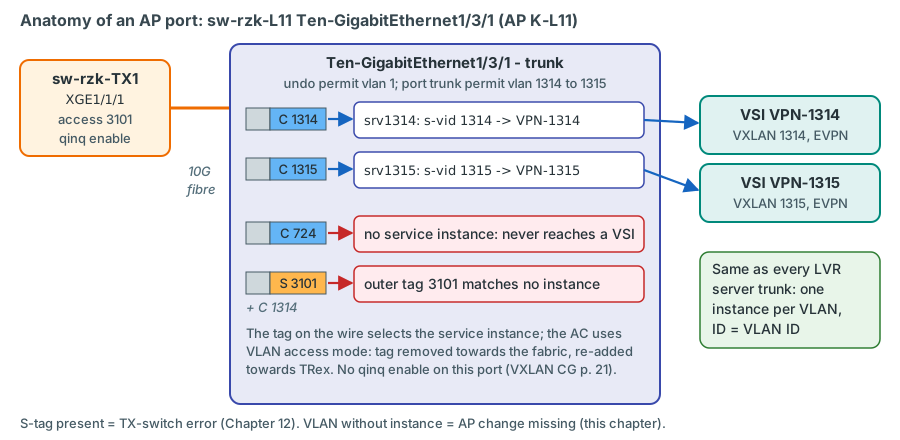
Four rules keep the AP safe:
- Only VLANs under test are permitted and mapped. Never S-VLANs, never VLANs "just in case".
- No QinQ on the production port. Ethernet service instances and QinQ cannot be used together on an interface (VXLAN Configuration Guide R630x, PDF p. 21); the S-tag is removed by the TX switch before the frame arrives.
- One link per Leaf/BL IRF pair, on member 1. A reboot of that member takes the AP down; the monitoring shows it as "path down" for this AP. That is intended.
- A fault on the AP affects only measurements. Only TRex sits behind the port. If in doubt, shut it down: no production traffic is lost.
The AP port template, line by line
The template is derived from sw-rzk-L11 Ten-GigabitEthernet1/3/3 (-> ESH-ZV12 Trunk), an existing server trunk in the
running configuration of February 2025:
interface Ten-GigabitEthernet<slot/port>
 port link-mode bridge
 description TRX AP <AP-CODE> --> <TX-SWITCH> <TX-PORT> (TRex attachment point)
 port link-type trunk
 undo port trunk permit vlan 1
 port trunk permit vlan 1314 to 1315
 #
 service-instance 1314
  encapsulation s-vid 1314
  xconnect vsi VPN-1314
 #
 service-instance 1315
  encapsulation s-vid 1315
  xconnect vsi VPN-1315
verified - same commands and structure as the running configuration of sw-rzk-L11
XGE1/3/3; documented in the VXLAN Command Reference R630x (service-instance PDF p. 42, encapsulation PDF pp. 24-25,
xconnect vsi PDF pp. 54-55) and the Layer 2 Command Reference R630x (port link-type PDF pp. 204-205,
port trunk permit vlan PDF pp. 205-206).
| Line | What it does | Why |
|---|---|---|
port link-mode bridge |
Layer 2 mode - the default on the 5950 (L2 Configuration Guide, PDF p. 40) | Already present on every free port in the running configuration; shown for completeness |
description TRX AP ... |
Names the AP code and the remote TX-switch port | The description is the label you see in display interface brief and in logs; it must match the cable label and the inventory |
port link-type trunk |
802.1Q trunk | TRex delivers tagged frames, one tag per production VLAN |
undo port trunk permit vlan 1 |
Removes the default VLAN 1 | Same hygiene as on all LVR server trunks |
port trunk permit vlan 1314 to 1315 |
Permits exactly the VLANs under test | LVR convention: the permit list mirrors the service instances. The command is additive - repeating it adds VLANs (L2 CR, PDF p. 206) |
service-instance 1314 |
Creates an Ethernet service instance (an AC) with ID 1314 | ID = VLAN ID, the LVR convention |
encapsulation s-vid 1314 |
Matches frames whose outer 802.1Q tag is 1314 | The tag set by TRex selects the instance |
xconnect vsi VPN-1314 |
Maps the instance into the existing VSI VPN-1314, default VLAN access mode |
The tag is removed towards the fabric and re-added towards TRex (Chapter 10) |
What is deliberately not in the template: qinq enable (incompatible with service instances), lldp compliance
admin-status cdp txrx (used on ESX ports for CDP; the TX switch speaks plain LLDP), and any storm control or BPDU
protection (no LVR server port uses them).
Optional: stp edged-port
stp edged-port marks a port as an edge port, which "can rapidly transit from the blocking state to the forwarding
state" (L2 Configuration Guide R630x, PDF p. 294; L2 Command Reference, PDF p. 318). It is optional, and on the
examined switches it has no effect at all:
- Spanning tree is globally disabled on all four examined switches:
display stpreports "Protocol status: Disabled", and the configurations contain nostp global enable(Chapter 10). Theirstp mode pvstandundo stp vlan ... enablelines (1314 and 1315 are in the disabled lists everywhere) are inactive. A new AP port therefore forwards in every VLAN immediately after link-up, edge port or not. - It would matter only on a Leaf that does run spanning tree - PVST, in which "each VLAN runs RSTP independently"
(L2 Configuration Guide, PDF p. 271) - for a VLAN under test whose STP is enabled. There, a new non-edge port that
receives no BPDUs (the TX switch sends none) forwards only after twice the forward delay - about 30 s with the default
15 s timer (L2 Command Reference, PDF p. 340) - after every link-up, for example after a TX-switch reboot. For the
Leafs without diag files,
display stp briefbefore the rollout shows whether this can happen confirm on device. - No existing LVR server port uses
stp edged-port, and no RZK/RZC switch uses BPDU protection.
Recommendation
Leave stp edged-port out, consistent with the existing server ports, as long as spanning tree is off on the Leaf
(all examined switches) or off for the mapped VLANs. Add it to an AP on a Leaf that runs PVST for a monitored VLAN, if
the 30-second gap after each link-up disturbs the results. Do not add BPDU protection: if anything ever sent a BPDU on
the AP, an error-disabled port would hide the problem instead of showing it.
The four example attachment points
Four APs had a free port in the diagnostic files of 17/18 February 2025. For the other nine Leafs a free SFP+ port still has to be chosen (TBD in the inventory). Every port below must be re-checked before use confirm on device.
| AP | Port | Found in Feb 2025 | Neighbouring ports (take care when patching) |
|---|---|---|---|
| K-L11 | sw-rzk-L11 XGE1/3/1 (JH180A, slot 3) |
only port link-mode bridge; DOWN; transceiver absent |
XGE1/3/2 "Link to sw-rzk-TI03 Port49", XGE1/3/3 -> ESH-ZV12 Trunk |
| C-L21 | SW-RZC-L21 XGE1/4/4 (JH180A, slot 4) |
only port link-mode bridge; DOWN; an HPE JD092B 10G SR optic is inserted |
XGE1/4/3 "Link to sw-rzc-TI02 Port49", XGE1/4/5 "AIX (009.2.01 oben) P1-C4-T4" |
| K-BL | sw-rzk-BL XGE1/3/6 (JH180A, slot 3) |
only port link-mode bridge; DOWN; transceiver absent |
XGE1/3/5 "CPF-ZV01 - inside" (member of BAGG10 to the ENT-FW) |
| C-BL | sw-rzc-BL XGE1/3/14 (JH180A, slot 3) |
only port link-mode bridge; DOWN; transceiver absent |
XGE1/3/13 "CPF-ZV02 - MAIN - DMZ" (member of BAGG11) |
Sources: running configurations, display interface brief and display transceiver interface in the diagnostic files.
The optic in SW-RZC-L21 XGE1/4/4 suggests that the port may have been prepared for something - ask before you use it.
AP K-L11 on sw-rzk-L11
system-view
interface Ten-GigabitEthernet1/3/1
 port link-mode bridge
 description TRX AP K-L11 --> sw-rzk-TX1 XGE1/1/1 (TRex attachment point)
 port link-type trunk
 undo port trunk permit vlan 1
 port trunk permit vlan 1314 to 1315
 service-instance 1314
  encapsulation s-vid 1314
  xconnect vsi VPN-1314
 quit
 service-instance 1315
  encapsulation s-vid 1315
  xconnect vsi VPN-1315
 quit
quit
save force
verified syntax (as the template; save [ force ], Fundamentals Command Reference, PDF
p. 189). confirm on device that the port is still free. An HPE-coded 10G SR transceiver
has to be inserted.
AP C-L21 on SW-RZC-L21 (Release R6205P03)
system-view
interface Ten-GigabitEthernet1/4/4
 port link-mode bridge
 description TRX AP C-L21 --> sw-rzc-TX1 XGE1/1/4 (TRex attachment point)
 port link-type trunk
 undo port trunk permit vlan 1
 port trunk permit vlan 1314 to 1315
 service-instance 1314
  encapsulation s-vid 1314
  xconnect vsi VPN-1314
 quit
 service-instance 1315
  encapsulation s-vid 1315
  xconnect vsi VPN-1315
 quit
quit
save force
verified syntax for this release: the running configuration of SW-RZC-L21 (R6205P03) uses
the same service-instance / encapsulation s-vid / xconnect vsi lines on its server ports, for example XGE1/4/5.
confirm on device that the port is free (an optic is inserted). The LVR switch analysis
recommends upgrading this Leaf to R630x independently of TRex. After commissioning, check whether the RZC Leafs know the
gateway MAC of sw-rzk-BL (Chapter 10, "Check during commissioning: the gateway MAC on the RZC Leafs").
AP K-BL on sw-rzk-BL
system-view
interface Ten-GigabitEthernet1/3/6
 port link-mode bridge
 description TRX AP K-BL --> sw-rzk-TX1 XGE1/1/6 (TRex attachment point)
 port link-type trunk
 undo port trunk permit vlan 1
 port trunk permit vlan 1314 to 1315 4003
 service-instance 1314
  encapsulation s-vid 1314
  xconnect vsi VPN-1314
 quit
 service-instance 1315
  encapsulation s-vid 1315
  xconnect vsi VPN-1315
 quit
 service-instance 4003
  encapsulation s-vid 4003
  xconnect vsi VPN-4003
 quit
quit
save force
verified syntax - sw-rzk-BL uses this access style itself (BAGG11, BAGG31) and maps
VPN-4003 exactly this way on BAGG10. confirm on device that the port is free. The
4003 lines belong to firewall-zone option B, the plan's default; with option A they are omitted
decision.
The Border Leaf AP is special in three ways. First, sw-rzk-BL is the gateway of 1314/1315: routed TRex traffic from K-BL
reaches Vsi914 without crossing the fabric, which makes K-BL the reference point for the routing hop alone - and, together
with C-BL, the fallback for the routed classes if clients behind Leaf APs cannot resolve the gateway
(Chapter 10). Second, the
same VSIs are also mapped to BAGG31 towards the DC firewall on this switch, so K-BL sits right next to the DC-FW in the same
broadcast domain. Third, with firewall-zone option B, the plan's default, K-BL and C-BL carry the firewall test zone, VLAN
4003 (below). Three more ACs are negligible on a device whose
BAGG31 alone carries about 450 service instances.
AP C-BL on sw-rzc-BL
system-view
interface Ten-GigabitEthernet1/3/14
 port link-mode bridge
 description TRX AP C-BL --> sw-rzc-TX1 XGE1/1/7 (TRex attachment point)
 port link-type trunk
 undo port trunk permit vlan 1
 port trunk permit vlan 1314 to 1315 4003
 service-instance 1314
  encapsulation s-vid 1314
  xconnect vsi VPN-1314
 quit
 service-instance 1315
  encapsulation s-vid 1315
  xconnect vsi VPN-1315
 quit
 service-instance 4003
  encapsulation s-vid 4003
  xconnect vsi VPN-4003
 quit
quit
save force
verified syntax - sw-rzc-BL maps VPN-4003 the same way on its BAGG10.
confirm on device that the port is free. The 4003 lines again only with option B
decision. sw-rzc-BL has no gateway for 1314/1315: routed traffic from C-BL travels
over the DCI to sw-rzk-BL.
VLAN 4003 on the Border Leaf APs: the firewall zone
In the plan's default, firewall-zone option B, the TRex firewall zone is not a new segment but the existing transfer VSI 4003 "Transfer ENTFW *frei*" (Chapter 10, Chapter 15). The firewall team adds a VLAN 4003 interface (VIP 10.9.90.1) on the bond that already connects both cluster members to the Border Leafs, and TRex reaches the zone through K-BL and C-BL like any other VLAN. Almost everything already exists:
| Element | State in the running configurations (February 2025) | What changes |
|---|---|---|
vsi VPN-4003, vxlan 4003 |
On both Border Leafs; no gateway vsi-interface, no MAC addresses learned; each Border Leaf lists only the other one as remote VTEP (display evpn auto-discovery imet) |
Nothing |
| BAGG10 to the ENT-FW member | port trunk permit vlan 4000 to 4003 and service-instance 4003 / xconnect vsi VPN-4003 on both Border Leafs |
Nothing |
| BAGG31 to the DC-FW | Permits ... 1000 to 1399 4033 - not 4003 |
Nothing: zone broadcasts never reach the DC firewall |
| ENT-FW members | Bonds to BAGG10 in place; no MAC address seen in VLAN 4003 | Firewall team: VLAN 4003 interface, VIP 10.9.90.1, members .2/.3 |
| AP K-BL / C-BL | Free ports | 4003 in the permit list plus service-instance 4003 (above) |
The service instance makes the TRex zone clients ordinary hosts in VSI VPN-4003: at K-BL the client in the EMU
namespace {p0, S 3110, C 4003} with 10.9.90.106 / 02:54:52:06:0f:a3, at C-BL {p1, S 3210, C 4003} with 10.9.90.113 /
02:54:52:0d:0f:a3, and the lab zone client behind p6 (pinned to FWZ = K-BL) with 10.9.90.156 and p6's fixed port MAC
02:54:52:f0:00:06.
They resolve their gateway, the firewall VIP 10.9.90.1, by ARP through the VSI. The TX switches do not change: VLAN 4003
is one more inner tag in S-VLANs 3110 and 3210 (Chapter 12).
Why both Border Leafs? The monitoring pairs of the class L3-ENTFW send to the zone client at the Border Leaf AP of the source's data centre - K-L11 and K-BL to 10.9.90.106, C-L21 and C-BL to 10.9.90.113 (Chapter 14, Chapter 16). Which DCI crossings a zone stream makes depends on the active firewall member.
After the change, display l2vpn vsi name VPN-4003 verbose (VXLAN Command Reference, PDF pp. 17-19) on both Border
Leafs lists the new AC; once the firewall interface and the zone clients are active, display l2vpn mac-address vsi
VPN-4003 (PDF p. 13) shows the firewall member MACs (001c-7f65-...) and the TRex zone client MACs - the local ones on
BAGG10 and on the AP port, those of the other data centre on the VXLAN-DCI tunnel
confirm on device.
The 4003 lines exist only with option B
The plan recommends option B and uses it as the default; option A - a new firewall port per member on the TX switches, the customer's original wish - remains the alternative decision. With option A the 4003 entries on K-BL and C-BL are omitted, and the zone uses VLAN 1420 behind S-VLAN 3300 on the TX switches, whose firewall ports are already configured but shut down (Chapter 12).
Checks before you configure an AP
Run these read-only checks and keep the output with the change record:
- The port is really free.
display current-configuration interface Ten-GigabitEthernet1/3/1must show nothing butport link-mode bridge;display interface Ten-GigabitEthernet1/3/1shows the port down without a description. Look at the port physically and in the cabling records - a down port can still be reserved. - The port is on an SFP+ module and on IRF member 1.
Ten-GigabitEthernet1/3/xmeans member 1, slot 3; the slot must hold a JH180A (display device manuinfo), not a 10GBASE-T module. - The transceiver is right.
display transceiver interface Ten-GigabitEthernet1/3/1(Fundamentals Command Reference, PDF p. 291): absent, or an HPE-coded 10G SR module like the rest of the estate (Vendor Name HPE,10G_BASE_SR_SFP). - The VSIs exist on this device.
display l2vpn vsi name VPN-1314(VXLAN Command Reference, PDF p. 17). Not every VSI exists on every Leaf: in February 2025VPN-724andVPN-171existed onsw-rzk-L11but not onSW-RZC-L21. Creating a VSI on a Leaf is a fabric change (VSI, VXLAN ID, EVPN instance) and not part of an AP change. - The VLAN exists and its STP state is known.
display vlan 1314(L2 Command Reference, PDF p. 193);display stp briefshows whether spanning tree runs at all ("Protocol status"; disabled on all examined switches), and theundo stp vlan ... enablelines (display current-configuration | include stp) show which VLANs it would leave out if it were enabled. - Snapshot. Save
display current-configuration interface ...before and after the change - it is your rollback reference.
How TRex clients become known in the fabric
When trex-mon starts, nothing in the fabric knows the TRex clients. Shortly afterwards they are known in both data
centres. Follow client 10.3.14.101 / 02:54:52:01:05:22 (AP K-L11, VLAN 1314) step by step:
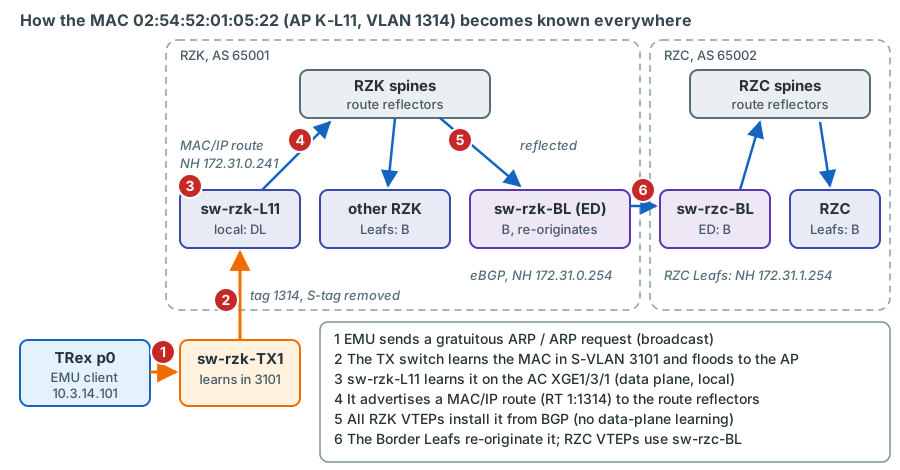
VPN-1314. Only the Leaf with the
AP learns from the data plane; all others learn from BGP EVPN.- EMU sends. The EMU client lives in the namespace {port 0 of
trex-mon(p0), S 3101, C 1314}. Its ARP plugin sends a gratuitous ARP and, for routed streams, an ARP request for the gateway 10.3.14.1 - both broadcasts (Chapter 6). - The TX switch learns and floods.
sw-rzk-TX1learns0254-5201-0522in S-VLAN 3101 on XGE1/1/21 and floods the broadcast in S-VLAN 3101 - to the AP port XGE1/1/1, which removes the S-tag (Chapter 12). - Local learning on the AC.
sw-rzk-L11receives the frame tagged 1314 on XGE1/3/1, service instance 1314 maps it into VSIVPN-1314, and the VTEP "automatically learns the source MAC addresses of frames sent from the local site" (EVPN Configuration Guide R630x, PDF p. 8). The entry is local: state Dynamic on XGE1/3/1 indisplay l2vpn mac-address vsi VPN-1314, flags DL indisplay evpn route mac. - EVPN advertisement.
sw-rzk-L11advertises a MAC/IP advertisement route for the MAC with export target 1:1314 and next hop 172.31.0.241 to both spines, which reflect it to every RZK VTEP (EVPN Configuration Guide, PDF pp. 6-7). - Remote installation. Every RZK VTEP with VSI
VPN-1314installs the MAC with flag B and the VXLAN tunnel to 172.31.0.241 as outgoing interface. Becausevxlan tunnel mac-learning disableis configured, BGP is the only way they learn it. - Re-origination to RZC.
sw-rzk-BL, the EVPN-DCI edge device, re-advertises the route tosw-rzc-BLwith itself as next hop and its router MAC;sw-rzc-BLre-advertises it to the RZC spines with next hop 172.31.1.254. RZC Leafs reach the client throughsw-rzc-BL(Chapter 10). - The broadcast travels too.
sw-rzk-L11replicates the ARP broadcast to every VTEP that announced VNI 1314 (IMET routes, EVPN Configuration Guide, PDF p. 7). Each one floods it to its local ACs: the other TRex APs, BAGG31 towards the DC firewall on both Border Leafs - and the gateway Vsi914 onsw-rzk-BL, which is expected to answer the ARP for 10.3.14.1 withec9b-8b67-37b8. ARP flood suppression is not enabled, so no VTEP answers on behalf of the gateway: the request reaches the gateway through a VXLAN tunnel, the case for which HPE's centralised-gateway guideline asks for ARP flood suppression. Whether the gateway answers must be confirmed during commissioning confirm on device (Chapter 10). - The gateway learns the client.
sw-rzk-BLthen has an ARP entry for 10.3.14.101 in VPN-CORE (display arp vpn-instance VPN-CORE, L3 IP Services Command Reference, PDF p. 33) and can route traffic back to it. It can learn clients behind VXLAN tunnels because remote ARP learning is enabled - it is the default, andvxlan tunnel arp-learning disableis not configured (EVPN Configuration Guide, PDF p. 36). The February 2025 ARP table ofsw-rzk-BLindeed contains many dynamic entries learned on Tunnel5, the VXLAN-DCI tunnel to RZC - but none on a tunnel to an RZK Leaf, which is why step 7 is a commissioning check.
The real diagnostic files show what such entries look like. In VSI 4002 on sw-rzk-BL, the ENT-FW member attached locally
(BAGG10) appears with link ID 0 and flags DL, the member attached in RZC with the VXLAN-DCI tunnel and flag B:
VSI name: VPN-4002
MAC address     Link ID/Name    Flags   Nexthop
001c-7f65-8ec8  0               DL      -
001c-7f65-ff14  Tunnel5         B       172.31.1.254
ec9b-8b67-3434  Tunnel5         BG      172.31.1.254
verified real output. A TRex client at an AP of sw-rzk-BL will look like the first line
there, and like the second line on every other VTEP.
Silent clients become flooding destinations
The local entry ages out when a client stops sending - after the MAC aging time, 300 s by default (L2 Command
Reference, PDF p. 28). The Leaf then withdraws the EVPN route, and traffic towards that client becomes unknown unicast
that is flooded to every VTEP of the VLAN and to the DC firewall. A stopped trex-mon therefore leaves no stale state
behind, but streams towards a client that does not send themselves must never be left running. In the default profile
every monitored pair is bidirectional, so every client sends.
Adding a VLAN under test
Adding a production VLAN to the monitoring is the most frequent change on the platform. The example adds VLAN 724 to AP K-L11 illustrative values - which production VLANs are monitored is still to be decided with LVR decision.
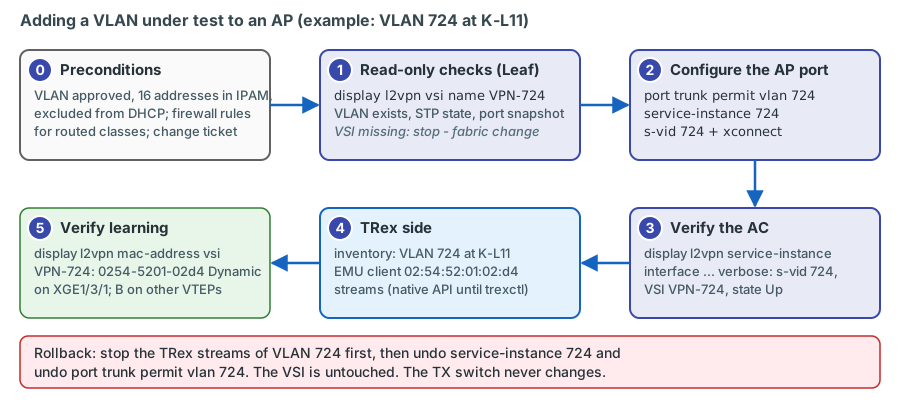
0. Preconditions (outside the switch): the VLAN is approved for monitoring; 16 TRex addresses (the monitoring pool, .101-.116) are reserved in IPAM and excluded from any DHCP scope - and if the VLAN is also used for lab tests, the lab-client range .151-.166 as well; for routed classes the firewall rules exist (Chapter 15); a change ticket exists.
1. Read-only checks on the Leaf (see the list above): display l2vpn vsi name VPN-724 verbose, display vlan 724, the
STP state (display stp brief: on sw-rzk-L11 spanning tree is globally disabled, so the port forwards in 724
immediately, as in 1314), and a configuration snapshot of the
port.
2. Configuration:
system-view
interface Ten-GigabitEthernet1/3/1
 port trunk permit vlan 724
 service-instance 724
  encapsulation s-vid 724
  xconnect vsi VPN-724
 quit
quit
save force
verified syntax (see template). port trunk permit vlan adds to the existing list, so 1314
and 1315 stay permitted.
3. Verify the AC:
display l2vpn service-instance interface Ten-GigabitEthernet1/3/1 verbose(VXLAN Command Reference, PDF pp. 15-16): service instance 724, encapsulations-vid 724, VSI nameVPN-724, state Up.display l2vpn vsi name VPN-724 verbose(PDF pp. 17-19): the ACXGE1/3/1 srv724listed and up.
4. Update the TRex side: add VLAN 724 to the AP in the inventory, create the EMU client (for K-L11 in VLAN 724:
02:54:52:01:02:d4, address = pool start of 724) and the streams. Until trexctl exists, this is done with the EMU and STL
Python APIs (Chapter 18).
5. Verify learning in the fabric once the client sends: display l2vpn mac-address vsi VPN-724 on sw-rzk-L11 shows
0254-5201-02d4 as Dynamic on XGE1/3/1; display evpn route mac vsi VPN-724 on another VTEP shows it with flag B.
The TX switch needs no change: VLAN 724 travels as the inner tag inside S-VLAN 3101.
Removing a VLAN under test
First stop the streams and remove the EMU clients of that VLAN, so that nothing keeps sending into a VLAN that is about to disappear from the port. Then:
system-view
interface Ten-GigabitEthernet1/3/1
 undo service-instance 724
 undo port trunk permit vlan 724
quit
save force
verified syntax (undo service-instance, VXLAN Command Reference, PDF p. 42; undo port
trunk permit vlan, L2 Command Reference, PDF p. 205). Check with display l2vpn service-instance interface
Ten-GigabitEthernet1/3/1 that instance 724 is gone, and update the inventory. The VSI itself is untouched.
Rolling back a whole AP
To return an AP port to its original state, stop all TRex traffic of that AP, remove every service instance and the
permit list in the reverse order of configuration, remove the description and compare the result with the snapshot taken
before the change. The interface command default restores all defaults at once, but it "might fail to restore the
default settings for some commands because of command dependencies"; check with display this afterwards (L2 Command
Reference, PDF p. 41). Unplugging the cable is also a complete rollback for production: the AP carries no production
traffic.
What can go wrong
| Problem | What TRex shows | How you see it on the switch | Fix |
|---|---|---|---|
| Service instance missing for a VLAN | No RX for that VLAN at that AP; EMU cannot resolve the gateway | display l2vpn service-instance interface ... does not list it; the TRex MAC never appears in display l2vpn mac-address vsi VPN-N |
Add the instance |
| VLAN missing from the permit list, instance present | Possibly nothing - HPE's own examples configure service instances without any permit list (EVPN Configuration Guide, PDF p. 47) | display current-configuration interface ...: permit list and instances differ |
Keep both in step (LVR convention) confirm the behaviour on the bench |
Wrong VSI in xconnect vsi (e.g. VPN-1341 instead of VPN-1314) |
Gateway unreachable, L2 streams lost - and TRex clients appear in another production VLAN | display l2vpn service-instance ... verbose shows the VSI name; the TRex MACs show up in the wrong VSI |
Correct immediately; VSI names are case-sensitive (VXLAN CR, PDF p. 55) |
| VSI does not exist on that Leaf | The mapping cannot be made | display l2vpn vsi name VPN-N returns nothing |
Choose another AP, or plan a fabric change |
| Port down | All streams of the AP lost | display interface ..., display transceiver interface ... / diagnosis interface ..., display logbuffer (NMM CR, PDF p. 423); check the TX-switch side too |
Optic, fibre, patch; HPE-coded optics on the Leaf |
| Spanning tree running on the Leaf and enabled for a VLAN under test, no edge port (not the case on the examined switches) | Loss for about 30 s after every AP link-up | display stp brief, then display stp vlan 724 interface Ten-GigabitEthernet1/3/1 brief (L2 CR, PDF p. 294) shows the port state |
stp edged-port, or accept the gap |
| Same client MAC at two APs | Loss or out-of-order on streams towards that client | display evpn route mac vsi VPN-1314 shows the entry flipping between ports and tunnels; display bgp l2vpn evpn shows a rising MAC Mobility sequence number (EVPN CR, PDF pp. 11-14) |
Correct the inventory; the deterministic MAC scheme prevents this by design |
| Gateway MAC unknown on an RZC Leaf | RZC-sourced routed streams show RX greater than TX at other RZC APs | display l2vpn mac-address vsi VPN-1314 on the RZC Leaf lacks ec9b-8b67-37b8 |
Raise with the fabric team (Chapter 10) |
| Gateway does not answer ARP requests from Leaf APs (centralised-gateway guideline, Chapter 10) | EMU clients at Leaf APs never resolve 10.3.14.1 (ARP queries without replies), clients at K-BL do; routed streams from Leaf APs cannot be built | The client MAC is learned in VSI VPN-1314 on the Leaf, so Layer 2 works; display arp vpn-instance VPN-CORE on sw-rzk-BL shows whether the gateway learned the client |
arp suppression enable in the Leaf VSIs (production change, VXLAN CR, PDF pp. 5-6), or run the routed classes from K-BL/C-BL |
The EVPN MAC mobility mechanism explains the duplicate-MAC symptom: each time the MAC is learned at the other AP, that VTEP advertises a new MAC/IP route with a higher sequence number and the old one is withdrawn (EVPN Configuration Guide, PDF p. 17). Traffic towards the MAC follows whichever AP advertised last.
Cabling and labelling rules
- Label both ends with the AP code and both ports, for example
TRX K-L11 | sw-rzk-L11 XGE1/3/1 <-> sw-rzk-TX1
  XGE1/1/1
. Use the same text in the interface descriptions on both switches and in the inventory (device port field). - Patch with care next to firewall bundles. On
sw-rzk-BLthe AP port XGE1/3/6 sits next to XGE1/3/5 "CPF-ZV01 - inside", onsw-rzc-BLXGE1/3/14 next to XGE1/3/13 "CPF-ZV02 - MAIN - DMZ". A cable moved by one port lands in a firewall bundle. - IRF member 1, SFP+ module, HPE-coded optics. The estate uses HPE 10G SR optics (
10G_BASE_SR_SFP, for example JD092B); use multimode OM3/OM4 patch cables for SR. - Verify after patching: link up at 10G on both ends (
display interface brief), the right neighbour on both ends (display lldp neighbor-information list), optical levels (display transceiver diagnosis interface ...). - Keep the order on the server side: p0-p7 name the eight X710 ports of the server; inside each TRex instance the ports
are numbered from 0 in the order of the
interfaceslist (PCI addresses) of its configuration file, so p4 is port 0 on thetrex-labconsole. Cable p0-p7 to the planned TX-switch ports and verify the mapping with the TRex port tools before the first test (Chapter 17).
Key takeaways
- An AP port on a Leaf or Border Leaf is an ordinary LVR server trunk: permit list plus one service instance per VLAN,
mapped with
xconnect vsi VPN-Ninto the existing VSI. Nothing is TRex-specific. stp edged-portis optional and has no effect on the examined switches, where spanning tree is globally disabled; it would only matter on a Leaf that runs PVST for a VLAN under test.- Four free ports were found in February 2025 (
sw-rzk-L11XGE1/3/1,SW-RZC-L21XGE1/4/4,sw-rzk-BLXGE1/3/6,sw-rzc-BLXGE1/3/14); each must be re-checked, and two of them sit next to firewall bundles. - With firewall-zone option B, the plan's default, the Border Leaf APs K-BL and C-BL also carry VLAN 4003
(
port trunk permit vlan 1314 to 1315 4003plusservice-instance 4003/xconnect vsi VPN-4003): the zone clients 10.9.90.106 and .113 join the existing transfer VSI that already reaches both ENT-FW members on BAGG10. With option A these lines are omitted. - Before mapping a VLAN, check that its VSI exists on that device - not every VSI exists on every Leaf.
- TRex clients are learned locally on the AC, advertised as EVPN MAC/IP routes, installed remotely from BGP only, and re-originated by the Border Leafs towards the other DC. Their ARP broadcasts reach every VTEP of the VLAN and the DC firewall.
- Whether the centralised gateway answers ARP requests from clients behind Leaf APs must be confirmed during commissioning; the fallbacks are ARP flood suppression in the Leaf VSIs or routed classes from K-BL/C-BL.
- Adding a VLAN under test = permit + service instance on the Leaf, inventory and profile on TRex; removing it = stop TRex
first, then
undo service-instanceandundo port trunk permit vlan. The TX switch never changes. - A wrong VSI name puts TRex clients into a foreign production VLAN: always verify the AC with
display l2vpn
  service-instance ... verbose
.
Check your understanding
1. Why does an AP port need no TRex-specific configuration on the Leaf?
Because the TX switch removes the S-tag, the Leaf receives ordinary single-tagged frames, exactly like from a server with several VLANs on a trunk. The Leaf maps each VLAN with a service instance into the existing VSI and learns the TRex MAC addresses like any host. The TRex-specific part (multiplexing, S-VLANs) lives entirely on the TX switch.
2. A colleague adds stp edged-port to the AP on sw-rzk-L11 to speed up VLAN 1314 after link-up. Does it help?
No. Spanning tree is globally disabled on sw-rzk-L11 (display stp: "Protocol status: Disabled"), and VLAN 1314
is also in its undo stp vlan ... 1082 to 1399 enable list, so the port forwards in 1314 immediately anyway.
stp edged-port only makes a difference on a Leaf that runs PVST for a VLAN under test.
3. You want to monitor VLAN 724 at AP C-L21. What do you check first, and what do you expect from the February 2025 data?
Whether VSI VPN-724 exists on SW-RZC-L21 (display l2vpn vsi name VPN-724). In February 2025 it did not: the VSI
existed on sw-rzk-L11 but not on SW-RZC-L21. Mapping the VLAN there would need a fabric change (new VSI); choose an
RZC AP whose Leaf has the VSI or plan that change separately.
4. After adding a service instance, the TRex client of K-L11 in VLAN 1314 appears in display l2vpn mac-address vsi VPN-1341. What happened and why is it urgent?
The xconnect vsi line names the wrong VSI (VPN-1341 instead of VPN-1314). Frames tagged 1314 from TRex are now
bridged into another production VLAN: TRex ARPs and test streams appear there, and the real VLAN under test is not
measured. Correct the mapping immediately and check the other VSI for leftover effects.
5. Explain how an RZC Leaf learns the MAC of a TRex client at AP K-L11.
sw-rzk-L11 learns the MAC locally on the AC and advertises a MAC/IP route to the RZK spines, which reflect it to
sw-rzk-BL. As EVPN-DCI edge device, sw-rzk-BL re-advertises it over eBGP to sw-rzc-BL with itself as next hop;
sw-rzc-BL re-advertises it to the RZC spines with next hop 172.31.1.254. The RZC Leaf installs the MAC with the tunnel to
sw-rzc-BL. No data-plane learning is involved, because remote MAC learning is disabled.
6. Why must the TRex streams of a VLAN be stopped before the VLAN is removed from the AP, and not afterwards?
If the service instance is removed while TRex keeps sending, the frames tagged with that VLAN no longer reach the VSI, while traffic from other APs towards the now-unreachable client is still sent. Once the client's MAC ages out, that traffic is unknown unicast and is flooded through the VLAN, including to the DC firewall. Stopping TRex first avoids both effects.
7. What is special about the AP K-BL compared with a Leaf AP?
sw-rzk-BL hosts the gateways Vsi914/Vsi915, so routed traffic from K-BL reaches the gateway without crossing the
fabric - a reference for the pure routing hop. It also maps 1314/1315 to BAGG31 towards the DC firewall, and its AP port
XGE1/3/6 sits next to XGE1/3/5, a member of the ENT-FW inside bundle, which calls for extra care when patching. With the
default firewall-zone option B it additionally carries VLAN 4003 into VSI VPN-4003: the zone client 10.9.90.106 and
the lab zone client of p6 live behind it.
8. Why does adding VLAN 4003 to K-BL and C-BL need no change on BAGG10, on the TX switches or towards the DC firewall?
VSI VPN-4003 already exists on both Border Leafs and is already mapped on BAGG10 (port trunk permit vlan 4000 to
4003, service-instance 4003) towards each ENT-FW member; the AP only adds one more AC to it. On the TX switches 4003
is just another inner tag inside S-VLAN 3110 or 3210, which they never interpret. And BAGG31 to the DC firewall does
not permit 4003, so the zone traffic and its broadcasts stay between the two Border Leafs, the firewall members and TRex.
References
- Running configurations and command outputs in the diagnostic files (17/18 Feb 2025):
diag_sw-rzk-L11_20250217-164257.txt,diag_SW-RZC-L21_20250218-075107.txt,diag_sw-rzk-BL_20250217-163816.txt,diag_sw-rzc-BL_20250217-163904.txt-display current-configuration(includingvsi VPN-4003and BAGG10/BAGG31 on both Border Leafs),display interface brief,display transceiver interface,display evpn route mac,display evpn auto-discovery imet,display l2vpn vsi. - Plan document v0.92 "TRex measurement platform LVR-InfoKom" (14 October 2026): sections 7.3 (Leaf attachment ports)
and 7.4 (Border Leaf attachment ports, including
service-instance 4003for firewall-zone option B). - HPE FlexFabric 5950 VXLAN Configuration Guide R630x: PDF p. 21 (Ethernet service instance restrictions, QinQ).
- HPE FlexFabric 5950 VXLAN Command Reference R630x: PDF pp. 5-6 (
arp suppression enable), pp. 15-19 (display l2vpn service-instance,display l2vpn vsi), pp. 24-25 (encapsulation), p. 42 (service-instance), pp. 54-55 (xconnect vsi), p. 13 (display l2vpn mac-address). - HPE FlexFabric 5950 EVPN Configuration Guide R630x: PDF pp. 6-8 (MAC/IP and IMET routes, MAC learning), p. 17 (MAC mobility), p. 28 (centralised gateway: ARP flood suppression on the VTEPs), p. 36 (remote MAC and ARP learning defaults), pp. 46-47 (centralised gateway example with service instances).
- HPE FlexFabric 5950 EVPN Command Reference R630x: PDF pp. 11-14 (
display bgp l2vpn evpn, MAC Mobility field), pp. 23-24 (display evpn route mac, flags). - HPE FlexFabric 5950 Layer 2 - LAN Switching Configuration Guide R630x: PDF p. 40 (link mode), p. 271 (PVST), p. 294 (edge ports).
- HPE FlexFabric 5950 Layer 2 - LAN Switching Command Reference R630x: PDF p. 28 (
mac-address timer), p. 41 (default), p. 193 (display vlan), pp. 204-206 (port link-type,port trunk permit vlan), p. 294 (display stp), p. 318 (stp edged-port), p. 340 (stp timer forward-delay, default 1500 centiseconds). - HPE FlexFabric 5950 Layer 3 - IP Services Command Reference R630x: PDF p. 33 (
display arp vpn-instance). - HPE FlexFabric 5950 Fundamentals Command Reference R630x: PDF p. 189 (
save), p. 291 (display transceiver interface). - HPE FlexFabric 5950 Network Management and Monitoring Command Reference R630x: PDF p. 423 (
display logbuffer).