17. Building the TRex server
In this chapter
You will learn
- which hardware
trex-rzk-01needs, and why the processor, the memory channels, the PCIe slots and the optics decide the quality of every latency value on the dashboards - which BIOS, kernel and operating-system settings DPDK depends on, and how to prove that each one is in effect
- how the TRex v3.08 release is installed, what the
t-rex-64wrapper does at every start, and how the X710 ports end up on thevfio-pcidriver - every key of
trex_mon.yaml,trex_lab.yamland the ASTF varianttrex_lab_astf.yaml, why trex-mon runs withc: 1, and why the two instances never get in each other's way - why the host needs an explicit protection concept: TRex stops firewalld at every start, and its control ports have no authentication
- how the systemd units start, stop and log the instances, why the lab units carry
--no-scapy-serverand never--emu, and why the client side uses Python 3.12 - how to prove the server in loopback before it is cabled to
sw-rzk-TX1, what to do when the installation fails, and how to upgrade TRex without losing more than a minute of monitoring
Prerequisites: Chapter 3 (DPDK, hugepages, cores, the TRex configuration file), Chapter 11 (the two TRex instances), Chapter 16 (what trex-mon has to carry).
The TRex server is a measuring instrument. A Leaf that forwards a frame 20 µs late is behaving normally; a test server that reports 20 µs because one of its own cores was asleep is broken - and nobody can tell the difference on a dashboard. Most steps in this chapter exist to take the server itself out of the measurement: power states with wake-up delays, memory on too few channels, NICs attached to the wrong processor, operating-system work on the cores that poll the NICs. The remaining steps make the build repeatable and supportable: one release in one place, three configuration files, three systemd units, and a self-test that tells you within minutes whether the instrument is healthy.
The chapter follows the order in which you build the server. Every stage ends with a check. Do not start the next stage until the check of the current one has passed - a problem found at stage 3 costs minutes, the same problem found during the loopback test costs an afternoon.
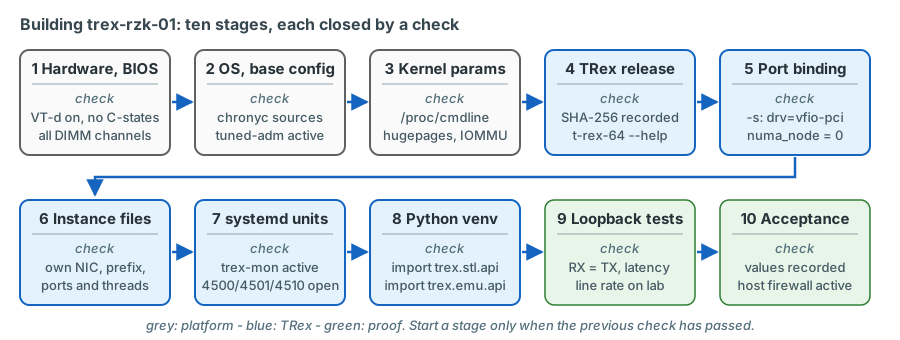
Bill of materials
Server, processor and memory
| Item | Recommendation | Why |
|---|---|---|
| Chassis | HPE ProLiant DL380 Gen11 (2U). A DL360 Gen11 only if two suitable PCIe slots on processor 1 are confirmed in the QuickSpecs | PCIe Gen5 risers, iLO 6, a free slot for a third NIC later |
| Processor | 1 × Intel Xeon Gold with 16 cores / 32 threads, for example 6426Y (2.5 GHz base) or 6444Y (3.6 GHz base) | 16 cores carry both TRex instances plus InfluxDB and Grafana; one socket means one NUMA node |
| Memory | 128 GB as 8 × 16 GB DDR5, one DIMM per channel | Every memory channel of the socket populated; 8 GB become hugepages, InfluxDB uses much of the rest as cache |
| Storage | 2 × 480 GB SSD in RAID 1 for the operating system, 2 × 1.92 TB SSD in RAID 1 for /data |
Database, TRex releases, logs and archives on their own mirrored volume |
| Data NICs | 2 × Intel X710-DA4 (4 × 10G SFP+, PCIe 3.0 x8), the HPE-branded adapter if the current QuickSpecs list one, otherwise Intel X710DA4FHBLK | The TRex manual lists the X710 as the preferred 10G NIC with per-stream statistics in hardware |
| Management | Embedded or OCP adapter under the Linux kernel driver, dedicated iLO port | SSH, Grafana, NTP and InfluxDB never share a port with test traffic |
| Cabling | 8 × passive SFP+ DAC, 1-3 m, server to sw-rzk-TX1 |
Avoids the X710 optics restriction described below |
| Power and rack | 2 × PSU, same rack as sw-rzk-TX1 |
The DAC length limits the distance |
Why one socket. A PCIe card hangs off exactly one processor. If a core of the other processor polls it, every
descriptor and every packet crosses the inter-processor link, and the latency TRex measures includes that detour. TRex
expresses the relationship explicitly - the socket value in each dual_if block of the configuration file is the NUMA
node from which the memory for that port pair is taken. With a single socket there is exactly one node, and nothing to get
wrong.
Why every memory channel. The TRex manual is blunt about it: "In all bare metal cases, it's important to have 4 DRAM channels. Fewer channels will impose a performance issue." Current Xeon processors have more channels than that; one DIMM per channel gives the full memory bandwidth and the lowest latency.
Why a high base clock. The BIOS profile recommended below switches Intel Turbo Boost off to keep the clock frequency constant. The base frequency is then the frequency the polling threads run at - which is why the 6444Y (3.6 GHz base) is the better of the two example processors if it is available.
Network adapters and the Intel optics restriction
The X710 checks every transceiver it is given and refuses modules that are not Intel-qualified. The TRex manual states
that the X710 "operates only with Intel SFP+" and lists Cisco twinax copper cables (SFP-H10GB-CU1M) as supported on
it - which is why the plan uses passive DACs and no third-party optics. A refused module shows up as a port without link;
while the port is still owned by the kernel driver, dmesg contains the i40e message "Rx/Tx is disabled on this device
because an unsupported SFP module type was detected".
The plan therefore uses passive DACs from the HPE list (HPE X240 10G SFP+ to SFP+ DAC, for example JD096C 1.2 m or JD097C 3 m). Order two Intel-coded SR modules (Intel E10GSFPSR) as a fallback; the switch side of an optical link then uses the HPE X130 10G SFP+ LC SR (JD092B) and an OM3/OM4 patch. Test one cable of each type on the bench before ordering the full quantity.
Both data NICs must be of the same type. The TRex manual says so for each configuration file ("All NICs must have the same type - do not mix different NIC types in one config file"); keeping both NICs identical also means one firmware level, one driver and one set of spares.
PCIe slots and NUMA
The HPE QuickSpecs for the DL380 Gen11 list the three slots of the primary riser (default x8 / x16 / x8) as attached to processor 1, and state that a secondary or tertiary riser requires the second processor. With one processor, both X710-DA4 therefore go into the primary riser - for example slots 1 and 3 - and slot 2 (x16) stays free. Order the server configuration accordingly; a riser on processor 2 is useless in a single-socket server.
Cabling to the TX switch
| Server port | NIC | Instance and TRex port | sw-rzk-TX1 port |
Role |
|---|---|---|---|---|
| p0 | NIC1 | trex-mon, port 0 | XGE1/1/21 | Monitoring trunk, default for the RZK attachment points, including the firewall-zone client at K-BL |
| p1 | NIC1 | trex-mon, port 1 | XGE1/1/22 | Monitoring trunk, default for the RZC attachment points, including the firewall-zone client at C-BL |
| p2, p3 | NIC1 | trex-mon, ports 2, 3 | XGE1/1/23, XGE1/1/24 | Reserve trunks |
| p4 - p7 | NIC2 | trex-lab, ports 0 - 3 (trex-lab-astf: p4 = port 0, p6 = port 1) | XGE1/1/9 - XGE1/1/12 | Lab ports, pinned by default to K-L11, K-L41, FWZ, C-L21; fixed MACs 02:54:52:f0:00:04 - :07 |
confirm on device The switch port names assume a 24-port SFP+ module in slot 1 of
sw-rzk-TX1; adjust them once the spare chassis and its modules are known (Chapter 12).
FWZ is the inventory's name for the firewall test zone (Chapter 18). With option B, which the
plan recommends and uses as the default, the zone is VLAN 4003 behind the Border Leaf attachment point K-BL: p6 sits in
K-BL's S-VLAN 3110 and TRex tags its frames with VLAN 4003. Option A - a direct firewall port on the TX switch, the
alternative - would put p6 into S-VLAN 3300 with VLAN 1420 instead decision
(Chapter 15).
Note the numbering: each TRex instance numbers its own ports from 0, in the order of the interfaces list of its
configuration file. Server port p6 is "port 2" in the trex-lab console - and "port 1" in the trex-lab-astf console,
whose configuration lists only p4 and p6 (see The instance configuration files).
The labels p0-p7 are used in this course only to talk about the server as a whole.
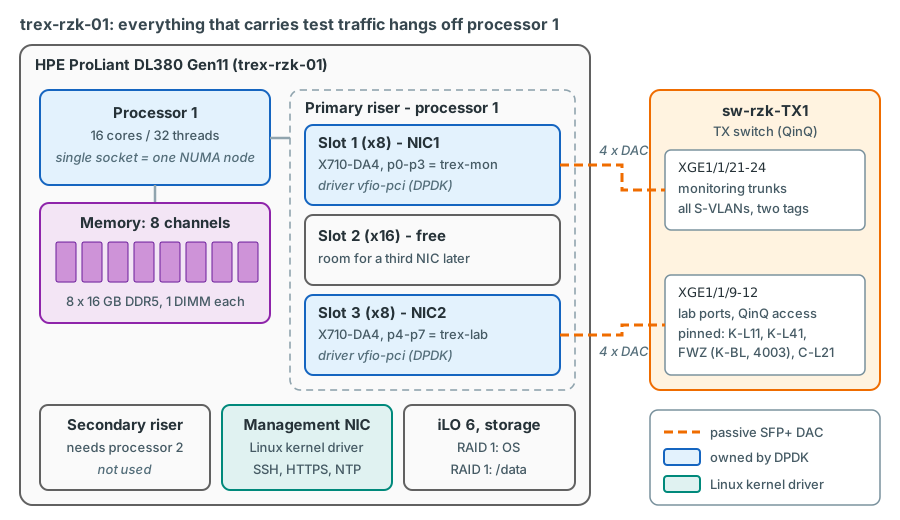
Firmware and BIOS (iLO / RBSU)
Install the current HPE Service Pack for ProLiant first, so that BIOS, iLO and NIC firmware are at a known level. Then set the BIOS options in System Utilities > System Configuration > BIOS/Platform Configuration (RBSU):
| Setting | Value | Why |
|---|---|---|
| Workload Profile | Apply Low Latency, save, reboot; then select Custom and keep it | Low Latency sets the latency-relevant options in one step; Custom keeps them and unlocks the dependent options. The server runs the Custom profile, never the predefined Low Latency profile itself |
| Virtualization Options > Intel (R) VT-d | Enabled (after switching to Custom) | The vfio-pci driver needs the IOMMU; the Low Latency profile sets VT-d - together with VT-x and SR-IOV - to Disabled |
| Minimum processor idle power core / package C-state | No C-states (set by Low Latency) | A core that has to wake up before it can poll adds delay and jitter to the measurement |
| Power Regulator, Energy/Performance Bias | Static High Performance, Max Performance (set by Low Latency) | Constant frequency, reproducible polling speed |
| Intel Turbo Boost | Disabled (set by Low Latency) | Deterministic clock; choose the processor by base frequency |
| Hyper-Threading | Enabled | The thread layout below uses both threads of the trex-lab cores |
| Sub-NUMA Clustering | Disabled | One NUMA node per socket, so socket: 0 is correct for every port pair |
| Boot mode, Secure Boot | UEFI; Secure Boot may stay enabled | vfio-pci is part of the signed RHEL kernel; the alternative igb_uio is an unsigned out-of-tree module that Secure Boot refuses |
| iLO | Dedicated port, NTP to 10.0.31.21 and 10.0.31.23, remote syslog | Out-of-band access also when the operating system hangs |
The Low Latency profile switches VT-d and VT-x off
In the HPE Gen11 dependency table for Intel Xeon processors, the Low Latency profile sets SR-IOV, VT-d and VT-x to
Disabled and Turbo Boost to Disabled. Dependent options cannot be changed while a predefined profile is active.
HPE's documented way out: apply the profile that has most of the wanted settings, then select Custom - "all the
settings for the previously selected profile are carried forward" - and change only the options that must differ. For
TRex that is Intel (R) VT-d = Enabled; the result is the Custom profile with the low-latency settings and VT-d
on. VT-x and SR-IOV serve virtual machines and virtual functions, which this bare-metal server does not use; they
may stay disabled. Without VT-d, the port binding falls back to other drivers and finally tries to compile
igb_uio, which Secure Boot refuses to load and which may not even compile on a current kernel.
Operating system installation
- Rocky Linux 9 or RHEL 9, minimal installation, language English, time zone Europe/Berlin, host name
trex-rzk-01. The TRex manual still names CentOS/RHEL 7.6 as its reference platform; the project decided on the 9.x family, and the loopback self-test at the end of this chapter is what proves the combination. - Network: configure only the management NIC (static address). Leave the eight X710 ports unconfigured; they will be taken over by DPDK.
- Users: one administrative user in group
wheel; root login over SSH disabled.
Partitioning:
| Volume | Mount point | Size | File system | Content |
|---|---|---|---|---|
| RAID 1 pair 1 | /boot/efi |
1 GB | vfat | UEFI boot loader |
| RAID 1 pair 1 | /boot |
2 GB | xfs | kernels |
| RAID 1 pair 1 | / |
120 GB | xfs | operating system, packages |
| RAID 1 pair 1 | swap | 16 GB | - | |
| RAID 1 pair 2 | /data |
whole volume | xfs | InfluxDB, TRex releases, logs, archives, test reports |
The separate /data volume has three reasons: a growing database can never fill the root file system, old TRex releases
stay available for a rollback, and the operating system can be reinstalled without touching the measurement history.
Keep NetworkManager away from the X710 ports
Until TRex binds them, the X710 ports are ordinary kernel interfaces, and NetworkManager may create automatic "Wired
connection" profiles and send DHCP requests out of them. Setting no-auto-default=* in the [main] section of a file
in /etc/NetworkManager/conf.d/ stops that. It also prevents the TRex configuration generator from flagging an X710
port as Active because it happens to have an address. confirm on the target OS
Base configuration
dnf -y update
dnf -y install chrony tuned pciutils numactl dmidecode ethtool tmux git wget tar \
    vim-enhanced python3.12 python3.12-pip nftables policycoreutils-python-utils
dnf -y install kernel-devel-$(uname -r) kernel-headers gcc make elfutils-libelf-devel   # (1)!

sed -i 's/^pool .*/server 10.0.31.21 iburst\nserver 10.0.31.23 iburst/' /etc/chrony.conf   # (2)!
systemctl enable --now chronyd
tuned-adm profile network-latency   # (3)!
- Only needed if the
igb_uiofallback ever has to be compiled. With VT-d enabled TRex usesvfio-pci, which needs no compiler. - The same NTP servers as most LVR switches (
ntp-service unicast-server 10.0.31.21/10.0.31.23in the running configurations of sw-rzk-L11, both Border Leafs and SW-RZC-L21). - The profile includes
latency-performance(C-state limit, performance governor,energy_perf_biasperformance) and adds its own settings: transparent hugepages off, automatic NUMA balancing off, and boot parameters such asskew_tick=1that appear in/proc/cmdlineafter the next reboot.
confirm on the target OS
chronyc sources -v        # both servers listed, one selected (*)
chronyc tracking          # small offset, "Leap status : Normal"
tuned-adm active          # Current active profile: network-latency
tuned-adm verify          # settings of the profile are in effect
Why NTP, if TRex does not use it for latency?
TRex timestamps latency packets with the processor's time-stamp counter (TSC) on transmit and on receive. Both ends are the same server and the same clock, so NTP corrections cannot distort a one-way latency value. NTP matters for everything around the measurement: the timestamps of the points in InfluxDB, the Grafana time axis, and the comparison with switch logs and change tickets. An outage seen at 10:14:07 in Grafana must be 10:14:07 in the switch log too.
Host protection: management access only
The server must be reachable from the management hosts only: SSH, HTTPS (Grafana) and - for a console or script on an admin workstation - the TRex control ports. InfluxDB listens on 127.0.0.1; the exporter and later the orchestrator run on the server itself. Two properties of TRex decide how this is achieved.
TRex stops firewalld at every start - and its control ports are open
The TRex start chain contains the script trex-cfg, and on Red Hat family systems it runs
systemctl stop firewalld.service before anything else - at every start, also for a harmless ./t-rex-64 --help.
A firewalld-based host firewall is therefore off after the first TRex start. At the same time the TRex control ports
bind to all addresses (tcp://*:<port>) and have no authentication: RPC 4501 (trex-mon) and 4601 (trex-lab),
publisher 4500 and 4600, EMU server 4510, Scapy server 4507. Anyone who reaches an RPC port can start traffic into
production VLANs.
Open decision: how the host is protected
The plan proposes options 1 and 2 together: firewalld disabled and removed, the native nftables service with an allow-list of management hosts, and ACLs in the management network. The LVR Linux and security teams still have to confirm the concept and supply the list of management hosts.
Option 1 - nftables service with an allow-list. firewalld is disabled and removed; the nftables service loads
a static ruleset that trex-cfg does not touch: SSH, HTTPS and the TRex control ports only from the management
hosts, nothing for InfluxDB (it listens on 127.0.0.1 only). Pro: deterministic, unaffected by TRex starts and
upgrades. Con: departs from the RHEL default tooling; the LVR Linux team maintains the ruleset by hand.
Option 2 - management-network ACLs. The management network admits only the admin hosts to the server's address and ports. Pro: independent of the server and of TRex. Con: does not filter other hosts in the same management segment; best combined with option 1.
Option 3 - keep firewalld and neutralise the stop. Remove the line from trex-cfg, or start firewalld again from
a systemd drop-in once TRex is up. Con: a modified vendor file that must be patched again after every TRex upgrade,
or a short, timing-dependent unprotected window at every start.
Whatever is chosen, the acceptance test includes "TRex restarted - host protection still active".
decision confirm on the target OS The plan's
ruleset for option 1 (plan section 8.3); the RHEL nftables service loads /etc/sysconfig/nftables.conf at boot:
systemctl disable --now firewalld
dnf -y remove firewalld                                 # (1)!
cat >/etc/sysconfig/nftables.conf <<'EOF'
flush ruleset
table inet filter {
    set mgmt_hosts {
        type ipv4_addr; flags interval
        elements = { <MGMT-PREFIX>, <JUMPHOST-IP> }
    }
    chain input {
        type filter hook input priority 0; policy drop;
        iif lo accept
        ct state established,related accept
        ct state invalid drop
        ip protocol icmp accept
        # SSH and Grafana from the management hosts only
        ip saddr @mgmt_hosts tcp dport { 22, 443 } accept
        # TRex control channels (publisher, RPC, Scapy, EMU) only from the management hosts
        ip saddr @mgmt_hosts tcp dport { 4500, 4501, 4507, 4510, 4600, 4601 } accept
        # InfluxDB listens on 127.0.0.1 only: nothing to open
        counter drop
    }
    chain forward { type filter hook forward priority 0; policy drop; }
    chain output  { type filter hook output priority 0; policy accept; }
}
EOF
systemctl enable --now nftables
nft list ruleset                                        # (2)!
- Removed, not only stopped, so that nothing can start it again by accident. The
systemctl stop firewalld.serviceintrex-cfgstill runs at every TRex start; it finds no unit and fails silently - the script discards its output and does not check its result. If the package has to stay installed,systemctl mask firewalldhas the same effect. - From outside, only the management hosts get through: SSH, HTTPS (Grafana) and the six TRex control ports, so that
a TRex console or a script on an admin workstation can reach the instances. Everything else is counted and dropped.
The local consoles, the exporter and trexctl use the loopback interface. A stricter variant leaves out the TRex-port
line: the control ports are then reachable from the server itself only, which is all the local tools need. If the
management network also uses IPv6, add
meta l4proto ipv6-icmp acceptafter the ICMP line (IPv6 neighbour discovery runs over ICMPv6); the allow-list rules above match IPv4 sources only.
Kernel parameters
grubby --update-kernel=ALL \
  --args="intel_iommu=on iommu=pt default_hugepagesz=2M hugepagesz=2M hugepages=4096"
# optional: keep the operating system off all TRex threads and their hyper-thread siblings (layout below);
# the OS, InfluxDB and Grafana then run on CPUs 0-3 and 16-19 only
grubby --update-kernel=ALL \
  --args="isolcpus=4-15,20-31 nohz_full=4-15,20-31 rcu_nocbs=4-15,20-31"
reboot
confirm on the target OS
| Parameter | What it does | Why TRex needs it |
|---|---|---|
intel_iommu=on |
Enables the VT-d IOMMU in the kernel | vfio-pci gives a user-space process DMA access to a device only through the IOMMU. The TRex binding script tries vfio-pci only if the string iommu= appears on the kernel command line |
iommu=pt |
Pass-through mode for devices owned by kernel drivers | No address translation overhead for the management NIC and the RAID controller |
default_hugepagesz=2M hugepagesz=2M hugepages=4096 |
Reserves 4096 × 2 MB = 8 GB of hugepages at boot | DPDK keeps packet buffers and rings in hugepages; reserving them at boot, before memory fragments, makes the pool deterministic |
isolcpus=, nohz_full=, rcu_nocbs= (optional) |
Keep the scheduler, the periodic timer tick and RCU callbacks off the listed CPUs | 4-15 and 20-31 are all TRex threads of the layout below plus their hyper-thread siblings; TRex pins its threads explicitly and still uses them, nothing else shares their cores |
Each instance takes at most its limit_memory (3 GB) from the 8 GB pool, so both instances fit with headroom. The TRex
wrapper also checks the hugepage pool at every start: it mounts a hugetlbfs at /mnt/huge, and on processors that
support 1 GB pages it makes sure that two 1 GB pages per NUMA node exist (otherwise 2048 pages of 2 MB). Seeing two 1 GB
pages next to the 2 MB pool after the first TRex start is therefore expected.
cat /proc/cmdline                                   # all parameters above, plus those added by tuned
grep -i huge /proc/meminfo                          # HugePages_Total: 4096, Hugepagesize: 2048 kB
dmesg | grep -i -e DMAR -e IOMMU | head             # IOMMU enabled
ls /sys/kernel/iommu_groups | wc -l                 # more than 0
lscpu -e=CPU,CORE,SOCKET,NODE                       # which CPU numbers are siblings of the same core
cat /sys/devices/system/cpu/isolated                # only if isolcpus is used: 4-15,20-31
lspci -nn -d 8086:1572                              # eight X710 functions (8086:1572 = X710 for 10GbE SFP+)
for d in $(lspci -D -n -d 8086:1572 | awk '{print $1}'); do
  echo "$d numa_node=$(cat /sys/bus/pci/devices/$d/numa_node)"   # all 0 (or -1) on one socket
done
confirm on the target OS
Installing TRex v3.08
mkdir -p /data/trex /opt/trex
cd /data/trex
curl -fO https://trex-tgn.cisco.com/trex/release/v3.08.tar.gz     # (1)!
sha256sum v3.08.tar.gz                                             # (2)!
tar xzf v3.08.tar.gz                                               # creates /data/trex/v3.08
ln -sfn /data/trex/v3.08 /opt/trex/current                         # (3)!
cd /opt/trex/current && ./t-rex-64 --help | head -5                # (4)!
- In a test on 13 Oct 2026 the certificate chain (IdenTrust / HydrantID) validated against a standard CA bundle. If it
does not on the server - typically because a proxy inspects TLS - add the proxy's CA instead of disabling certificate
checks. Without Internet access, download on an admin workstation and copy the archive with
scp. - TRex publishes no checksum next to the archives. Record the hash in the installation log and compare it on both sides
of every copy. For reference: the archive downloaded for this course on 13 Oct 2026 (284 092 535 bytes) had the SHA-256
d2ac73627906c4ce01127c1c6954464fab373463966ea9592509446e74972b5f. - Everything - systemd units, the Python path, documentation - refers to
/opt/trex/current. An upgrade or a rollback is a change of this one symbolic link. - The smoke test: the wrapper exits before touching any NIC and lets the binary print its usage text. If the binary cannot
load a shared library, it fails here (see the box below). Remember that
trex-cfgstops firewalld even for this call.
confirm on the target OS
The release directory contains everything; nothing is compiled or installed system-wide:
| Path | What it is |
|---|---|
t-rex-64, trex-cfg |
Bash wrapper and its preparation script; must run as root, from the release directory |
_t-rex-64, _t-rex-64-o |
The server binary (DPDK built in); -o is the variant for processors without AVX |
dpdk_setup_ports.py, dpdk_nic_bind.py |
Port inspection, configuration generator, driver binding, hugepage set-up |
trex-console, trex-emu, general_daemon_server |
Console, EMU server, helper that starts EMU and the Scapy server |
stl/, astf/, emu/, cfg/ |
Example traffic profiles, EMU profiles and configuration files |
automation/trex_control_plane/interactive/ |
The Python client libraries (STL, ASTF, EMU) |
external_libs/ |
Python libraries the client brings along (Scapy 2.4.3, a ctypes-based ZeroMQ binding, PyYAML ...) |
ko/ |
igb_uio kernel module: prebuilt only for two EL7 kernels, plus source code |
so/x86_64/ |
Bundled shared libraries, among them libstdc++.so.6 and libzmq.so.5 |
Known issue: the bundled libstdc++
_t-rex-64 carries the run path so:so/x86_64, relative to the working directory, so it loads the bundled
libstdc++.so.6 before the system copy. That library provides symbol versions up to GLIBCXX_3.4.24. If a system
library pulled in later needs a newer version, the start aborts with a message like
version 'GLIBCXX_3.4.30' not found. This was reported with v3.06 on a current Ubuntu; on Rocky/RHEL 9 it may not occur
at all. If it does, point TRex to the system library (which also satisfies TRex itself - the binary needs only
GLIBCXX_3.4.19):
cd /opt/trex/current/so/x86_64
mv libstdc++.so.6 libstdc++.so.6.trex
ln -s /usr/lib64/libstdc++.so.6 libstdc++.so.6
cd /opt/trex/current && ./t-rex-64 --help | head -5
The change lives in the release directory, so repeat it for every new release. confirm on the target OS
Binding the X710 ports to DPDK
Binding means detaching a PCI function from its kernel driver (i40e for the X710) and attaching it to a driver that
lets a user-space process program the NIC directly. Afterwards the port has no kernel interface any more - it disappears
from ip link - and only TRex can use it. Chapter 3 explains why DPDK works this way.
You never bind by hand in daily operation: the wrapper calls dpdk_setup_ports.py at every start and binds the ports
listed in the configuration file. The order in which it tries the drivers is worth knowing, because it explains most
binding problems:
| Order | Driver | Condition | Assessment for LVR |
|---|---|---|---|
| 1 | igb_uio |
Module already loaded, or prebuilt for the running kernel in ko/ |
Not the case on RHEL 9 (prebuilt only for EL7) |
| 2 | vfio-pci |
The kernel command line contains iommu= |
The intended driver: in-kernel, signed, works with Secure Boot, isolates the NIC's DMA through the IOMMU |
| 3 | uio_pci_generic |
Module can be loaded | Generic fallback, not the intended mode |
| 4 | igb_uio, compiled from ko/src |
Kernel headers and compiler present | Unsigned: refused under Secure Boot; may not compile on current kernels |
./dpdk_setup_ports.py -s                          # (1)!
./dpdk_setup_ports.py -t                          # table: PCI address, NUMA node, MAC, driver, Linux name
./dpdk_setup_ports.py -m                          # memory banks per NUMA node - all channels populated?
./dpdk_setup_ports.py -i                          # (2)!
./dpdk_setup_ports.py --cfg /etc/trex/trex_mon.yaml   # (3)!
./dpdk_setup_ports.py -s                          # NIC1 ports now under "DPDK-compatible driver", drv=vfio-pci
- Status: ports grouped into "Network devices using DPDK-compatible driver", "... using kernel driver" and "Other network
devices". The interface that carries your SSH session is marked
*Active*- it must never appear in a TRex configuration. - Interactive configuration generator: you pick ports, it proposes IP placeholders (assuming loopback 0↔1, 2↔3) and a
thread layout, and offers to save the result (default
/etc/trex_cfg.yaml). It does not bind anything. Use its output as a cross-check of PCI addresses and NUMA nodes; the two instance files are written by hand (next section). - Run without any other action, the script binds the ports of the given configuration file and prints "The ports are
bound/configured." Useful to test binding without starting TRex.
-Lreturns all DPDK ports to Linux, for example to read optics withethtool -mor to see i40e messages indmesg.
options verified: dpdk_setup_ports.py, TRex v3.08 confirm on the target OS
The TRex manual shows what the status output looks like (its example uses 82599 NICs and an older driver):
 Network devices using DPDK-compatible driver
 ============================================
 Network devices using kernel driver
 ===================================
 0000:03:00.0 '82599ES 10-Gigabit SFI/SFP+ Network Connection' drv= unused=ixgb
 0000:03:00.1 '82599ES 10-Gigabit SFI/SFP+ Network Connection' drv= unused=ixgb
 0000:13:00.0 '82599ES 10-Gigabit SFI/SFP+ Network Connection' drv= unused=ixgb
 0000:13:00.1 '82599ES 10-Gigabit SFI/SFP+ Network Connection' drv= unused=ixgb
 0000:02:00.0 '82545EM Gigabit Ethernet Controller (Copper)' if=eth2 drv=e1000 unused=igb_uio *Active*
 Other network devices
 =====================
 <none>
from TRex docs TRex manual, "Identify the ports"
Why each instance owns a whole NIC
Before binding, the script checks every X710 port of the instance: if another function of the same physical NIC is
still driven by the kernel i40e driver, TRex refuses to start with "i40e interface ... is under Linux and will
interfere with TRex interface ..." (TRex issue 528). If it belongs to another DPDK process, TRex only warns. The clean
design is the one used here: NIC1 with all four ports belongs to trex-mon, NIC2 with all four ports to trex-lab. That is
why trex_mon.yaml lists all four NIC1 ports, although only p0 and p1 are cabled for monitoring. The ASTF variant of
the lab instance is the one exception: it lists only p4 and p6 (next section), so its unit adds the TRex option
--unbind-unused-ports, which detaches p5 and p7 from i40e instead of exiting confirm on
the bench.
The instance configuration files
All files follow the TRex manual chapter "Platform YAML". The PCI addresses are placeholders - use the values reported by
dpdk_setup_ports.py -s, NIC1 for trex-mon and NIC2 for trex-lab.
- version: 2                                   # (1)!
  interfaces: ['31:00.0', '31:00.1', '31:00.2', '31:00.3']   # (2)!
  port_limit: 4
  prefix: mon                                  # (3)!
  zmq_pub_port: 4500                           # (4)!
  zmq_rpc_port: 4501
  limit_memory: 3072                           # (5)!
  port_bandwidth_gb: 10
  c: 1                                         # (6)!
  services_core: 4                             # (7)!
  port_info:                                   # (8)!
    - ip: 1.1.1.1
      default_gw: 1.1.1.2
    - ip: 1.1.1.2
      default_gw: 1.1.1.1
    - ip: 1.1.2.1
      default_gw: 1.1.2.2
    - ip: 1.1.2.2
      default_gw: 1.1.2.1
  platform:
    master_thread_id: 4                        # (9)!
    latency_thread_id: 5
    dual_if:                                   # (10)!
      - socket: 0
        threads: [6]
      - socket: 0
        threads: [8]
# OS, InfluxDB, Grafana and the exporter: threads 0-3 and 16-19 (isolcpus=4-15,20-31).
- Mandatory, always 2. The file is a YAML list with one element.
- Port order defines the TRex port numbers: the first entry is port 0. The ports pair up as (0,1) and (2,3).
- Passed to DPDK as
--file-prefix: separate hugepage files and runtime directory per instance. Mandatory as soon as two instances run on one server. - Publisher (statistics stream) and RPC (commands) ports. Each instance needs its own pair; the consoles and the exporter connect to them. The EMU server of trex-mon listens on 4510.
- Megabytes of hugepage memory this instance may take per NUMA node (passed to DPDK as the socket memory limit).
- Data-plane threads per port pair - and for trex-mon the setting that decides latency accuracy. In software mode TRex
chooses its queue mode from
c: withc: 1it uses ONE_QUE, in which the RX thread reads each port's receive queue directly; withcof 2 or more it uses MULTI_QUE, in which the data-plane threads read the queues and hand latency packets to the RX thread - the source says "latency won't be accurate in this mode". The startup log shows the choice (set dpdk queues mode to ONE_QUE). One thread per pair easily carries the ~20 kpps of the monitoring. TRex uses the firstcentries of eachthreadslist below; all lists must have the same length (at leastc), and no thread may appear twice or coincide with the master or latency thread - otherwise TRex refuses to start with an "ERROR ... thread" message. - CPU for the helper processes that the wrapper starts with
taskset: the EMU server and the Scapy server. The helper recommends "a free core or the TRex master thread core" - never the latency thread 5, which busy-polls whenever latency streams are active confirm on the bench. - Placeholders. In stateless mode the real addresses are the EMU clients (trex-mon) or test-specific settings (trex-lab).
The pairs are chosen so that ports 0↔1 and 2↔3 resolve each other in a loopback test. They are not completely inert:
at every start TRex sends gratuitous ARP for these IPs and up to 10 ARP requests for each
default_gw, untagged, on every port with link; in interactive mode a failed resolution is only logged. On a lab port such frames leave the pinned AP port untagged - one reason why the Leaf AP ports do not permit VLAN 1 (Chapter 13). - Control thread (RPC, statistics) and RX thread. In software mode the RX thread processes every latency packet.
- One block per port pair, in
interfacesorder.socketis the NUMA node for the pair's memory;threadsare the hardware threads that transmit for the pair. Thread 8 polls the idle reserve pair p2/p3 at 100 % - the price of owning the whole NIC.
- version: 2
  interfaces: ['98:00.0', '98:00.1', '98:00.2', '98:00.3']
  port_limit: 4
  prefix: lab
  zmq_pub_port: 4600
  zmq_rpc_port: 4601
  limit_memory: 3072
  port_bandwidth_gb: 10
  c: 4
  port_info:                                   # fixed lab-port MACs; the IPs are placeholders (see below)
    - src_mac: '02:54:52:f0:00:04'             # p4
      ip: 2.1.1.1
      default_gw: 2.1.1.2
    - src_mac: '02:54:52:f0:00:05'             # p5
      ip: 2.1.1.2
      default_gw: 2.1.1.1
    - src_mac: '02:54:52:f0:00:06'             # p6
      ip: 2.1.2.1
      default_gw: 2.1.2.2
    - src_mac: '02:54:52:f0:00:07'             # p7
      ip: 2.1.2.2
      default_gw: 2.1.2.1
  platform:
    master_thread_id: 10
    latency_thread_id: 11
    dual_if:
      - socket: 0
        threads: [12, 13, 28, 29]
      - socket: 0
        threads: [14, 15, 30, 31]
The src_mac entries are real and fixed: every lab port keeps one MAC (02:54:52:f0:00:04 for p4 ... :07 for p7)
whatever it is pinned to, because TRex answers ARP for a lab port with the port MAC and the pin changes over time. Only
the lab IP follows the pinned AP (lab pool start .151 + (AP index - 1)); the ip/default_gw values above are
placeholders, the test runner sets the real lab IP per pin with set_l3_mode. The inventory records the same MACs in
ports.lab and the validator checks that they match (Chapter 18).
For stateful tests the lab instance uses a third file. ASTF assigns fixed roles - even TRex ports are the client side,
odd ports the server side - so with trex_lab.yaml both p4 (port 0) and p6 (port 2) would be client ports. The ASTF file
therefore lists only the two ports of the test, in this order: p4 becomes port 0 (client side, pinned to K-L11) and p6
port 1 (server side, pinned to the firewall zone FWZ, that is K-BL in VLAN 4003). Unlike the placeholder addresses of
the other two files, the port_info entries of this file are real - address, default gateway and VLAN of each port,
plus the same fixed src_mac as in trex_lab.yaml - and trexctl test astf will rewrite the addresses for the chosen
pins. Addresses and the test procedure:
Chapter 7 and Chapter 22.
- version: 2
  interfaces: ['98:00.0', '98:00.2']           # p4 = port 0 (client side), p6 = port 1 (server side)
  port_limit: 2
  prefix: lab                                  # same prefix and ZMQ ports as trex-lab: only one of them runs
  zmq_pub_port: 4600
  zmq_rpc_port: 4601
  limit_memory: 3072
  port_bandwidth_gb: 10
  c: 4
  port_info:
    - src_mac: '02:54:52:f0:00:04'             # p4: fixed lab-port MAC
      ip: 10.3.14.151                          # lab address at AP K-L11 (.151 + index 1 - 1)
      default_gw: 10.3.14.1
      vlan: 1314
    - src_mac: '02:54:52:f0:00:06'             # p6: fixed lab-port MAC
      ip: 10.9.90.156                          # lab zone client: FWZ = K-BL (.151 + index 6 - 1)
      default_gw: 10.9.90.1                    # firewall VIP in the zone
      vlan: 4003                               # option B (default); option A: 10.9.90.164, vlan 1420, same src_mac
  platform:
    master_thread_id: 10
    latency_thread_id: 11
    dual_if:
      - socket: 0
        threads: [12, 13, 28, 29]
keys verified: TRex manual, "Platform YAML" illustrative values PCI addresses and thread numbers depend on the delivered server; the ASTF port addresses follow the lab addressing (lab pool .151 + (AP index - 1), with the fixed MAC of the lab port) and need their IPAM reservation. The zone values are those of firewall-zone option B, the plan's default decision.
| Key | trex-mon | trex-lab | Why they differ |
|---|---|---|---|
interfaces |
NIC1, four ports | NIC2, four ports (ASTF file: p4 and p6 only) | One whole NIC per instance; ASTF needs the client port even and the server port odd |
prefix |
mon |
lab |
Separate DPDK runtime and hugepage files |
zmq_pub_port / zmq_rpc_port |
4500 / 4501 | 4600 / 4601 | Two servers cannot listen on the same port; the wrapper refuses to start if the publisher port is taken |
c |
1 | 4 | trex-mon: software mode with c: 1 uses the ONE_QUE queue mode, the only one with accurate latency, and one thread per pair easily carries ~20 kpps. trex-lab: line rate per port; in hardware mode the X710 steers latency packets to the RX thread by a filter (DROP_QUE_FILTER), so latency stays accurate with any c |
services_core |
4 | not set (defaults to the master thread 10) | Only trex-mon runs EMU |
| Start options (systemd unit) | --software --emu |
--no-scapy-server (hardware mode), or --astf --no-scapy-server --unbind-unused-ports with trex_lab_astf.yaml |
QinQ flow statistics and 1023 flow-stat streams need software mode; line-rate tests need the X710 hardware counters; the per-host Scapy and EMU helpers belong to trex-mon |
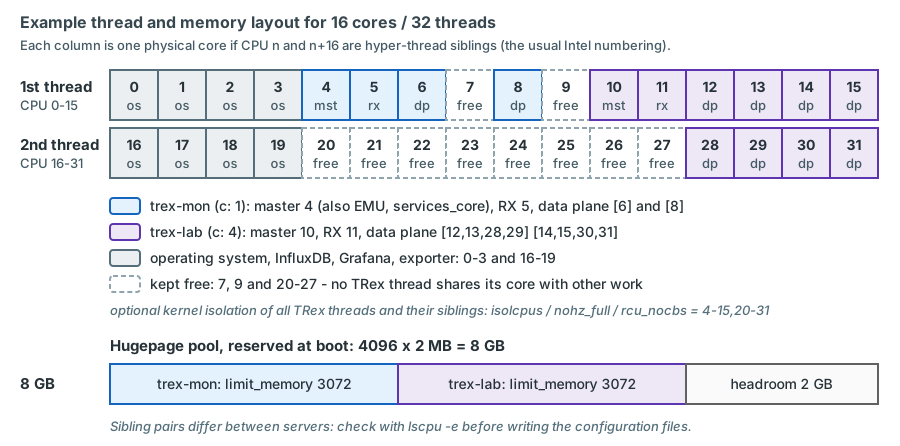
lscpu -e.In the LVR platform
On the usual Intel numbering, CPU n and n+16 are the two threads of one core. The operating system, InfluxDB
and Grafana then own cores 0-3 completely (threads 0-3 and 16-19), trex-lab owns cores 12-15 (12-15 and 28-31), and
the siblings of the other TRex threads (20, 21, 22 and 24 for trex-mon, 26 and 27 for the trex-lab master and RX
threads) stay idle, as do threads 7, 9, 23 and 25. That is the reason for isolcpus=4-15,20-31. Without the isolation
parameters, pin InfluxDB and Grafana to the same CPUs with systemd (CPUAffinity=0-3 16-19, next sections), so that
database load can never add jitter to the trex-mon RX thread.
systemd units
TRex does not install a service of its own. systemd starts the wrapper, captures its output and restarts it if it dies.
(The binary also knows --no-key, "daemon mode, don't get input from keyboard"; under systemd standard input is already
/dev/null, so the units below work without it.)
mkdir -p /etc/trex /var/log/trex

cat >/etc/systemd/system/trex-mon.service <<'EOF'
[Unit]
Description=TRex monitoring instance (stateless, software mode, EMU)
After=network-online.target
Wants=network-online.target

[Service]
Type=simple
User=root
WorkingDirectory=/opt/trex/current
ExecStart=/opt/trex/current/t-rex-64 -i --software --emu --cfg /etc/trex/trex_mon.yaml --iom 0
Restart=on-failure
RestartSec=15
LimitMEMLOCK=infinity
LimitNOFILE=65536
StandardOutput=append:/var/log/trex/trex-mon.log
StandardError=append:/var/log/trex/trex-mon.log

[Install]
WantedBy=multi-user.target
EOF

cat >/etc/systemd/system/trex-lab.service <<'EOF'
[Unit]
Description=TRex lab instance (stateless, hardware flow statistics)
After=network-online.target
Conflicts=trex-lab-astf.service

[Service]
Type=simple
User=root
WorkingDirectory=/opt/trex/current
ExecStart=/opt/trex/current/t-rex-64 -i --cfg /etc/trex/trex_lab.yaml --iom 0 --no-scapy-server
Restart=no
LimitMEMLOCK=infinity
StandardOutput=append:/var/log/trex/trex-lab.log
StandardError=append:/var/log/trex/trex-lab.log
EOF

cat >/etc/systemd/system/trex-lab-astf.service <<'EOF'
[Unit]
Description=TRex lab instance (advanced stateful, ASTF)
After=network-online.target
Conflicts=trex-lab.service

[Service]
Type=simple
User=root
WorkingDirectory=/opt/trex/current
ExecStart=/opt/trex/current/t-rex-64 -i --astf --cfg /etc/trex/trex_lab_astf.yaml --iom 0 --no-scapy-server --unbind-unused-ports
Restart=no
LimitMEMLOCK=infinity
StandardOutput=append:/var/log/trex/trex-lab.log
StandardError=append:/var/log/trex/trex-lab.log
EOF

systemctl daemon-reload
systemctl enable --now trex-mon.service       # the lab units stay disabled: started on demand
confirm on the target OS
| Directive | Why |
|---|---|
User=root |
The wrapper refuses to run otherwise ("Please run as root"): binding drivers, hugepages and raw NIC access need it |
WorkingDirectory=/opt/trex/current |
The wrapper calls ./trex-cfg before it changes into its own directory, and the binary's library path so:so/x86_64 is relative |
-i |
Interactive server: TRex waits for commands over RPC instead of running a fixed traffic file |
--software (trex-mon) |
No hardware filters: all received packets go through software. Needed for QinQ flow statistics and up to 1023 flow-stat streams on the X710 |
--emu (trex-mon only) |
Opens the packet channel to the EMU server and starts it (RPC port 4510) |
--astf (trex-lab-astf) |
Advanced stateful mode on NIC2 with its own file trex_lab_astf.yaml (p4 = port 0 client side, p6 = port 1 server side) |
--no-scapy-server (both lab units) |
The Scapy server (port 4507) is one named helper per host, like the EMU server. Every interactive stateless start restarts it unless this option is given, and the wrapper stops it again when that instance exits. Without the option, starting trex-lab would restart the helper that trex-mon started - pinned to trex-lab's master thread 10 from then on - and stopping trex-lab would leave the host without it. An ASTF start runs the helper only with --scapy-server; on trex-lab-astf the option makes the intent explicit |
--unbind-unused-ports (trex-lab-astf) |
The ASTF file uses only two of the four NIC2 ports, p4 and p6. If p5 and p7 are still on the kernel i40e driver (after a reboot, before trex-lab ever ran), TRex would refuse to start (issue 528); with this option, which exists for i40e NICs such as the X710, it detaches them from i40e instead confirm on the bench |
--iom 0 |
Silent server output (no refreshing text screen in the log); TRex also switches stdout to line buffering in this mode, so log lines appear immediately |
Restart=on-failure, RestartSec=15 |
trex-mon must come back on its own; the pause avoids a tight restart loop |
Restart=no (lab units) |
A lab instance that crashed during a test must not silently restart and continue |
Conflicts= |
trex-lab and trex-lab-astf use the same NIC, prefix and ZMQ ports. Starting one stops the other |
LimitMEMLOCK=infinity |
DMA-mapped memory is locked memory; root normally bypasses the limit, this is a safety net |
StandardOutput=append: |
One plain log file per instance under /var/log/trex/ |
Why static unit files rather than a template unit or a tmux session: each file shows the complete command line of
one operating mode; Conflicts= expresses that NIC2 has exactly one owner; the sudo rule of the orchestrator can allow
exactly these unit names (Chapter 18); and only trex-mon is enabled at boot.
Never add --emu to a lab unit - and keep --no-scapy-server
The wrapper starts the EMU server as a named helper ("Emu") without the instance prefix and restarts it if it already
runs. A second instance started with --emu would therefore restart trex-mon's EMU server and wipe all its clients -
every gateway the monitoring streams depend on would be forgotten. The Scapy server (port 4507, needed only by the TRex
GUI to build packets) is a named helper of the same kind: every interactive stateless start restarts it, and the
instance that started it stops it when it exits. The monitoring does not use it, but a lab start must never touch
what trex-mon started - hence --no-scapy-server on both lab units. With it, port 4507 stays with trex-mon whatever
happens on NIC2. The same applies to any manual start of the lab configuration, for example during an upgrade.
systemctl status trex-mon.service --no-pager
tail -n 50 /var/log/trex/trex-mon.log             # no errors from binding, hugepages or EAL
grep "queues mode" /var/log/trex/trex-mon.log     # (1)!
ss -ltnp | grep -E ':(4500|4501|4507|4510)\b'     # publisher, RPC, Scapy server, EMU RPC listening
./dpdk_setup_ports.py -s                          # (in /opt/trex/current) NIC1 under vfio-pci
nft list ruleset | head -20                       # host protection still in place (see above)
- Must show
set dpdk queues mode to ONE_QUE(printed at every start,src/trex_modes.cpp).MULTI_QUEmeans thatcis larger than 1 in software mode - the latency values of that run are not accurate.
confirm on the target OS
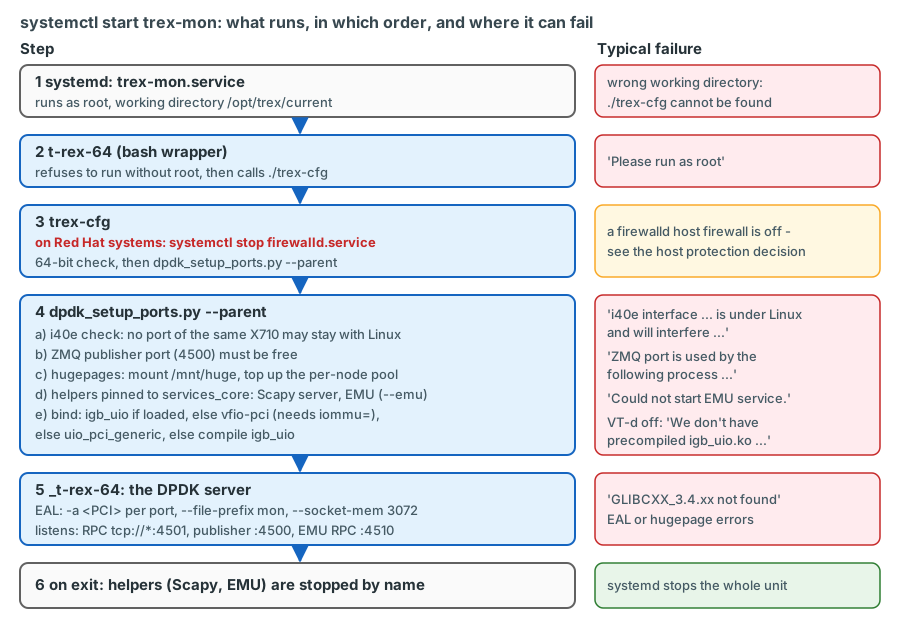
systemctl start trex-mon and a server that answers on port 4501. When the
start fails, find the failing step here and read its lines in the log.The log files grow slowly with --iom 0, but rotate them anyway. Because systemd keeps the file open, rotate with
copytruncate:
/var/log/trex/*.log {
    weekly
    rotate 8
    compress
    missingok
    notifempty
    copytruncate
}
confirm on the target OS
The Python 3.12 environment
Release notes of TRex v3.08: "Python 3.12 support (client side), older python might not work". RHEL 9 ships Python 3.9
as /usr/bin/python3; Python 3.12 is available as an additional package (python3.12, RHEL/Rocky 9.4 and later). So
every TRex client - the console, the exporter, later trexctl - runs with 3.12. The server side (dpdk_setup_ports.py,
started by the wrapper) keeps using the system Python.
python3.12 -m venv /opt/trexctl/venv
/opt/trexctl/venv/bin/pip install --upgrade pip
/opt/trexctl/venv/bin/pip install influxdb-client          # (1)!
echo "/opt/trex/current/automation/trex_control_plane/interactive" \
  > /opt/trexctl/venv/lib/python3.12/site-packages/trex.pth   # (2)!
/opt/trexctl/venv/bin/python -c \
  "from trex.stl.api import STLClient; from trex.emu.api import EMUClient; print('ok')"
- Only what TRex does not bring itself. trexctl will add its own dependencies (for example
jsonschema,rich). - A
.pthfile adds a directory tosys.pathat interpreter start. Because it points to/opt/trex/current, the client libraries always match the running server after an upgrade.
confirm on the target OS
Why not pip install scapy pyzmq pyyaml?
The TRex client is self-contained. When trex is imported, it puts its own copies of Scapy 2.4.3, a ctypes-based
ZeroMQ binding with its own libzmq, PyYAML and a few smaller libraries at the front of sys.path and evicts modules of
the same name that were loaded before. A newer Scapy installed with pip would simply be ignored by the TRex code - and
could confuse anybody reading the environment. Install only what TRex lacks.
The console is started from the release directory (it uses relative paths). Its interpreter search honours the variable
PYTHON3:
cd /opt/trex/current
PYTHON3=/usr/bin/python3.12 ./trex-console -p 4501 --async_port 4500 --emu      # trex-mon
PYTHON3=/usr/bin/python3.12 ./trex-console -p 4601 --async_port 4600            # trex-lab
PYTHON3=/usr/bin/python3.12 ./trex-console -p 4501 --async_port 4500 -r         # read-only look at trex-mon
options verified: trex_console.py, find_python.sh, TRex v3.08 confirm on the bench
Look at a running monitoring instance read-only
A normal console acquires all ports when it connects. On trex-mon that takes the ports away from the process that owns
the monitoring streams, and a careless start or reset replaces them. Use -r (read-only) whenever you only want to
look; Chapter 20 builds the daily routine on it.
Co-located services
InfluxDB OSS 2.9.x and Grafana run on the same server (installation and configuration in
Chapter 8, Chapter 9 and Chapter 19).
For the server build three rules matter: their data lives on /data; InfluxDB listens on 127.0.0.1:8086 only; and
neither of them may run on the CPUs of the TRex threads or their siblings (with isolcpus=4-15,20-31 this is automatic,
otherwise use CPUAffinity=0-3 16-19 in a drop-in for each service).
Self-tests in loopback
Before the server is cabled to sw-rzk-TX1, prove it against itself. Connect NIC1 p2↔p3 and NIC2 p6↔p7 with a DAC each.
p2/p3 are the reserve ports of trex-mon (ports 2 and 3 in its console); p6/p7 are ports 2 and 3 of trex-lab.
The shipped example profiles and the profile below send from 16.0.0.1 to 48.0.0.1, the TRex example addresses. Over a DAC between two TRex ports that is harmless - no switch or router sees the packets; on the TX switches only the real LVR addresses are used (chapter 4).
Tests 1 and 2 use example profiles shipped in stl/, test 4 additionally stl/imix.py. For exact frame sizes and for
frames tagged like the monitoring traffic, add one small profile of your own (the shipped stl/flow_stats.py derives its
padding from the length of the type name, so its --fsize does not give the exact frame size):
import argparse
from trex.stl.api import *


class SelfTest:
    """One continuous UDP stream with flow statistics, exact frame size, optional QinQ tags."""

    def get_streams(self, port_id=0, tunables=None, **kwargs):
        parser = argparse.ArgumentParser(description="fixed-size self-test stream")
        parser.add_argument("--size", type=int, default=1518, help="frame size in bytes including the 4-byte FCS")
        parser.add_argument("--svlan", type=int, default=0, help="outer tag, 0 = none")
        parser.add_argument("--cvlan", type=int, default=0, help="inner tag, 0 = none")
        parser.add_argument("--pg_id", type=int, default=2001)
        args = parser.parse_args(tunables or [])

        pkt = Ether()                                    # MACs from the port configuration
        for vid in (args.svlan, args.cvlan):
            if vid:
                pkt = pkt / Dot1Q(vlan=vid)              # Scapy sets TPID 0x8100 for both tags
        pkt = pkt / IP(src="16.0.0.1", dst="48.0.0.1") / UDP(sport=1025, dport=12)
        pad = max(0, args.size - 4 - len(pkt)) * b"x"   # the NIC appends the FCS
        return [STLStream(packet=STLPktBuilder(pkt=pkt / pad),
                          mode=STLTXCont(pps=1),         # the rate comes from -m
                          flow_stats=STLFlowStats(pg_id=args.pg_id))]


def register():
    return SelfTest()
sketch - validate on the bench TRex v3.08 passes profile tunables as an argparse list
(-t --size 1518), as the shipped examples do.
Test 1 - packet path, trex-mon. In the trex-mon console:
trex> portattr -a --prom on
trex> start -f stl/udp_1pkt_simple.py -m 1kpps -d 60 --port 2
trex> stats -p
trex> stop -a
stats -p shows the port counters: opackets of port 2 must equal ipackets of port 3, no errors. Promiscuous mode makes
the result independent of the ARP resolution between the loop ports. tui shows the same live (q leaves it).
Test 2 - latency in software mode, trex-mon. The shipped profile stl/flow_stats_latency.py sends one latency stream
at a fixed 1000 pps with pg_id 7 plus the port number - here pg_id 9:
trex> start -f stl/flow_stats_latency.py --port 2
trex> stats -s
trex> stats -l
trex> stats --lh
trex> stop -a
stats -s must show TX = RX for pg_id 9; stats -l shows average, maximum and jitter; stats --lh the histogram. This is
the server's own latency floor - DPDK, two NIC ports and a DAC, no switch - and every fabric value later contains it. It
is only meaningful in the queue mode the monitoring uses: before you record it, confirm that the trex-mon log contains
set dpdk queues mode to ONE_QUE (start-up checks above).
Test 3 - QinQ flow statistics in software mode, trex-mon. Double-tagged frames of the monitoring size (128 bytes plus FCS), tagged like a monitoring stream of AP K-L11 in VLAN 1314:
trex> start -f /opt/trexctl/profiles/raw/selftest_fixed_size.py -m 1kpps --port 2 -t --size 132 --svlan 3101 --cvlan 1314 --pg_id 1000
trex> stats -s
trex> stop -a
TX must equal RX for pg_id 1000: software mode counts flow statistics on double-tagged frames, which the X710 hardware filters cannot do.
Test 4 - line rate in hardware mode, trex-lab. systemctl start trex-lab, open the trex-lab console:
trex> start -f /opt/trexctl/profiles/raw/selftest_fixed_size.py -m 100% -d 60 --port 2 -t --size 1518
trex> stats -s
trex> stats -g
trex> start -f stl/imix.py -m 100% -d 60 --port 2
trex> stats -p
1518-byte frames at 100 % of 10 Gbit/s are about 812 700 pps. TX must equal RX for pg_id 2001, and queue_full in the
global statistics must stay 0. The IMIX run (64-, 594- and 1518-byte frames on the wire) adds small packets. Stop the lab
instance afterwards (systemctl stop trex-lab).
shipped profiles and console options verified in TRex v3.08 (stl/ examples, console parser) confirm on the bench
| Acceptance check | Instance | Expected |
|---|---|---|
| Queue mode | trex-mon | log line set dpdk queues mode to ONE_QUE (c: 1) |
| Loopback 1 kpps, 60 s | trex-mon | 0 drops, opackets port 2 = ipackets port 3 |
| Loopback latency stream | trex-mon | average below 20 µs, no sequence errors |
| QinQ flow statistics | trex-mon | TX = RX per pg_id |
| 1518 bytes at 100 %, 60 s | trex-lab | 0 drops, queue_full = 0 |
| Restart of trex-mon | both | trex-mon back within a minute; host protection still active |
Record the measured values (average and maximum latency, CPU utilisation from stats -c) in the acceptance protocol. They
are the reference when somebody later asks whether the server or the network has changed.
Installation troubleshooting
| Symptom | Cause | Action |
|---|---|---|
| "Please run as root" | Wrapper started as a normal user | Run as root (systemd unit or sudo -i) |
version 'GLIBCXX_3.4.xx' not found |
Bundled libstdc++ older than a system library needs | Symlink the system library (box above) |
| "i40e interface ... is under Linux and will interfere with TRex interface ..." | Another port of the same X710 is still on the kernel driver | List all four NIC ports in the instance file; never split a NIC between instances or with Linux. trex-lab-astf (only p4 and p6) uses --unbind-unused-ports |
| "ZMQ port is used by the following process" | The instance runs already, or two files use the same ports | systemctl status, check zmq_pub_port / zmq_rpc_port / prefix |
Binding tries igb_uio ("We don't have precompiled igb_uio.ko module for your kernel version") |
vfio-pci was not possible: VT-d off (Low Latency profile) or iommu= missing |
BIOS: VT-d on; cat /proc/cmdline; dmesg for DMAR |
| Port without link, ports missing | Non-Intel optic refused, bad DAC | ./dpdk_setup_ports.py -L, then dmesg (i40e) and ethtool -m; try a DAC from the HPE list |
| EAL / hugepage errors at start | Pool not reserved, or both limit_memory values larger than the pool |
grep -i huge /proc/meminfo; keep the sum of limit_memory below the pool |
| "Could not start EMU service." | Helper failed to start on services_core |
Check services_core, the log, and that trex-emu exists in the release |
| "Failed resolving dest MAC for default gateway: ... on port N" | The port_info placeholders are not reachable (normal outside loopback) |
Harmless in interactive mode: streams with explicit MACs do not need the port's gateway |
| Management access lost or host firewall inactive after a TRex start | A firewalld-based ruleset was in use, and trex-cfg stopped firewalld |
Use the nftables service (host protection above); never re-enable firewalld on this host |
| Port 4507 no longer listening after a lab test | The lab configuration was started without --no-scapy-server (for example by hand): that start restarted the per-host Scapy helper, and its exit stopped it |
Always start the lab configuration with --no-scapy-server. Not urgent - the monitoring does not use the helper; it returns with the next trex-mon start |
| "Mismatch between client and server versions" | Console or script uses client libraries of another release | Start clients through /opt/trex/current; restart long-running clients after an upgrade |
| Works from a root shell, fails under systemd | Wrong working directory, or a security policy denial | WorkingDirectory=; ausearch -m AVC -ts recent |
| Latency jitter, high CPU | NIC on the wrong NUMA node, C-states active, OS load on TRex threads or their siblings | numa_node, tuned-adm active, BIOS profile, sibling map (lscpu -e), isolcpus or CPUAffinity=0-3 16-19 |
trex-mon latency higher or noisier than in the acceptance test; log shows set dpdk queues mode to MULTI_QUE |
c of 2 or more in software mode: latency packets take the indirect path through the data-plane threads |
Set c: 1 in trex_mon.yaml (one thread per dual_if), restart, check for ONE_QUE |
More cases - also those that appear only once the TX switch is connected - are collected in Chapter 25.
Upgrading TRex
The symbolic link makes an upgrade a short, reversible operation:
- Read the release notes (trex-tgn.cisco.com, release notes), especially for client-side Python changes and NIC support.
- Download and unpack the new release to
/data/trex/vX.YY; record its SHA-256. Re-apply the libstdc++ workaround in the new directory if it was needed for the current release; check./t-rex-64 --helpthere. - Test the new release on NIC2 while monitoring continues on NIC1. Stop the lab units and start the new binary by
hand with the lab file and the same
--no-scapy-serveras the unit, so that the test leaves trex-mon's Scapy helper alone:cd /data/trex/vX.YY && ./t-rex-64 -i --cfg /etc/trex/trex_lab.yaml --no-scapy-server. Check that it binds and starts cleanly, that a console of the new directory connects and that the ports come up; stop it with Ctrl+C. Where a DAC loop on NIC2 is possible (a maintenance window with the lab ports unplugged fromsw-rzk-TX1, or a bench system), repeat tests 2 and 4 and compare with the recorded values. - Switch:
ln -sfn /data/trex/vX.YY /opt/trex/current, thensystemctl restart trex-mon. Monitoring pauses for about a minute; the streams have to be re-applied - the exporter's supervisor thread does this automatically once the new server accepts connections (trexctl apply -p <active profile>), or you run the orchestrator or the runner of Chapter 18 by hand. - Restart all long-running clients (exporter, runner): the client announces its API version at connect time, and a client of the old release may be rejected.
- Verify: all streams back, RX = TX, latency in the familiar range,
set dpdk queues mode to ONE_QUEin the log, host protection active (nft list ruleset). Check in the new release'strex-cfgthat it still stops only firewalld, not nftables. - Rollback: point the link back to the previous directory and restart. Keep at least the previous release on
/data.
Upgrade in a change window
Restarting trex-mon removes all monitoring streams and EMU clients for about a minute. The gateways keep the TRex client entries in their ARP caches, but Grafana shows a gap and any loss alerts must be muted for the window.
Key takeaways
- Every component of the server exists to keep the instrument out of the measurement: one socket, all memory channels populated, both NICs on processor 1, no C-states, a fixed clock, optional CPU isolation.
- On HPE Gen11, the Low Latency workload profile disables SR-IOV, VT-d and VT-x (and Turbo Boost). The server runs the
Custom profile with the low-latency settings and VT-d enabled (apply Low Latency, switch to Custom, re-enable VT-d),
or the ports cannot use
vfio-pci. - The X710 accepts Intel-coded optics only; passive DACs from the HPE list are the plan, Intel SR modules the fallback.
- The wrapper
t-rex-64does a lot at every start: it stops firewalld on Red Hat systems, checks NIC ownership and ZMQ ports, tops up hugepages, starts the EMU helper (with--emu) and the Scapy helper (unless--no-scapy-server) onservices_coreand binds the ports. - Because TRex stops firewalld and its control ports have no authentication, the host is protected explicitly: the plan proposes the nftables service with an allow-list of management hosts (firewalld removed) plus management-network ACLs, to be confirmed by LVR - checked after every TRex start and upgrade.
- One whole X710 per instance, separate
prefix, ZMQ ports,limit_memoryand threads: that is all that is needed for two TRex instances on one server. - trex-mon runs
-i --software --emuwithc: 1: only the ONE_QUE queue mode gives accurate latency in software mode - check forset dpdk queues mode to ONE_QUEin the log. OS, InfluxDB and Grafana stay on CPUs 0-3 and 16-19. - trex-lab runs hardware mode (
c: 4) or--astfwith its own file listing p4 (client, port 0) and p6 (server, port 1, pinned to the firewall zoneFWZin VLAN 4003). Both lab units carry--no-scapy-server- the ASTF unit also--unbind-unused-ports- and never--emu, so they cannot touch trex-mon's helpers;Conflicts=keeps them apart. - Clients use Python 3.12 and the client libraries of
/opt/trex/current; the TRex client brings its own Scapy and ZeroMQ. - The loopback self-test gives the server's own latency floor and line-rate capability - record it as the reference.
Check your understanding
1. After the BIOS was set to the Low Latency profile, the TRex log shows an attempt to compile igb_uio. What happened, and how do you fix it?
The Low Latency workload profile sets Intel VT-d to Disabled (together with VT-x and SR-IOV). Without an IOMMU,
vfio-pci cannot be used, so the binding script moves on to uio_pci_generic and finally tries to compile igb_uio,
which needs a compiler and fails to load under Secure Boot. Fix it in the BIOS: keep the Low Latency settings by
switching the Workload Profile to Custom, enable Intel (R) VT-d, reboot, and confirm the IOMMU with dmesg and
/sys/kernel/iommu_groups.
2. Why does trex_mon.yaml list all four ports of NIC1 when only p0 and p1 are cabled for monitoring?
Before binding, TRex checks every X710 function of the instance; if another port of the same physical NIC is still
on the kernel i40e driver, it refuses to start (issue 528). Listing all four ports gives trex-mon sole ownership of
NIC1 - p2 and p3 become reserve ports and are useful for the loopback test.
3. Somebody wants to make trex-lab more useful by adding --emu to its unit. What would happen to monitoring?
The EMU server is started as a single named helper without the instance prefix, and the wrapper restarts it if it is
already running. Starting trex-lab with --emu would restart trex-mon's EMU server: all EMU clients and their
resolved gateways disappear, and every L3 monitoring stream that depends on them breaks until the monitoring profile is
re-applied by hand - the exporter's supervisor thread does not step in, because trex-mon itself keeps running and its
stream count does not change. For the same reason both lab units carry --no-scapy-server: without it, every lab start would restart
the Scapy helper as well, and every lab stop would remove it from the host.
4. Why is NTP configured on a server whose latency measurement does not depend on it?
TRex timestamps transmit and receive with the processor's TSC on the same server, so clock corrections cannot change a one-way latency. NTP is needed for the time axis: InfluxDB points, Grafana panels and alerts must line up with switch logs, syslog and change tickets to the second.
5. After systemctl restart trex-mon you notice that SSH from outside the management prefix works. Explain.
trex-cfg, called by the wrapper at every start, runs systemctl stop firewalld.service on Red Hat family systems.
If firewalld is the host firewall, its rules are gone until it is started again - and at the same time the TRex RPC,
publisher, EMU and Scapy ports listen on all addresses without authentication. That is why the host protection must
be in place before go-live and checked after every TRex start: the plan proposes an nftables allow-list that
trex-cfg does not touch, with firewalld removed, plus management-network ACLs (the alternative is neutralising the
stop in trex-cfg).
6. Why does the venv contain influxdb-client but not scapy or pyzmq?
The TRex client brings its own Scapy 2.4.3, ZeroMQ binding (with its own libzmq) and PyYAML and puts them at the front
of sys.path when trex is imported. Copies installed with pip would be ignored by the TRex code. The venv only needs
what TRex lacks - the InfluxDB client, and later the libraries of trexctl.
7. In the loopback latency test the average is fine, but you want the value to stay comparable after a TRex upgrade. What do you do?
Record the measured average and maximum latency, the histogram, the CPU utilisation and the queue mode line of the log
(ONE_QUE) in the acceptance protocol. After the upgrade, run the same test with the new release on NIC2 before
switching the symbolic link, and compare. A change of the floor is then attributed to the server, not to the network.
If the queue mode ever reads MULTI_QUE, c is no longer 1 and the values are not comparable at all.
8. Why are the two lab units separate files with Conflicts= instead of one unit with a variable mode?
Each file shows the complete command line of one mode, Conflicts= makes systemd stop one when the other starts (both
use NIC2, the same prefix and the same ZMQ ports), and the sudo rule of the orchestrator can allow exactly these unit
names. Only trex-mon is enabled at boot; the lab units run on demand.
References
- TRex manual, sections "Hardware recommendations", "Obtaining the TRex package", "Identify the ports", "Creating minimum configuration file", "Platform YAML (--cfg argument)": https://trex-tgn.cisco.com/trex/doc/trex_manual.html
- TRex release notes 3.06-3.08: https://trex-tgn.cisco.com/trex/doc/release_notes.html
- TRex stateless guide, "Port service mode", "Tutorial: Per stream latency/jitter/packet errors": https://trex-tgn.cisco.com/trex/doc/trex_stateless.html
- TRex EMU guide, "Tutorial: Load TRex server in multi-core": https://trex-tgn.cisco.com/trex/doc/trex_emu.html
- trex-core source (master = v3.08, Nov 2025):
scripts/t-rex-64(helper clean-up on exit),scripts/trex-cfg(firewalld),scripts/dpdk_setup_ports.py(driver order, i40e check and--unbind-unused-ports, hugepages, helpers:run_servers(),should_scapy_server_run(),cleanup_servers()),scripts/general_daemon_server(taskset, helpers identified by their port),scripts/find_python.sh,src/main_dpdk.cpp(options incl.--no-scapy-serverand--unbind-unused-ports,--file-prefix,--socket-mem,--iom, start-up ARP inpre_test()),src/trex_modes.handsrc/trex_modes.cpp(queue modes ONE_QUE / MULTI_QUE / DROP_QUE_FILTER, log line "set dpdk queues mode to"),src/trex_platform.cpp(thread-list checks),src/trex_global.h(ARP request limit),src/stx/common/trex_rx_core.cpp(busy polling while latency is active),src/rpc-server/trex_rpc_req_resp_server.cppandsrc/publisher/trex_publisher.cpp(bind address),scripts/stl/flow_stats.py,flow_stats_latency.py,udp_1pkt_simple.py,imix.py: https://github.com/cisco-system-traffic-generator/trex-core - TRex v3.08 release archive (contents of
so/x86_64/,ko/,external_libs/; run path of_t-rex-64): https://trex-tgn.cisco.com/trex/release/v3.08.tar.gz - TRex GitHub issue 1183 (igb_uio compile failure, libstdc++ workaround): https://github.com/cisco-system-traffic-generator/trex-core/issues/1183
- i40e unsupported-module message: intel/ethernet-linux-i40e issue 20, https://github.com/intel/ethernet-linux-i40e/issues/20
- TRex ASTF guide, client and server port roles: https://trex-tgn.cisco.com/trex/doc/trex_astf.html
- Red Hat, Configuring firewalls and packet filters (RHEL 9), chapter "Getting started with nftables" (the
nftablesservice and/etc/sysconfig/nftables.conf) - Red Hat, Installing and using dynamic programming languages (RHEL 9), chapter "Installing and using Python" (Python 3.12 since RHEL 9.4)
- UEFI System Utilities User Guide for HPE Compute Gen11 servers, Edition 6 (December 2024): Workload Profiles, PDF p. 57; "Workload profile dependencies for Intel Xeon Scalable processors", Table 1, PDF p. 65; "Changing dependent options after applying a profile", PDF p. 70; "Enabling or disabling Intel VT-d", PDF p. 107 (HPE document sd00003788en_us)
- HPE ProLiant DL380 Gen11 QuickSpecs (a50004307enw), riser and slot tables: https://www.hpe.com/psnow/doc/a50004307enw.pdf
- tuned profiles
network-latencyandlatency-performance: https://github.com/redhat-performance/tuned/tree/master/profiles - LVR running configurations (NTP servers):
sw-rzk-L11.cfg,sw-rzk-BL.cfg,sw-rzc-BL.cfg,SW-RZC-L21.cfg(ntp-service unicast-server 10.0.31.21/10.0.31.23) - Plan document v0.92 (14 October 2026), sections 4.6.3 (lab client identity), 4.8 (security and operational impact), 5.1 (bill of materials) and 8 (server installation: 8.1 BIOS, 8.3 base configuration and nftables, 8.5 configuration files, 8.6 systemd units)