12. QinQ on the TX switches
In this chapter
You will learn
- how Comware QinQ works: S-VLAN and C-VLAN, what a QinQ-enabled port does on ingress and egress, link types, TPID, transparent VLANs, and why plain QinQ is enough here (no VLAN mapping)
- why the TX switches use QinQ, and why every attachment point must be its own S-VLAN
- how MAC learning and flooding work per S-VLAN, and what that means for the monitoring and lab ports
- why spanning tree is disabled, and how BPDUs and LLDP behave on the TX switches
- the complete configuration of
sw-rzk-TX1andsw-rzc-TX1, block by block, including re-pinning a lab port and what is already pre-provisioned for firewall-zone option A - the unknown-unicast flooding risk from lab ports and how it is contained
- how to verify a TX switch and recognise the common mistakes
Prerequisites: Chapter 10 (access model, VLANs 1314/1315) and Chapter 11 (port allocation). Chapter 6 helps for the TRex side of double-tagged frames.
The TX switches are the simplest devices of the platform - a dozen VLANs, a handful of commands per port, no routing - and at the same time the only place where a typing error can create a Layer 2 loop through the production fabric. This chapter explains the one Comware mechanism they rely on, QinQ, until you can predict for every frame what the switch does with it. Then it walks through the complete configuration of both TX switches, line by line.
All QinQ commands in this chapter are documented for the 5950 R630x in the Layer 2 - LAN Switching Configuration Guide (PDF pp. 219-224) and Command Reference (PDF pp. 277-281).
QinQ on Comware
The terms
The HPE documentation uses two terms (Layer 2 Configuration Guide R630x, PDF p. 219):
- CVLAN (customer VLAN, inner VLAN) - the VLAN the customer uses. At LVR this is the production VLAN under test, for example 1314.
- SVLAN (service VLAN, outer VLAN) - the VLAN the provider network uses to carry customer traffic. At LVR this is the VLAN that identifies the attachment point on the TX switch, for example 3101 for K-L11.
"The devices in the service provider network forward a tagged frame according to its SVLAN tag only. The CVLAN tag is transmitted as part of the frame's payload." That sentence is the whole design in a nutshell: the TX switch is the "provider network", and it never looks at the production VLAN.
What a QinQ-enabled port does
QinQ is enabled per port. Four rules describe its behaviour completely:
- Ingress: push the PVID. "A QinQ-enabled port tags all incoming frames (tagged or untagged) with the PVID tag." A single-tagged frame becomes double-tagged; an untagged frame gets one tag, the PVID (L2 Configuration Guide, PDF p. 220). The switch does not check the existing tag - any inner VLAN passes.
- Forwarding: by the outer tag only. From then on the frame belongs to the PVID VLAN (the S-VLAN). MAC learning, lookup and flooding all happen in the S-VLAN.
- Egress: normal port rules. On egress, the port's link type decides: an access port removes the tag of its VLAN, a trunk keeps the tag of every permitted VLAN except its PVID (L2 Configuration Guide, PDF pp. 140-141). A QinQ access port therefore pops the S-tag on the way out - the frame leaves exactly as it came in.
- Any link type. "The link type of a QinQ-enabled port can be access, hybrid, or trunk. The QinQ tagging behaviors are
the same across these types of ports." (PDF p. 220.) The procedure is: set the link type, make sure the port passes its
PVID, then
qinq enable(PDF pp. 221-222; L2 Command Reference, PDF p. 278).
| Port on the TX switch | Frame arriving from outside | Frame leaving the switch |
|---|---|---|
| QinQ access port, PVID 3101 (AP or lab port) | any frame gets S-tag 3101 pushed | S-tag 3101 removed - the frame leaves as it came in |
| Trunk without QinQ, permits the S-VLANs (TRex monitoring port, inter-DC trunk) | classified by its outer tag; dropped if that VLAN is not permitted | keeps the S-tag (it is never the PVID) |
TPID, transparent VLANs, priority, MTU
- TPID. Both tags use 0x8100 by default:
qinq ethernet-type customer-tag(system view) sets the TPID that a QinQ port uses to recognise an incoming tagged frame,qinq ethernet-type service-tag(interface view) the TPID of the S-tag (L2 Configuration Guide, PDF pp. 223-224; L2 Command Reference, PDF pp. 278-280). TRex sends 0x8100 for both tags and the Leafs send 0x8100, so nothing is configured. - Transparent VLANs.
qinq transparent-vlanexcludes a list of VLANs from the push on a hybrid or trunk port (PDF p. 222; L2 Command Reference, PDF p. 281). Not used at LVR: no VLAN must ever bypass the S-VLAN isolation. - 802.1p. The priority of the pushed S-tag is copied from the C-tag only when the port trusts 802.1p (
qos trust
  dot1p
); otherwise it is the port priority, 0 by default (PDF p. 224). Irrelevant here: the TX switches never congest, and TRex measures DSCP, which the switch does not touch. - MTU. "The inner 802.1Q tag of QinQ frames is treated as part of the payload ... set the MTU to a minimum of 1504 bytes
for each port on their forwarding path" (PDF p. 221). The 5950 accepts frames up to 9416 bytes by default (
jumboframe
  enable
, PDF p. 41), so no MTU change is needed on the TX switches. A DWDM system on the TX-to-TX path is a different matter (see Common mistakes).
Why plain QinQ and not VLAN mapping
Comware offers finer tools: one-to-two and two-to-two VLAN mappings and the QoS nest action (PDF p. 220). LVR needs none
of them. Every frame of an AP gets the same S-VLAN, whatever its production VLAN - exactly what plain QinQ does with one
command and no per-VLAN state. Fewer features mean fewer ways to get it wrong. (If several are configured, QoS beats VLAN
mapping, VLAN mapping beats QinQ, and QinQ excludes two-to-two mappings - PDF p. 221.)
QinQ belongs on the TX switch only
The VXLAN configuration guide is explicit: "Ethernet service instances and QinQ cannot work together. Do not configure both features on an interface" (VXLAN Configuration Guide R630x, PDF p. 21). QinQ lives on the TX switches, Ethernet service instances on the Leafs. Never the two on one port.
Why QinQ at LVR
Three goals, one mechanism:
- Multiplexing. Two active TRex ports reach thirteen APs: the outer tag selects the AP, the inner tag the VLAN.
- Isolation. Each AP is an isolated bridge domain: {AP port, TRex trunk ports, the lab ports pinned to that AP}.
- No production VLANs on the TX switches. The production VLAN ID is payload for the TX switch, so adding a VLAN under test changes only the Leaf port and the TRex profile.
Watch the animation below. Follow one monitoring frame from TRex port p0 to AP K-L11 and back. Note in particular step 3
(the trunk port looks only at the outer tag), step 4 (the access port removes S 3101, so the Leaf sees a normal frame in
VLAN 1314), step 5 (the Leaf's service instance maps the frame into VSI VPN-1314, and the frame crosses the fabric
untagged inside VXLAN) and steps 6-8 (the Leaf sends the reply single-tagged, qinq enable pushes S 3101 onto it, and TRex
knows from the two tags which AP and which VLAN it came from).
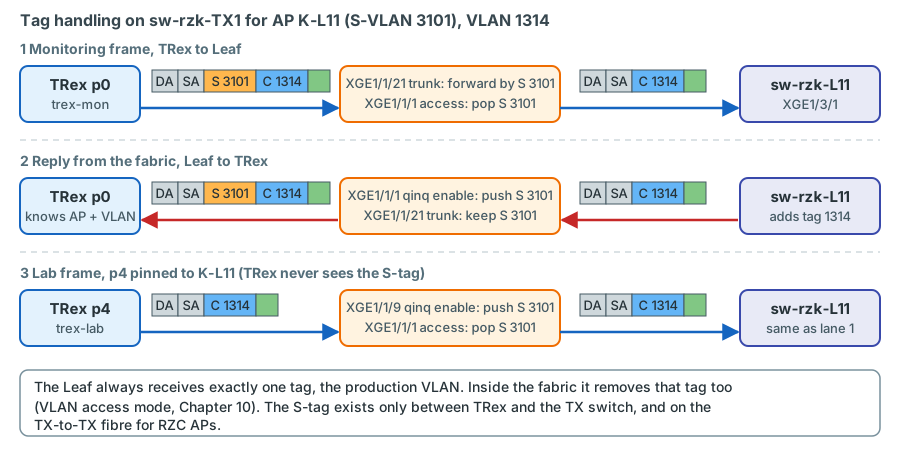
The S-VLAN plan
| AP | DC | Device and port | TX switch port | S-VLAN | AP index |
|---|---|---|---|---|---|
| K-L11 | RZK | sw-rzk-L11 XGE1/3/1 |
sw-rzk-TX1 XGE1/1/1 |
3101 | 1 |
| K-L12 | RZK | sw-rzk-L12 (TBD) |
XGE1/1/2 | 3102 | 2 |
| K-L21 | RZK | sw-rzk-L21 (TBD) |
XGE1/1/3 | 3103 | 3 |
| K-L31 | RZK | sw-rzk-L31 (TBD) |
XGE1/1/4 | 3104 | 4 |
| K-L41 | RZK | sw-rzk-L41 (TBD) |
XGE1/1/5 | 3105 | 5 |
| K-BL | RZK | sw-rzk-BL XGE1/3/6 |
XGE1/1/6 | 3110 | 6 |
| C-L11 | RZC | sw-rzc-L11 (TBD) |
sw-rzc-TX1 XGE1/1/1 |
3201 | 7 |
| C-L12 | RZC | sw-rzc-L12 (TBD) |
XGE1/1/2 | 3202 | 8 |
| C-L13 | RZC | sw-rzc-L13 (TBD) |
XGE1/1/3 | 3203 | 9 |
| C-L21 | RZC | SW-RZC-L21 XGE1/4/4 |
XGE1/1/4 | 3204 | 10 |
| C-L22 | RZC | sw-rzc-L22 (TBD) |
XGE1/1/5 | 3205 | 11 |
| C-L23 | RZC | sw-rzc-L23 (TBD) |
XGE1/1/6 | 3206 | 12 |
| C-BL | RZC | sw-rzc-BL XGE1/3/14 |
XGE1/1/7 | 3210 | 13 |
| FW (option A only) | both | firewall zone: a new port on CPF-ZV01 / CPF-ZV02 | sw-rzk-TX1 XGE1/1/7 + sw-rzc-TX1 XGE1/1/8 (configured, shut down) |
3300 | 14 |
The plan's default, firewall-zone option B, needs no row of its own: the zone is the existing transfer VSI 4003, and TRex
reaches it through K-BL and C-BL - VLAN 4003 is one more inner tag in S-VLANs 3110 and 3210
(Chapter 13). sw-rzk-TX1 XGE1/1/7 and sw-rzc-TX1 XGE1/1/8 are nevertheless configured as
the firewall ports of option A (access, PVID 3300, QinQ) and kept shut down, and S-VLAN 3300 exists on both switches and
is permitted on all trunks without an active member port - so option A later needs only the firewall cabling and
undo shutdown decision.
The S-VLAN IDs never leave the TX switches - the AP ports remove them - so technically they could collide with production VLAN IDs. They were nevertheless chosen from a range that no LVR switch uses (2907-3999 is unused in all nine configurations; 3000-3099 is reserved on the Border Leafs), so that a capture or a log line is never ambiguous. 31xx means RZK, 32xx RZC; 3300 is the firewall-zone S-VLAN of option A, defined on both TX switches but without an active member port with option B.
Why every AP must be its own S-VLAN
Imagine two AP ports, XGE1/1/1 (K-L11) and XGE1/1/2 (K-L12), accidentally in the same S-VLAN. For the TX switch they are
now two ports of one bridge. A broadcast in VLAN 1314 - a TRex ARP, or any production ARP in 1314 - leaves sw-rzk-L11 on
its AP port, crosses the TX switch, enters sw-rzk-L12 on its AP port into VSI VPN-1314, is flooded through the fabric
by VXLAN back to sw-rzk-L11, leaves its AP port again, and so on. VSI VPN-1314 already connects the two Leafs; the TX
switch has added a second, parallel path: a loop. STP is disabled for 1314 on every examined switch, so nothing blocks it.
The result is a broadcast storm in the whole VSI - every Leaf with VLAN 1314, both Border Leafs and, through BAGG31, the DC
firewall - plus MAC addresses flapping between the two APs in EVPN.
The animation plays the same thought experiment with the other way to make this mistake: the TX switch carrying the
production VLAN itself. In steps 1-6 (marked WRONG design) both AP ports carry VLAN 1314 as an ordinary VLAN, as on a
normal access switch. Follow one ARP broadcast from a server: sw-rzk-L11 floods it to its AP port (step 2), the TX
switch floods it to the AP port of sw-rzk-L12 (step 3), sw-rzk-L12 floods it into VSI VPN-1314, and VXLAN carries it
straight back to sw-rzk-L11 (step 4), where the cycle starts again and grows into a broadcast storm (step 5). Step 6
draws the conclusion - the TX switch never knows a production VLAN - and notes that two APs into the same Leaf pair, or a
lab port that bridges two APs, would build the same loop. Steps 7-8 show the actual design: XGE1/1/1 is access 3101 with
qinq enable, XGE1/1/2 access 3102 with qinq enable. The broadcast enters the TX switch in S-VLAN 3101, whose only
other members are the TRex trunk ports, so it ends at TRex and can never reach AP K-L12 in S-VLAN 3102.
With one S-VLAN per AP, the only other members of each S-VLAN are TRex ports. TRex ports are DPDK ports: they never forward a received frame to another port. No path between two APs can exist, whatever the Leafs do. With the plan's default firewall-zone option B this holds for every S-VLAN on both TX switches, without exception (S-VLAN 3300 exists, but has no active member port).
Only with option A: S-VLAN 3300
If firewall-zone option A were chosen, the two Enterprise-firewall members CPF-ZV01 and CPF-ZV02 would share S-VLAN
3300, stretched over the TX-to-TX fibre, because both members of one cluster must see the same zone segment. That is
two AP ports in one S-VLAN - and it is safe only because the zone VLAN of option A (1420) exists on the firewall
interfaces alone, never in the fabric, and a routed firewall does not bridge between its interfaces. Never map S-VLAN
3300 or VLAN 1420 to a Leaf port. Option B needs no such exception: its zone VLAN 4003 reaches TRex through the
ordinary, single-AP S-VLANs of K-BL and C-BL. S-VLAN 3300 is defined and permitted on the trunks of both switches all
the same, but its only access members, XGE1/1/7 on sw-rzk-TX1 and XGE1/1/8 on sw-rzc-TX1, stay shut down.
decision (Chapter 15)
MAC learning and flooding per S-VLAN
Comware keeps one MAC table per VLAN. On the TX switch that means one independent MAC table per AP. Take S-VLAN 3101
on sw-rzk-TX1:
| Member port | Role | Tagging | What the switch learns there |
|---|---|---|---|
| XGE1/1/1 | AP K-L11 | untagged (S-tag removed) | Everything that arrives from the Leaf in any VLAN of the AP: the gateway MAC ec9b-8b67-37b8, remote TRex clients, and production hosts that send broadcasts in 1314/1315 |
| XGE1/1/21, XGE1/1/22 | TRex p0, p1 | tagged | The TRex clients emulated behind that port, e.g. 0254-5201-0522 (K-L11, VLAN 1314) on p0 |
| XGE1/1/23, XGE1/1/24 | TRex p2, p3 | tagged | nothing while shut down |
| XGE1/1/9 | TRex p4 (lab) | untagged | p4's fixed port MAC 0254-52f0-0004, but only while p4 is pinned to K-L11 |
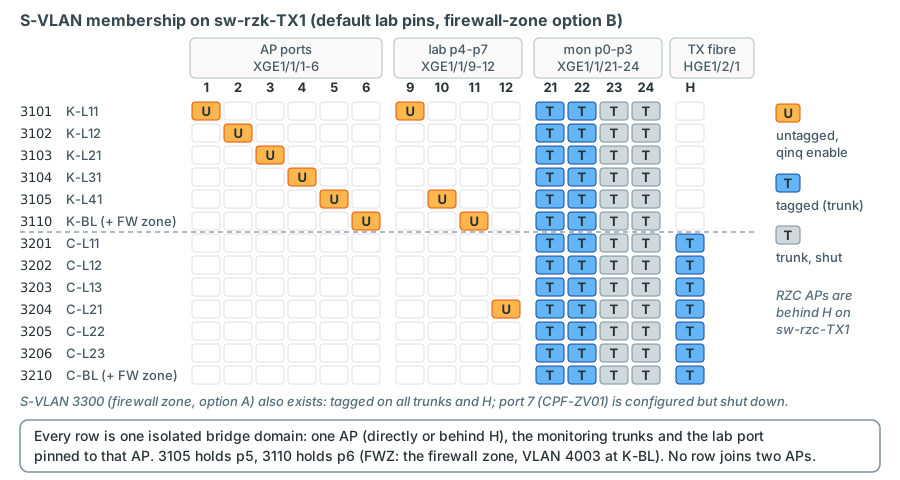
sw-rzk-TX1. Read a row as one isolated bridge domain: exactly one AP port
(or, for RZC APs, the inter-DC trunk that leads to it), the monitoring trunks, and the lab port pinned to that AP - p4
in 3101, p5 in 3105 (K-L41), p6 (FWZ, the firewall zone at K-BL) in 3110, p7 in 3204.Three consequences matter in practice:
- Unknown destinations are flooded to every TRex port of the S-VLAN. If a frame from the fabric is addressed to a TRex
client that the TX switch has not learned (for example after the client was silent for longer than the MAC aging time of
300 s, L2 Command Reference, PDF p. 28), the switch floods it to p0, p1 and every lab port pinned to that AP. TRex
receives the same frame on several ports and counts it more than once. In normal operation this does not happen,
because every client transmits continuously (each monitored pair is bidirectional, and the EMU ARP plugin also sends
gratuitous ARPs - counter
pktTxGArpin the EMU documentation) - but remember it whenever RX is larger than TX. - Production broadcasts reach the TRex ports. The AP carries production VLANs, so ARP requests of production hosts in
1314/1315 (and later in the production VLANs under test) arrive at the AP and are flooded to the TRex trunks. TRex
ignores them, but they are part of the receive load of
trex-mon, which runs in software mode. - The same MAC in two S-VLANs is no conflict for the TX switch - but it would be in the fabric. The deterministic addressing (AP index in every monitoring client MAC, one fixed MAC per lab port) prevents duplicates by construction.
On the TRex side the double-tagged frames arrive at a port whose own MAC is not their destination. That is why the
trex-mon ports run in promiscuous mode, and why EMU namespaces are keyed by port, outer tag and inner tag
(Chapter 6).
Spanning tree, BPDUs and LLDP
STP is switched off explicitly
verified L2 Command Reference R630x, PDF p. 321; L2 Configuration Guide, PDF p. 306.
The default depends on how the device starts: "When the device starts up with initial settings, the spanning tree feature
is globally disabled. When the device starts up with factory defaults, the spanning tree feature is globally enabled."
(L2 Configuration Guide, PDF p. 306, and with the procedure for stp global enable on pp. 300-301; L2 Command
Reference, PDF p. 321.) A 5950 without a startup configuration file - exactly the state after a factory reset - starts
with factory defaults (Fundamentals Configuration Guide R630x, PDF p. 103). A freshly reset spare switch therefore
runs STP. Always configure undo stp global enable explicitly and verify it with display stp (L2 Command Reference,
PDF p. 294).
Why no STP at all? Inside a TX switch no loop is possible (one AP per S-VLAN, TRex never forwards), so STP has nothing to protect. It could only do harm: a TX switch running STP puts its AP and TRex ports through the discarding and learning states after every link-up (about 30 s without edge configuration), flushes MAC tables on topology changes, and would interact with any spanning tree it meets - the examined Leafs have STP globally disabled, other devices are not known. The TX switch must stay invisible to spanning tree.
BPDUs from the Leafs
The examined Leafs and Border Leafs have spanning tree globally disabled (display stp: "Protocol status: Disabled";
the stp mode pvst lines in their configurations are inactive - Chapter 10), so they send no BPDUs of
their own. Should a Leaf without diag files run PVST, or should a BPDU arrive from elsewhere in a VLAN, the TX switch
(STP disabled as well) treats it as an ordinary frame: the AP port pushes the S-tag and floods it inside that one
S-VLAN - to the TRex ports only. (The configuration guide describes the same behaviour for devices with STP disabled:
such a device "transparently transmits BPDUs", PDF p. 306.) TRex discards them. A BPDU can never reach another Leaf.
confirm on the bench
If you prefer the BPDUs not to reach TRex at all, add bpdu-drop any to the AP ports: "A BPDU drop-enabled port does not
receive any BPDUs" (L2 Configuration Guide, PDF p. 311; L2 Command Reference, PDF pp. 292-293; Layer 2 Ethernet
interface view only). This is optional and should be decided after the bench test.
LLDP
lldp global enable is part of the base configuration (with factory defaults LLDP is already enabled, with initial
settings it is not - L2 Configuration Guide, PDF p. 334). LLDP is link-local: the TX switch and the Leaf see each other
on the AP port, which makes LLDP the quickest cabling check (display lldp neighbor-information list, L2 Command
Reference, PDF p. 355). The TRex ports send no LLDP - they are DPDK ports - so TRex never appears as a neighbour.
confirm on device that LLDP neighbours are shown on the QinQ-enabled AP ports.
The configuration of sw-rzk-TX1
The configuration below assumes a 4-slot 5950 with a 24 x SFP+ module (JH180A) in slot 1 and a QSFP28 module in slot 2,
as on the LVR Leafs. Interface names depend on the spare chassis: check display device (Fundamentals Command
Reference, PDF p. 272) and display interface brief first and adapt.
confirm on device: port numbers
It is the configuration of the plan's default, firewall-zone option B. The S-VLAN and the firewall ports that option A
would need are nevertheless pre-provisioned - configured, but shut down - so that the decision can be taken later without
a second configuration round; what option A would still need is collected in one marked block after the sw-rzc-TX1
configuration (If firewall-zone option A is chosen).
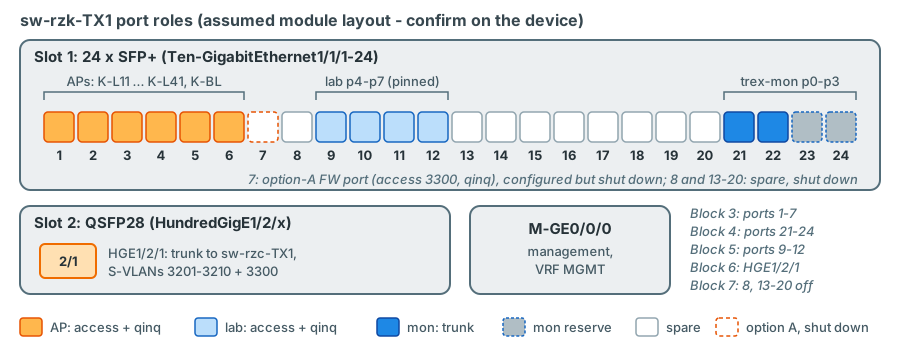
sw-rzk-TX1. The blocks of the configuration follow these groups one by one;
port 7 is configured as the firewall port of option A but stays shut down unless option A is chosen.Preparation
- Factory-reset the spare unit:
restore factory-defaultin user view, thenrebootand answer N to saving the running configuration (Fundamentals Configuration Guide, PDF p. 194). The switch then starts with factory defaults - STP and LLDP on. - Bring it to the Border Leafs' release R6301P03 with the HPE release notes
HPE5950CMW710R6301P03RN.pdfconfirm file names on the flash. - Confirm the module layout and interface names; connect the management port to the switch management network.
Block 1 - system and management
sysname sw-rzk-TX1
clock timezone COLOGNE add 01:00:00
clock summer-time MEST 02:00:00 March last Sunday 02:00:00 October last Sunday 01:00:00
clock protocol ntp
#
ip vpn-instance MGMT
 route-distinguisher 10:1
 description MGMT/Monitoring
 vpn-target 10:1 import-extcommunity
 vpn-target 10:1 export-extcommunity
#
interface M-GigabitEthernet0/0/0
 description mgmt_oobm
 ip binding vpn-instance MGMT
 ip address <MGMT-IP-TX-K> <MASK>
#
 ip route-static vpn-instance MGMT 0.0.0.0 0 <MGMT-GW> description mgmt-DEFAULT-GATEWAY
 ntp-service enable
 ntp-service source M-GigabitEthernet0/0/0
 ntp-service unicast-server 10.0.31.21 vpn-instance MGMT
 ntp-service unicast-server 10.0.31.23 vpn-instance MGMT
 info-center loghost vpn-instance MGMT 10.0.61.10
 ssh server enable
 lldp global enable
verified - the commands follow the LVR running configurations: the clock settings and the MGMT
VRF as on the Border Leafs, ip binding vpn-instance MGMT on the management port as on sw-rzk-BL and sw-rzc-BL, the
management default route and NTP in VPN MGMT as on sw-rzk-L11 and sw-rzc-BL, SSH and LLDP as on every LVR switch. The
LVR switches send syslog from the public instance (info-center loghost 10.0.61.10). The TX switch has its only IP
address in VPN MGMT, so it uses the documented VPN form info-center loghost [ vpn-instance vpn-instance-name ]
{ hostname | ipv4-address | ... } (Network Management and Monitoring Command Reference R630x, PDF p. 440)
confirm on device that 10.0.61.10 is reachable from VPN MGMT. Descriptions, <...>
placeholders and the static management address are new values: the LVR switches obtain theirs with
ip address dhcp-alloc - use whatever the management-network team prefers.
| Line | What it does | Why |
|---|---|---|
sysname, clock ... |
Name, time zone and summer time as on the production switches | Log lines and Grafana annotations must correlate with the fabric's logs |
ip vpn-instance MGMT, interface M-GigabitEthernet0/0/0, management route |
Out-of-band management in the MGMT VRF, LVR pattern | The TX switch has no in-band IP at all - its data ports carry only test frames |
ntp-service ..., info-center loghost ... |
NTP from 10.0.31.21/.23, syslog to 10.0.61.10 | Correct time stamps; AP up/down events are evidence during incidents |
ssh server enable, lldp global enable |
Management access; LLDP for cabling checks | - |
SNMPv3, AAA (HWTACACS) and local users follow the LVR standard of an existing Leaf; copy them from there (they contain secrets and are not reproduced here).
Block 2 - no spanning tree, the S-VLANs
 undo stp global enable
#
 vlan 3101 to 3110
 vlan 3201 to 3210
#
vlan 3101
 name TRX-AP-K-L11
vlan 3102
 name TRX-AP-K-L12
vlan 3103
 name TRX-AP-K-L21
vlan 3104
 name TRX-AP-K-L31
vlan 3105
 name TRX-AP-K-L41
vlan 3110
 name TRX-AP-K-BL
vlan 3201
 name TRX-AP-C-L11
vlan 3202
 name TRX-AP-C-L12
vlan 3203
 name TRX-AP-C-L13
vlan 3204
 name TRX-AP-C-L21
vlan 3205
 name TRX-AP-C-L22
vlan 3206
 name TRX-AP-C-L23
vlan 3210
 name TRX-AP-C-BL
vlan 3300
 name TRX-AP-FW-ZONE-stretched
verified undo stp global enable (L2 Command Reference, PDF p. 321), vlan batch
creation (PDF pp. 199-200), name (1-32 characters, PDF p. 197). S-VLAN 3300 is the firewall-zone S-VLAN of option A and
is created on both TX switches anyway: with option B the zone is VLAN 4003, an inner tag in S-VLANs 3110 and 3210, and
3300 has no active member port - harmless, and nothing to create later if option A is chosen
(below).
| Line | What it does | Why |
|---|---|---|
undo stp global enable |
Disables spanning tree globally | No loop is possible inside the switch; STP could only delay or block ports and interact with a neighbour's spanning tree |
vlan 3101 to 3110 |
Creates the RZK S-VLANs (3106-3109 stay free for future RZK APs) | One S-VLAN per AP |
vlan 3201 to 3210 |
Creates the RZC S-VLANs - also on sw-rzk-TX1 |
RZC frames pass through sw-rzk-TX1 on their way to TRex |
vlan 3300, name TRX-AP-FW-ZONE-stretched |
Creates the firewall-zone S-VLAN of option A on both TX switches | Harmless with option B (no active member port), required with option A; the name records that it is stretched over the TX-to-TX fibre |
name TRX-AP-... |
Human-readable name per S-VLAN | display vlan and logs show which AP a VLAN is |
Block 3 - attachment-point ports
interface Ten-GigabitEthernet1/1/1
 description TRX AP K-L11 --> sw-rzk-L11 XGE1/3/1
 port link-type access
 port access vlan 3101
 qinq enable
#
interface Ten-GigabitEthernet1/1/2
 description TRX AP K-L12 --> sw-rzk-L12 <PORT>
 port link-type access
 port access vlan 3102
 qinq enable
#
 ... XGE1/1/3, 1/1/4, 1/1/5 the same with 3103, 3104, 3105 (K-L21, K-L31, K-L41)
#
interface Ten-GigabitEthernet1/1/6
 description TRX AP K-BL --> sw-rzk-BL XGE1/3/6
 port link-type access
 port access vlan 3110
 qinq enable
#
interface Ten-GigabitEthernet1/1/7
 description TRX AP FW-ZONE (option A) --> CPF-ZV01 <FW-PORT>
 port link-type access
 port access vlan 3300
 qinq enable
 shutdown
verified syntax: port link-type (L2 Command Reference, PDF pp. 204-205), port access
vlan (PDF p. 202), qinq enable (PDF p. 278; procedure L2 Configuration Guide, PDF pp. 221-222), shutdown
(PDF p. 96). confirm on device: port numbers - XGE1/1/7 is the firewall port of
option A: it carries the complete AP configuration for S-VLAN 3300 but stays shutdown with the default option B, so
that option A later needs only the cabling and undo shutdown decision.
The firewall zone of option B needs nothing here: its VLAN 4003 arrives from sw-rzk-BL on XGE1/1/6 like 1314 and 1315.
| Line | What it does | Why |
|---|---|---|
description TRX AP K-L11 --> ... |
Labels the port with AP code and remote end | The description is the in-band cable label; LLDP must confirm it |
port link-type access |
Access port: belongs to exactly one VLAN, sends it untagged | Untagged on egress = the S-tag is removed towards the Leaf |
port access vlan 3101 |
PVID = S-VLAN of this AP | The VLAN must have been created first (PDF p. 202) - block 2 did that |
qinq enable |
Pushes the PVID onto every incoming frame | The Leaf's tagged frames would otherwise be dropped (an access port drops tagged frames whose VLAN is not its PVID, L2 Configuration Guide, PDF p. 141) |
shutdown on XGE1/1/7 |
Keeps the pre-provisioned option-A firewall port down | S-VLAN 3300 has no active member port with option B; a cable plugged in by mistake does nothing |
Block 4 - TRex monitoring trunks (p0-p3)
interface Ten-GigabitEthernet1/1/21
 description TRX p0 trex-mon (double-tagged, all APs)
 port link-type trunk
 undo port trunk permit vlan 1
 port trunk permit vlan 3101 to 3110 3201 to 3210 3300
#
interface Ten-GigabitEthernet1/1/22
 description TRX p1 trex-mon (double-tagged, all APs)
 port link-type trunk
 undo port trunk permit vlan 1
 port trunk permit vlan 3101 to 3110 3201 to 3210 3300
#
interface Ten-GigabitEthernet1/1/23
 description TRX p2 trex-mon reserve
 port link-type trunk
 undo port trunk permit vlan 1
 port trunk permit vlan 3101 to 3110 3201 to 3210 3300
 shutdown
#
interface Ten-GigabitEthernet1/1/24
 description TRX p3 trex-mon reserve
 port link-type trunk
 undo port trunk permit vlan 1
 port trunk permit vlan 3101 to 3110 3201 to 3210 3300
 shutdown
verified syntax (port trunk permit vlan, L2 Command Reference, PDF pp. 205-206).
confirm on device: port numbers
| Line | What it does | Why |
|---|---|---|
port link-type trunk |
802.1Q trunk, no QinQ | TRex already sends both tags; the trunk classifies by the outer one and keeps it on egress |
undo port trunk permit vlan 1 |
Removes the default VLAN | Nothing but S-VLANs on TRex links |
port trunk permit vlan 3101 to 3110 3201 to 3210 3300 |
All S-VLANs on every monitoring port - including 3110 and 3210, in which the firewall-zone clients (VLAN 4003) also live, and 3300, which has no active member port with option B | Any AP from any monitoring port, no reconfiguration per stream - also not if option A is chosen later. The command is additive: repeating it adds VLANs (PDF p. 206) |
shutdown on p2/p3 |
Reserve ports stay down until used | A down port cannot receive floods or create surprises |
Block 5 - TRex lab ports (p4-p7), pinned
interface Ten-GigabitEthernet1/1/9
 description TRX p4 trex-lab pinned [K-L11]
 port link-type access
 port access vlan 3101
 qinq enable
#
interface Ten-GigabitEthernet1/1/10
 description TRX p5 trex-lab pinned [K-L41]
 port link-type access
 port access vlan 3105
 qinq enable
#
interface Ten-GigabitEthernet1/1/11
 description TRX p6 trex-lab pinned [FWZ = K-BL, VLAN 4003]
 port link-type access
 port access vlan 3110
 qinq enable
#
interface Ten-GigabitEthernet1/1/12
 description TRX p7 trex-lab pinned [C-L21]
 port link-type access
 port access vlan 3204
 qinq enable
verified syntax as block 3. confirm on device: port numbers
A lab port is configured exactly like an AP port, because it plays the same role from the other side: TRex sends a single-tagged frame (C 1314), the port pushes the S-tag of the AP it is pinned to, and the AP port pops it again. TRex never sees an S-tag on a lab port, so the X710 hardware statistics ("IPv4 with one VLAN tag") work.
A lab port also keeps one fixed MAC whatever it is pinned to: 02:54:52:f0:00:04 for p4, :05 for p5, :06 for p6,
:07 for p7, set as src_mac in the TRex configuration and recorded in the inventory. Only its IP follows the pinned
AP: lab IP = .151 + (AP index - 1), so p4 at K-L11 is 10.3.14.151 in VLAN 1314, p5 at K-L41 .155, p7 at C-L21 .160. The
MAC cannot depend on the AP, because TRex answers ARP for a lab port with the port MAC and a lab port is re-pinned over
time; a fixed MAC per port also keeps the static MAC entries below and the firewall objects stable across re-pins.
p6 is pinned to FWZ, the inventory alias for the firewall zone. With option B the zone is VLAN 4003 at K-BL, so p6
gets the PVID of K-BL, 3110, and TRex sends single-tagged VLAN 4003 frames on it (lab zone client 10.9.90.156 with p6's
fixed MAC 02:54:52:f0:00:06). S-VLAN 3110 therefore contains the AP port XGE1/1/6, the monitoring trunks and p6; p5
sits in 3105 with K-L41. With option A, p6 would move to S-VLAN 3300 (below)
decision.
Re-pinning a lab port to another AP changes one line - plus the label:
system-view
interface Ten-GigabitEthernet1/1/9
 port access vlan 3204
 description TRX p4 trex-lab pinned [C-L21]
verified syntax. Then update the inventory (lab port p4 -> AP C-L21), move the static MAC
entry of p4's port MAC into S-VLAN 3204 if you use static entries (below) - the MAC and the TRex configuration do not
change, only the lab IP follows the new AP (10.3.14.160 at C-L21) - and check with display vlan 3204 that XGE1/1/9 is
now an untagged member. Re-pin only when no test is running on that port.
Block 6 - inter-DC trunk
interface HundredGigE1/2/1
 description TRX inter-DC --> sw-rzc-TX1 HGE1/2/1 (dark fibre)
 port link-type trunk
 undo port trunk permit vlan 1
 port trunk permit vlan 3201 to 3210 3300
verified syntax. confirm on device: interface and optics
| Line | What it does | Why |
|---|---|---|
port trunk permit vlan 3201 to 3210 3300 |
Carries the RZC S-VLANs, including 3210 with the firewall-zone client at C-BL, and the stretched firewall-zone S-VLAN 3300 | RZK S-VLANs (31xx) never leave sw-rzk-TX1: they would only add flooding to RZC. 3300 on the trunk is harmless with option B (no member ports) and required with option A |
| interface choice | HGE1/2/1 assumes a QSFP28 module in slot 2 | A JH180A module also has two 40G QSFP+ ports (FGE1/1/25-26); a 10G XGE port also works but becomes the bottleneck for RZC lab tests |
Frames on this link are double-tagged. The optics follow the measured fibre distance (the production DCI uses 40 km-class ER4 optics, see Chapter 10) or the client interface of a DWDM system.
Block 7 - everything else off
interface range Ten-GigabitEthernet1/1/8 Ten-GigabitEthernet1/1/13 to Ten-GigabitEthernet1/1/20
 shutdown
#
save force
verified interface range (L2 Command Reference, PDF pp. 34-35: a space-separated list of
interfaces and subranges; the range itself is not saved, the shutdown of each member is), save [ force ]
(Fundamentals Command Reference, PDF p. 189). confirm on device: port numbers
Remaining unused ports of other modules (for example HGE1/2/2-8, FGE1/1/25-26) are shut down the same way.
A port that is not used is shut down. An unconfigured port is an access port in VLAN 1; shutting it down guarantees that
a cable plugged in by mistake does nothing. XGE1/1/7 is not in this group: it is the pre-provisioned firewall port of
option A and carries its own shutdown in block 3.
The configuration of sw-rzc-TX1
sw-rzc-TX1 has the same base (block 1 with its own name and management address, block 2 with the RZC S-VLANs and
3300), no TRex ports, seven AP ports, the shut-down option-A firewall port XGE1/1/8 and the inter-DC trunk:
 undo stp global enable
 vlan 3201 to 3210
#
vlan 3201
 name TRX-AP-C-L11
 ... (3202-3206 and 3210 named as on sw-rzk-TX1)
vlan 3300
 name TRX-AP-FW-ZONE-stretched
#
interface Ten-GigabitEthernet1/1/1
 description TRX AP C-L11 --> sw-rzc-L11 <PORT>
 port link-type access
 port access vlan 3201
 qinq enable
#
 ... XGE1/1/2, 1/1/3, 1/1/5, 1/1/6 the same with 3202, 3203, 3205, 3206 (C-L12, C-L13, C-L22, C-L23)
#
interface Ten-GigabitEthernet1/1/4
 description TRX AP C-L21 --> SW-RZC-L21 XGE1/4/4
 port link-type access
 port access vlan 3204
 qinq enable
#
interface Ten-GigabitEthernet1/1/7
 description TRX AP C-BL --> sw-rzc-BL XGE1/3/14
 port link-type access
 port access vlan 3210
 qinq enable
#
interface Ten-GigabitEthernet1/1/8
 description TRX AP FW-ZONE (option A) --> CPF-ZV02 <FW-PORT>
 port link-type access
 port access vlan 3300
 qinq enable
 shutdown
#
interface HundredGigE1/2/1
 description TRX inter-DC --> sw-rzk-TX1 HGE1/2/1 (dark fibre)
 port link-type trunk
 undo port trunk permit vlan 1
 port trunk permit vlan 3201 to 3210 3300
#
interface range Ten-GigabitEthernet1/1/9 to Ten-GigabitEthernet1/1/24
 shutdown
#
save force
verified syntax (same commands as on sw-rzk-TX1). confirm on
device: port numbers XGE1/1/8 is the option-A firewall port of CPF-ZV02: configured like an AP port in S-VLAN
3300, but shut down with the default option B, exactly as XGE1/1/7 on sw-rzk-TX1.
On sw-rzc-TX1 each RZC S-VLAN has two members: the AP port and the inter-DC trunk. The frame from TRex to C-L21 enters
sw-rzk-TX1 on p1 with S 3204, crosses the TX-to-TX fibre still double-tagged, and leaves sw-rzc-TX1 on XGE1/1/4 with
only C 1314. The way back mirrors it. The firewall-zone client at C-BL travels the same way in S-VLAN 3210, with C-tag
4003.
If firewall-zone option A is chosen
Everything above is the plan's default, option B: the firewall zone is VLAN 4003 at the Border Leaf APs. The TX switches
nevertheless already hold everything option A needs on their side: S-VLAN 3300 (TRX-AP-FW-ZONE-stretched) on both
switches, permitted on the monitoring trunks and on the TX-to-TX trunk, and the firewall ports XGE1/1/7 (sw-rzk-TX1)
and XGE1/1/8 (sw-rzc-TX1) configured as QinQ access ports in 3300 - shut down. The plan recommends option B and uses
it as the default; option A - a new firewall port per member on the TX switches, the customer's original wish - remains
the alternative decision (Chapter 15). Should LVR choose
option A, the TX switches need only the firewall cabling and this:
# sw-rzk-TX1 - after cabling CPF-ZV01 to XGE1/1/7
interface Ten-GigabitEthernet1/1/7
 undo shutdown
#
# sw-rzc-TX1 - after cabling CPF-ZV02 to XGE1/1/8
interface Ten-GigabitEthernet1/1/8
 undo shutdown
#
# sw-rzk-TX1 - only if the lab zone client is to sit at AP FW: re-pin p6
interface Ten-GigabitEthernet1/1/11
 port access vlan 3300
 description TRX p6 trex-lab pinned [FW-ZONE]
verified syntax: undo shutdown (L2 Command Reference, PDF p. 96), port access vlan
(PDF p. 202). confirm on device: port numbers
decision
| Line | What it does | Why |
|---|---|---|
undo shutdown on XGE1/1/7 (sw-rzk-TX1) / XGE1/1/8 (sw-rzc-TX1) |
Activates the pre-provisioned zone ports of CPF-ZV01 / CPF-ZV02 - access 3300 and qinq enable are already there |
The firewall's VLAN 1420 tag stays intact as the inner tag; S-VLAN 3300 now has two active AP ports |
| nothing on the trunks | S-VLAN 3300 is already permitted on XGE1/1/21-24 and on HGE1/2/1 at both ends | The zone client of option A sits behind p0: {p0, S 3300, C 1420}, 10.9.90.114; CPF-ZV02 in RZC reaches the same domain as CPF-ZV01 and TRex |
port access vlan 3300 on XGE1/1/11 |
Re-pins p6 from K-BL (3110) to the zone | The lab zone client becomes 10.9.90.164 in VLAN 1420; its MAC stays p6's fixed 02:54:52:f0:00:06 |
Two consequences come with it. S-VLAN 3300 then contains two active AP ports - the deliberate exception explained in
Why every AP must be its own S-VLAN - and the two firewall ports, which
ClusterXL monitors as cluster interfaces, depend on the TX switches, the TX-to-TX fibre and their optics
(Chapter 11, Chapter 15). If you use static MAC entries for the lab
ports, move the p6 entry as for any re-pin: 0254-52f0-0006 in S-VLAN 3300 instead of 3110 - the MAC itself does not
change. On the Border Leaf APs the service-instance 4003 blocks are then omitted (Chapter 13).
Variant: the spare units are 5950 32QSFP28
If the spare switches turn out to be 32-port QSFP28 units (JH321A, like the spines), there are not enough native SFP+ ports for the APs. Each 100G port can be split into four 10G breakout interfaces with a QSFP28-to-4 x SFP+ breakout cable:
interface HundredGigE1/0/1
 using tengige
#
interface Ten-GigabitEthernet1/0/1:1
 description TRX AP K-L11 --> sw-rzk-L11 XGE1/3/1
 port link-type access
 port access vlan 3101
 qinq enable
verified syntax: using tengige (L2 Configuration Guide, PDF pp. 37-38; L2 Command
Reference, PDF p. 101). The breakout interfaces "support the same configuration and attributes as common 10-GE
interfaces"; no reboot is needed; IRF ports and service-loopback members cannot be split; a dedicated breakout cable is
required confirm the cable type with the installation guide. The rest of the
configuration is identical, only the interface names change (Ten-GigabitEthernet1/0/N:1 to :4).
The flooding risk from lab ports
Every S-VLAN also contains the trex-mon trunk ports. A lab test sends up to 10 Gbit/s into one S-VLAN. If the
destination MAC of that stream is not in the TX switch's table for that S-VLAN - the far-end lab client has not sent
anything yet, or its entry has aged out - the TX switch floods the stream to every member: into trex-mon p0/p1, whose
receive path runs in software on one RX core (c: 1) and is designed for the monitoring's roughly 20 kpps, and into the
AP. If the Leaf does not know the MAC either, the fabric floods it to every VTEP of the VLAN and, for 1314/1315, to the DC
firewall. The reverse direction has the same problem: frames from the fabric for a lab client that the TX switch has not
learned on the lab port are flooded to the monitoring trunks.
The mitigations, briefly (Chapter 24 treats them in full and shows the effect in an animation):
-
Static MAC entries for the lab-port MACs on the lab port. Every lab port has one fixed MAC, so one entry per lab port in the S-VLAN of its current pin is enough:
Example: p4 (K-L11, S-VLAN 3101) and p6 (FWZ = K-BL, S-VLAN 3110)interface Ten-GigabitEthernet1/1/9 mac-address static 0254-52f0-0004 vlan 3101 # interface Ten-GigabitEthernet1/1/11 mac-address static 0254-52f0-0006 vlan 3110verified syntax (L2 Command Reference, PDF pp. 16-17: the VLAN must be one the interface belongs to - here the S-VLAN, since the TX switch knows no other; a static entry takes precedence over a learned one; it survives a reboot only if saved). Frames for the lab client then go to the lab port only - the monitoring trunks of that S-VLAN no longer receive them. When you re-pin the port, remove the entry (
undo mac-address static <MAC> vlan <S-VLAN>, same page) and recreate it in the new S-VLAN: the MAC stays, only the S-VLAN changes. The entry moves with the pin. -
Learning traffic before every run. A short, low-rate bidirectional warm-up (or a gratuitous ARP from every lab client) makes every MAC known along the whole path before the rate goes up.
-
Unknown-unicast storm suppression on the lab and AP ports, for example
unicast-suppression pps <max-pps>(L2 Command Reference, PDF p. 98). Whether the threshold applies to received or sent traffic is not stated in the reference confirm on the bench before relying on it. -
Prefer the test VLANs 1314/1315 for line-rate tests, and ramp the rate up.
Verifying a TX switch
All commands are read-only. They are documented for the 5950 R630x; display interface brief, display counters rate,
display mac-address mac-move and display transceiver diagnosis interface also appear in the LVR diagnostic files.
| Command | Expected result |
|---|---|
display qinq (L2 CR, PDF p. 277) |
Exactly the AP ports XGE1/1/1-7 (XGE1/1/7 = the shut-down option-A firewall port) and the lab ports XGE1/1/9-12 - no trunk port |
display vlan 3101 (L2 CR, PDF p. 193) |
Untagged: XGE1/1/1 (and XGE1/1/9 while p4 is pinned to K-L11); tagged: XGE1/1/21-24 |
display vlan 3105 |
Untagged: XGE1/1/5 (AP K-L41) and XGE1/1/10 (p5, default pin); tagged: XGE1/1/21-24 |
display vlan 3110 |
Untagged: XGE1/1/6 (AP K-BL) and XGE1/1/11 (p6 = FWZ, default pin); tagged: XGE1/1/21-24 |
display vlan 3204 |
Untagged: XGE1/1/12 while p7 is pinned to C-L21 (default); tagged: the trunks and HGE1/2/1 |
display vlan 3300 |
Untagged: XGE1/1/7 only (administratively down); tagged: XGE1/1/21-24 and HGE1/2/1 - no active member port with option B |
display interface brief |
AP and lab ports UP at 10G, type A, PVID = S-VLAN; monitoring trunks type T; XGE1/1/7 and the unused ports administratively down |
display mac-address vlan 3101 (L2 CR, PDF p. 11) |
TRex client MACs 0254-5201-xxxx on XGE1/1/21 and p4's 0254-52f0-0004 on XGE1/1/9; the gateway ec9b-8b67-37b8 and remote TRex clients on XGE1/1/1 |
display mac-address mac-move (L2 CR, PDF p. 14) |
No records. Moves between two AP ports would indicate a loop |
display lldp neighbor-information list (L2 CR, PDF p. 355) |
The right Leaf or Border Leaf on each AP port; nothing on the TRex ports |
display stp (L2 CR, PDF p. 294) |
Spanning tree globally disabled |
display counters rate inbound interface (L2 CR, PDF p. 43) |
Rates that match the active profile (about 20 kpps in total over p0 and p1 with the default monitoring profile) |
display transceiver diagnosis interface HundredGigE1/2/1 |
Optical receive levels on the TX-to-TX link within the module's range |
These are descriptions of what you should see, not captured output - the TX switches do not exist yet.
Common mistakes
| Mistake | What you see | Why | Fix |
|---|---|---|---|
qinq enable missing on an AP port |
TRex TX counters run, RX for that AP stays at 0; EMU cannot resolve the gateway | The S-tag is still removed towards the Leaf (access port), but the Leaf's tagged replies (VLAN 1314 is not the PVID) are dropped by the access port | qinq enable on the port |
| Same S-VLAN on two AP ports | Broadcast storm, rising counters on both APs, MAC moves on the TX switch and in EVPN, alarms in production | Two APs bridged = a loop through the stretched VLAN; STP is off for 1314/1315 | Shut one of the ports at once, correct the PVID. Prevent by validating the inventory (unique S-VLANs) |
| STP left enabled after a factory reset | AP and TRex ports stay in discarding/learning for about 30 s after every link-up; MAC flushes on topology changes | Factory defaults enable STP globally | undo stp global enable; check display stp |
| S-VLAN missing in a trunk permit list | One AP unreachable from TRex (or all RZC APs if the inter-DC trunk is wrong) | A trunk drops frames of VLANs it does not permit | Add the S-VLAN to port trunk permit vlan |
| MTU limit on a DWDM path | Monitoring to RZC fine, large lab frames to RZC lost | Frames on the TX-to-TX link carry two tags, 8 bytes more than untagged; a transponder with a standard frame limit drops the largest ones | Confirm the transponder's maximum frame size covers the largest test frame plus both tags, or keep lab frames smaller |
| Re-pinned lab port, old static MAC entry left | Flooding into the monitoring ports during the next lab test | The entry still points to the old S-VLAN (the lab port's MAC itself never changes) | Move the static entry and update the inventory together with the PVID |
| AP cable in the wrong TX port | Streams of two APs swapped or dead; LLDP shows the wrong neighbour | Port roles are positional | Compare display lldp neighbor-information list with the inventory |
Key takeaways
- A QinQ-enabled port pushes its PVID onto every incoming frame, tagged or not; forwarding uses the outer tag only; an access port pops the tag on egress. That is all the TX switch needs.
- At LVR the S-VLAN identifies the attachment point and the C-VLAN is the production VLAN, which the TX switch never interprets - adding a VLAN under test never changes a TX switch.
- Every AP has its own S-VLAN. Two APs in one S-VLAN create a loop through the stretched production VLAN, and STP would not stop it. With the plan's default firewall-zone option B there is no exception; only option A would activate one, S-VLAN 3300 with the zone ports of the two firewall members.
- With option B the firewall zone is invisible to the TX switches: VLAN 4003 is an inner tag at K-BL and C-BL, and p6 is
pinned to
FWZ(PVID 3110). Option A is pre-provisioned: S-VLAN 3300 exists and is permitted on all trunks, XGE1/1/7 (sw-rzk-TX1) and XGE1/1/8 (sw-rzc-TX1) are configured as its firewall ports and shut down - option A needs only the cabling andundo shutdown. - Each S-VLAN is an independent MAC domain: unknown destinations are flooded to all TRex ports of that S-VLAN, so every TRex client must keep transmitting.
- STP must be disabled explicitly - a factory-reset 5950 starts with STP enabled. BPDUs from a Leaf can only reach TRex;
bpdu-drop anyis an option. - Monitoring ports are trunks permitting all S-VLANs; lab ports are QinQ access ports pinned to one AP (defaults: p4 K-L11,
p5 K-L41, p6
FWZ= K-BL, p7 C-L21); re-pinning is oneport access vlancommand plus an inventory update and moving the static MAC entry. A lab port keeps its fixed MAC (02:54:52:f0:00:04...:07); only its IP follows the pin. - Lab tests can flood into the monitoring ports and the production VSI; static MAC entries, warm-up traffic and unknown-unicast suppression contain the risk.
Check your understanding
1. A frame arrives on XGE1/1/1 (AP K-L11, access 3101, QinQ enabled) with a single tag 1315. What leaves XGE1/1/21?
The QinQ port pushes the PVID 3101 as the outer tag, so the frame is in S-VLAN 3101 with C-tag 1315 as payload. XGE1/1/21 is a trunk permitting 3101 and 3101 is not its PVID, so the frame leaves double-tagged: S 3101, C 1315. TRex sees from the outer tag that it came from K-L11 and from the inner tag that it belongs to VLAN 1315.
2. Why is qinq enable not configured on the monitoring trunk ports?
The frames from TRex are already double-tagged. The trunk must classify them by the outer tag (the S-VLAN) and keep that tag on egress towards TRex. With QinQ enabled, the port would push yet another tag - its PVID - onto every frame from TRex, and the frames would no longer be forwarded in the intended S-VLAN.
3. A new production VLAN 724 is to be monitored at K-L11. What do you change on sw-rzk-TX1?
Nothing. The TX switch only knows S-VLANs; VLAN 724 travels as the inner tag through S-VLAN 3101. The change is on the Leaf AP port (permit list and service instance, Chapter 13) and in the TRex profile and inventory.
4. A colleague puts the new AP for sw-rzk-L12 into S-VLAN 3101 \"temporarily, until the VLAN is created\". What happens?
K-L11 and K-L12 now share a bridge domain on the TX switch. Every VLAN carried by both APs (at least 1314/1315) has a second path between the two Leafs besides VXLAN: a Layer 2 loop. STP is disabled for these VLANs, so the first broadcast starts a storm in the whole VSI, including both Border Leafs and the DC firewall. The port must be shut down immediately.
5. The spare switch was factory-reset and configured without undo stp global enable. Why is that a problem even though no loop exists?
Factory defaults enable STP globally. The TX switch then runs spanning tree on its own ports: after every link-up its AP and TRex ports pass the discarding and learning states (about 30 s of lost measurements), topology changes flush its MAC tables, and it would interact with any spanning tree on the other side. The examined Leafs have STP globally disabled, so the effect stays on the TX switch - but it is still wrong. The TX switch must stay invisible to spanning tree.
6. During a lab test from p4 (pinned to K-L11) to p5 (pinned to K-L41), the latency of all monitoring streams on p0 jumps. What is the most likely cause and the remedy?
The lab stream's destination (p5's fixed port MAC, reached through AP K-L11 and the fabric) was unknown in S-VLAN 3101,
or the return stream's destination (p4's MAC) was unknown in S-VLAN 3105, so the TX switch flooded up to 10 Gbit/s
into the monitoring trunks, overloading the software RX
of trex-mon. Remedy: stop the test; add static MAC entries for the lab-port MACs on the lab ports, send warm-up
traffic before raising the rate, and consider unknown-unicast suppression.
7. Large lab frames from K-L11 to C-L21 are lost, small monitoring frames on the same path are fine. What do you check?
The maximum frame size of the TX-to-TX path, typically a DWDM transponder. Frames on that link carry two tags; a frame of 1518 bytes untagged becomes 1526 bytes there. If the transponder only accepts standard frame sizes, large double-tagged frames are dropped while small ones pass.
8. With the default firewall-zone option B, S-VLAN 3300 exists on both TX switches although nothing uses it. Is that a loop risk, and what does TRex send on p6?
No loop risk: S-VLAN 3300 has no active member port - its only access members, XGE1/1/7 on sw-rzk-TX1 and XGE1/1/8
on sw-rzc-TX1, are
shut down - so on the trunks it is a permitted VLAN without traffic; in the plan's words, "harmless with option B,
required with option A". p6 is pinned to FWZ - the firewall zone, which option B places at K-BL as VLAN 4003 - so
TRex sends single-tagged VLAN 4003 frames there (lab zone client 10.9.90.156 with p6's fixed MAC
02:54:52:f0:00:06); the TX switch pushes S 3110 and sw-rzk-BL maps the frames into VSI VPN-4003. Only with
option A would p6 move to S-VLAN 3300 - keeping its MAC, with the lab IP changing to 10.9.90.164.
References
- HPE FlexFabric 5950 Layer 2 - LAN Switching Configuration Guide R630x: PDF pp. 37-38 (100-GE breakout,
using
  tengige
), p. 41 (jumbo frames, default 9416 bytes), pp. 140-141 (port link types and frame handling), pp. 219-224 (QinQ: terms, implementation, restrictions, enabling, transparent VLANs, TPID, 802.1p), pp. 300-301 and p. 306 (STP defaults with initial settings and factory defaults), p. 306 (undo stp global enable, devices with STP disabled pass BPDUs transparently), p. 311 (BPDU drop), p. 334 (lldp global enable). - HPE FlexFabric 5950 Layer 2 - LAN Switching Command Reference R630x: p. 11 (
display mac-address), p. 14 (display mac-address mac-move), pp. 16-17 (mac-address staticin interface view), p. 28 (mac-address timer, default 300 s), pp. 34-35 (interface range), p. 43 (display counters rate), p. 96 (shutdown/undo shutdown), p. 98 (unicast-suppression), p. 101 (using tengige), p. 193 (display vlan), p. 197 (name), pp. 199-200 (vlan), p. 202 (port access vlan), pp. 204-206 (port link-type,port trunk permit vlan), pp. 277-281 (display qinq,qinq enable,qinq ethernet-type,qinq transparent-vlan), pp. 292-293 (bpdu-drop any), p. 294 (display stp), p. 321 (stp global enable, defaults), p. 355 (display lldp neighbor-information). - HPE FlexFabric 5950 VXLAN Configuration Guide R630x: PDF p. 21 (Ethernet service instances and QinQ are mutually exclusive on an interface).
- HPE FlexFabric 5950 Fundamentals Configuration Guide R630x: PDF p. 103 (initial configuration vs factory defaults),
p. 194 (
restore factory-default). - HPE FlexFabric 5950 Fundamentals Command Reference R630x: PDF p. 189 (
save), p. 272 (display device). - HPE FlexFabric 5950 Network Management and Monitoring Command Reference R630x: PDF p. 440 (
info-center loghost). - Plan document v0.92 "TRex measurement platform LVR-InfoKom" (14 October 2026): sections 4.2 (attachment-point model), 4.3.5 (firewall-zone options), 4.6.3 (client addressing, fixed lab-port MACs), 6.1-6.2 (port assignment of both TX switches), 7.1-7.2 (TX-switch configuration).
- LVR running configurations in the diagnostic files
diag_sw-rzk-L11_20250217-164257.txt,diag_sw-rzk-BL_20250217-163816.txtanddiag_sw-rzc-BL_20250217-163904.txt(display current-configuration: clock, MGMT VRF and management-port binding, NTP, syslog, SSH, LLDP pattern). - TRex EMU documentation, https://trex-tgn.cisco.com/trex/doc/trex_emu.html, section "Tutorial: Load TRex server, One Client with ARP/ICMP plugin" (ARP plugin counters including gratuitous ARP).