3. Inside the TRex server
In this chapter
You will learn
- why the Linux network stack cannot generate and timestamp traffic at line rate, and how DPDK solves it (poll-mode drivers, hugepages, mbufs, descriptor rings, zero copy, NUMA locality)
- why a TRex core shows 100 % CPU in
top, and why that is normal - how the X710 ports are bound to DPDK on the LVR server, and why they disappear from
ip link - which threads a TRex instance runs, what each of them does, and how the LVR server divides its 32 CPUs
- every key of the LVR configuration files
trex_mon.yamlandtrex_lab.yamland its effect (the third file,trex_lab_astf.yaml, follows in chapter 7) - the server command-line options used at LVR, and how two instances share one server safely
- how to run TRex on Linux interfaces for practice, and how to see what the cores are doing
Prerequisites: Chapter 2
The TRex server is a normal Linux program, but it treats the hardware very differently from the programs you are used to: it takes network cards away from the kernel, reserves memory at boot, and keeps CPU cores busy at 100 %. When something goes wrong on the platform - a port that does not come up, an instance that refuses to start, latency spikes that are not in the network - the cause is usually in one of the mechanisms explained here. This chapter is the foundation for the server build in chapter 17 and for troubleshooting in chapter 25.
Why the kernel is too slow for a traffic generator
The per-packet budget
Chapter 1 showed that a 10G link carries up to 14.88 million minimum-size frames per second: one every 67.2 ns. A CPU core running at 3 GHz executes about 200 clock cycles in that time. A traffic generator that wants to fill the link with small packets must therefore build, transmit and account for each packet in roughly 200 cycles - per port, per direction. For comparison, a single read from main memory that misses all caches costs on the order of 100 ns, more than the whole budget.
What the kernel does for every packet
The Linux network stack is designed for generality and safety, not for this budget. On receive, for every packet (or small batch of packets):
- The NIC writes the frame into a buffer by DMA and raises an interrupt.
- The kernel's interrupt handler schedules a software interrupt; the driver polls the NIC (NAPI) and wraps each frame
in a socket buffer (
sk_buff) with metadata. - The frame climbs the protocol stack: Ethernet, IP, UDP, firewall hooks, socket lookup.
- The data is queued on a socket and the receiving process is woken up - a context switch.
- The process calls
recv()- a system call - and the kernel copies the data from kernel memory into the process's buffer.
Transmit runs the same path in reverse. Each step costs cycles, and the system calls, copies and context switches cost the most. Kernel interfaces are good for about a million packets per second per core: the TRex manual quotes "~1 Mpps" for its own mode that uses Linux interfaces. The kernel also adds timing noise - an interrupt or a scheduler decision at the wrong moment shifts packet spacing and timestamps by microseconds.
DPDK - packet processing in user space
DPDK (Data Plane Development Kit) is a set of libraries and drivers that moves packet processing out of the kernel into the application. TRex is built on DPDK and ships its own copy, so DPDK does not need to be installed separately.
Poll-mode drivers instead of interrupts
The NIC is detached from its kernel driver and attached to a small pass-through driver (vfio-pci at LVR) that does
nothing but give a user-space process safe access to the device. A poll-mode driver (PMD) inside the TRex process -
for the X710 the DPDK i40e driver - then programs the NIC registers directly. There are no interrupts: a dedicated core
reads the NIC's receive ring in a tight loop and processes whatever has arrived, typically in bursts of tens of packets
so that fixed costs are shared. Nothing has to be woken up, and there is no system call and no context switch in the
packet path.
Hugepages and mbufs
Packets live in mbufs, fixed-size buffers that DPDK allocates at start-up from hugepage memory and keeps in pools (mempools). Hugepages matter for three reasons:
- Fewer TLB misses. The CPU caches address translations in the TLB. With normal 4 KB pages, a few hundred megabytes of packet buffers need tens of thousands of entries; with 2 MB pages, 512 times fewer.
- DMA-friendly. Hugepages are physically contiguous within the page and are never swapped out, so the NIC can write into them directly.
- Pre-allocated. Memory is reserved once; there is no allocation in the packet path.
TRex keeps separate mbuf pools per packet-size class and per NUMA node; the console command stats -m shows how many are
in use.
Descriptor rings and zero copy
Each NIC queue is a ring of descriptors in host memory. On receive, every descriptor points to an empty mbuf; the NIC writes the frame into it by DMA and marks the descriptor as done; the PMD sees the mark on its next poll, hands the mbuf pointer to the application and puts a fresh mbuf into the ring. On transmit, the application places mbuf pointers into the transmit ring and tells the NIC (a single register write for a whole burst); the NIC fetches the frames by DMA. The packet data is never copied between kernel and user space - there is no kernel in the path.
TRex adds its own optimisation on top: a constant packet is built once, and the same buffer is transmitted again and again by reference count. Only what changes per packet - the fields a field-engine program modifies, or the 16-byte latency trailer with sequence number and timestamp - is written per packet. This is how TRex reaches 10-22 Mpps per core.
NUMA locality
On a multi-socket server every CPU socket has its own memory and its own PCIe slots. A core that touches memory or a
NIC attached to the other socket pays a penalty on every access. DPDK and TRex therefore allocate memory and choose
cores per NUMA node: in the TRex configuration each port pair is assigned to a socket (dual_if → socket). The LVR
server has a single CPU, so there is only one NUMA node - see NUMA and PCIe slot placement
below for the remaining pitfalls.
Watch the difference
The animation contrasts the two packet paths. On the kernel side, watch for the interrupt, the copy from kernel to user memory and the system call per packet. On the DPDK side, watch how the NIC writes packets into a ring in hugepage memory and a polling core in user space picks them up directly - the TRex transmit cores fill the transmit ring the same way, and the receive core reads latency packets without any kernel involvement.
Why a polling core shows 100 % CPU - and why that is normal
A polling core never sleeps while it has work to watch: it spins in a loop, asking the NIC "anything new?" millions of times per second. To the operating system this looks like a process using 100 % of a CPU, whether one packet or ten million packets per second arrive. TRex adapts its loops to the work it has (from the trex-core source):
| Thread | Polls without pause | Otherwise |
|---|---|---|
| DP cores | while transmitting; in the multi-queue receive model (see below) also whenever streams with statistics are active | when idle: sleeps 2 ms between checks, 50 ms after a while |
| RX core | whenever streams with statistics are active - unless the DP cores do the receive work (multi-queue model) - or while a capture is active ("hot" state) | adapts: polls while there is work, sleeps 10 ms between polls after a long idle period |
| Master | never | its loop sleeps 10 ms per round |
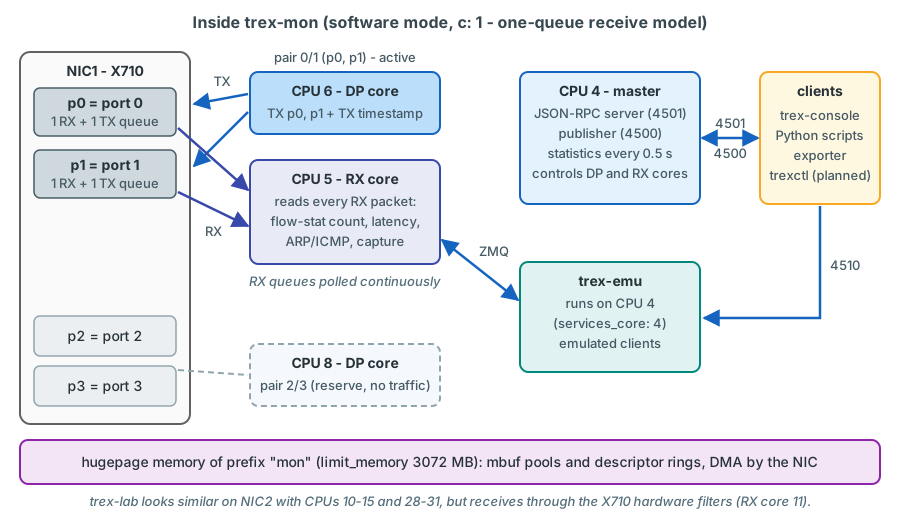
On trex-mon streams with statistics run permanently. Its RX core (CPU 5) therefore polls all the time, and so does
the DP core of the active pair (CPU 6), which transmits all the time: both show 100 % in top. That is normal. The DP
core of the reserve pair (CPU 8) has nothing to send and, by the idle loop in the source, sleeps between its checks
confirm on device. The useful load is what TRex itself reports: the cpu_util and
rx_cpu_util values in the global statistics and the per-core table of stats -c measure the share of time spent on
real work (see Seeing what the cores do).
Tip
Do not let host monitoring alarm on 100 % CPU for the CPUs reserved for TRex (4-15 and 20-31 on the LVR server).
Alarm on the load TRex reports itself - cpu_util and rx_cpu_util - and on the OS CPUs 0-3 and 16-19.
Hugepages and the IOMMU on the LVR server
The LVR server reserves its hugepages and enables the IOMMU on the kernel command line (chapter 17 shows the procedure):
| Argument | Effect | Why |
|---|---|---|
intel_iommu=on |
Enables Intel VT-d DMA remapping (also enable VT-d in the BIOS) | vfio-pci needs the IOMMU to give a user-space process safe DMA access to a device |
iommu=pt |
Pass-through mode for devices that stay with kernel drivers | No address-translation overhead for the management NIC and disks; devices handed to vfio-pci still get their own protected IOMMU domain |
default_hugepagesz=2M hugepagesz=2M |
Hugepage size 2 MB | Standard size for DPDK on x86 |
hugepages=4096 |
Reserve 4096 x 2 MB = 8 GB at boot | Room for both instances: trex-mon and trex-lab take 3072 MB each (limit_memory), 2 GB stay free |
Reserving the pages at boot matters: the TRex start script also checks the reservation and tries to add pages at run time if there are too few, but on a server that has been running for a while the memory is fragmented and the allocation can fail. Check the result after every reboot confirm on the target OS:
cat /proc/cmdline                                   # the arguments above must appear
grep -E 'HugePages_(Total|Free)|Hugepagesize' /proc/meminfo
dmesg | grep -i -E 'DMAR|IOMMU' | head              # IOMMU initialised
Which driver: vfio-pci, igb_uio, uio_pci_generic
| Driver | What it is | At LVR |
|---|---|---|
vfio-pci |
Standard kernel module; uses the IOMMU so the device can only reach memory the process has mapped | Used. Signed, works with Secure Boot |
igb_uio |
Out-of-tree DPDK module, compiled per kernel version, no IOMMU protection | Not used; unsigned, needs Secure Boot off |
uio_pci_generic |
Generic kernel UIO module | Fallback only |
The TRex binding logic (dpdk_setup_ports.py) tries them in this order: a pre-built igb_uio module if the TRex package
contains one for the running kernel, then vfio-pci (only if iommu= is on the kernel command line), then
uio_pci_generic, and finally it tries to compile igb_uio. On the LVR server the expected result is vfio-pci; verify
it as shown below rather than assuming it.
Binding the NICs
dpdk_setup_ports.py
dpdk_setup_ports.py in the TRex directory is the tool for everything that concerns NICs and drivers:
| Command | Does |
|---|---|
./dpdk_setup_ports.py -s |
Shows every network device, grouped into "using DPDK-compatible driver" and "using kernel driver" |
./dpdk_setup_ports.py -t |
Table with PCI address, NUMA node, MAC address, driver and Linux name |
./dpdk_setup_ports.py -i |
Interactive creation of a configuration file (asks for the interfaces and addresses) |
./dpdk_setup_ports.py -c <ifaces> -o <file> |
The same without questions |
./dpdk_setup_ports.py --cfg <file> |
Binds the interfaces listed in that configuration file - the same step t-rex-64 performs at every start |
./dpdk_setup_ports.py -L |
Returns all DPDK-bound interfaces to their Linux drivers (only with TRex stopped) |
./dpdk_setup_ports.py -m |
Shows the memory channel topology per NUMA node |
This is what -s looks like on a server where nothing is bound to DPDK yet - the example is from the TRex manual with
82599 NICs from TRex docs:
[bash]>sudo ./dpdk_setup_ports.py -s

 Network devices using DPDK-compatible driver
 ============================================

 Network devices using kernel driver
 ===================================
 0000:03:00.0 '82599ES 10-Gigabit SFI/SFP+ Network Connection' drv= unused=ixgb #
 0000:03:00.1 '82599ES 10-Gigabit SFI/SFP+ Network Connection' drv= unused=ixgb
 0000:13:00.0 '82599ES 10-Gigabit SFI/SFP+ Network Connection' drv= unused=ixgb
 0000:13:00.1 '82599ES 10-Gigabit SFI/SFP+ Network Connection' drv= unused=ixgb
 0000:02:00.0 '82545EM Gigabit Ethernet Controller (Copper)' if=eth2 drv=e1000 unused=igb_uio *Active* #

 Other network devices
 =====================
 <none>
The interface marked *Active* carries your SSH session. The manual's warning applies literally: never put this
interface into a TRex configuration file - binding it to DPDK would cut you off from the server. On the LVR server the
management NIC must never appear in a TRex configuration file (trex_mon.yaml, trex_lab.yaml, trex_lab_astf.yaml);
only the eight X710 ports (PCI ID 8086:1572, visible with lspci -nn | grep -i ethernet) belong there.
When the binding happens - and why the ports disappear from ip link
You do not bind the ports by hand. t-rex-64 calls the TRex setup script trex-cfg at every start, and it binds every
interface listed in the instance's configuration file that is not yet bound. After a reboot the X710 ports are therefore
back with the kernel driver (i40e) until the first TRex start; once trex-mon and trex-lab have started, all eight
belong to vfio-pci, and ./dpdk_setup_ports.py -s lists them under "Network devices using DPDK-compatible driver"
with drv=vfio-pci. The same script also stops firewalld on Red Hat-family systems at every start - one reason why
the protection of the TRex control ports is designed explicitly in the server build
(chapter 17).
From that moment the kernel has no network device for these ports: they disappear from ip link, ethtool and
tcpdump. This is not a fault, it is the point of DPDK. To see what is happening on a TRex port, use the TRex tools -
port statistics in the console and the TRex packet capture (chapter 4).
All ports of an X710 belong together
TRex refuses to start if one port of an X710 card is used by TRex while another port of the same card is still
under the Linux i40e driver ("i40e interface ... is under Linux and will interfere with TRex interface", TRex issue
trex-528). This is one more reason why each LVR instance owns a complete card: NIC1 belongs to trex-mon, NIC2 to
trex-lab. Never hand a single X710 port back to Linux. The ASTF unit trex-lab-astf uses only p4 and p6 of NIC2;
it is started with --unbind-unused-ports, which makes TRex unbind the other two ports of the card (p5, p7) from
i40e instead of exiting with this error confirm on the bench.
Optics
The X710 accepts only Intel-coded optics; passive DAC cables usually work. The LVR design uses DACs between the
server and sw-rzk-TX1. Test one cable before ordering in bulk.
NUMA and PCIe slot placement
With one CPU, the LVR server has a single NUMA node, and both X710 cards, all hugepages and all TRex cores are local to each other. Three things still need checking:
- The slots must be wired to the populated CPU. On the DL380 Gen11 some riser slots are connected to the second CPU socket; with only one CPU fitted, those slots do not work at all. The riser configuration must provide two x8 (or wider) slots on CPU 1 - an X710-DA4 needs PCIe 3.0 x8 for its 4 x 10G.
- The BIOS must not split the socket. Some Xeon generations can present one socket as several NUMA nodes
(sub-NUMA clustering). If
lscpushows more than one NUMA node, treat the server like a multi-socket machine and check which node each card is attached to. - The configuration must match. Both
dual_ifentries of both instances usesocket: 0.
The PCI address in the second command is an example confirm on the target OS:
lscpu | grep -i numa                                   # expect: NUMA node(s): 1
cat /sys/bus/pci/devices/0000:31:00.0/numa_node        # 0, or -1 on a single-node system
The TRex threads
A TRex instance is one process with a fixed set of threads, each pinned to the CPU named in the configuration file.
Thread (name in top -H) |
Configured by | What it does |
|---|---|---|
Master / control plane (main thread of _t-rex-64, plus helper threads such as "Trex ZMQ sync", "Trex Publisher", "Trex Watchdog") |
master_thread_id |
JSON-RPC server, publisher, statistics collection (every 0.5 s), stream and port management, watchdog. Mostly sleeping |
| RX core, also called latency thread ("TRex RX") | latency_thread_id |
Received packets that need software handling: service-mode packets (ARP, ICMP), the packet path to and from EMU, captures - and, in the receive models where it reads the traffic itself, latency and flow-stat processing |
| DP cores ("Trex DP core N") | dual_if → threads, c |
Build and transmit the streams of their port pair; in the multi-queue software model also receive, count flow statistics, measure latency and hand service packets to the RX core |
| Helper processes (not TRex threads) | services_core |
The EMU server trex-emu and the Scapy helper server are separate processes pinned to this CPU |
Three receive models
Which core counts the received packets and takes the receive timestamp depends on the mode and on c. TRex chooses the
model at start-up and prints it to its log ("set dpdk queues mode to ..."; the log line is from the trex-core source,
confirm on device in /var/log/trex/trex-mon.log):
| Model (log name) | Selected when | Who receives and measures | At LVR |
|---|---|---|---|
Hardware filter (DROP_QUE_FILTER) |
Stateless, hardware mode, X710 | The NIC counts flow-stat packets itself, drops what nobody needs and steers latency packets to a queue that the RX core reads continuously | trex-lab (stateless) |
One queue (ONE_QUE) |
Software mode with c: 1 |
The RX core reads every received packet itself: counting, latency, service packets | trex-mon (c: 1) |
Multi-queue (MULTI_QUE) |
Software mode with c of 2 or more |
Each DP core has its own receive queue; the NIC spreads packets over them. The DP cores parse every packet, count flow statistics and compute latency themselves; service packets go to the RX core | not used - latency is not accurate |
Software mode supports any packet format - including QinQ - at the cost of a lower total receive rate. TRex advises keeping the total rate of latency streams well below 5 Mpps; the LVR monitoring load is about 20 kpps.
The multi-queue model has one property that rules it out for monitoring. A DP core that is transmitting runs a
scheduler, and it services its receive queues as one scheduled task every 20 µs (constant STL_RX_FLUSH_SEC in
the trex-core source). A latency packet that arrives just after such a pass waits up to about 20 µs in the queue before
it is read and time-stamped, so every latency sample can contain up to about 20 µs of TRex's own receive delay. The
source comment on this mode says it plainly: "latency won't be accurate in this mode -- both latency Tx and Rx are
indirect". In the hardware-filter and one-queue models the receiving core polls continuously and this effect does not
exist.
Why trex-mon runs with c: 1
In software mode c selects the receive model, so its value is a design decision with a measurable consequence.
With c: 1, trex-mon runs in the one-queue model: one DP core per port pair transmits - far more than enough for
about 20 kpps - and the RX core reads every received packet in a continuous loop, so receive timestamps are taken
without the 20 µs polling step. All software receive work (flow-stat counting, latency, ARP and ICMP for EMU) is
concentrated on CPU 5; its load, rx_cpu_util, is the value to watch. With c: 2 TRex would switch to the
multi-queue model, and every latency value would carry up to about 20 µs of TRex's own polling delay. Keep c
fixed: changing the receive model later shifts the baseline and every latency history.
confirm on the bench After every start of trex-mon, the log must show the
one-queue model:
grep "queues mode" /var/log/trex/trex-mon.log | tail -n 1 # expected: set dpdk queues mode to ONE_QUE
The LVR thread layout
The server has one 16-core CPU with hyper-threading: 32 logical CPUs. The layout below divides them between the two TRex instances and everything else that runs on the server (operating system, InfluxDB, Grafana, the planned trexctl).
| Logical CPUs | Used by | Role |
|---|---|---|
| 0-3, 16-19 | Operating system | OS, InfluxDB, Grafana, trexctl, SSH (both hardware threads of cores 0-3) |
| 4 | trex-mon | master (control plane) and helper processes, including the EMU server (services_core: 4) |
| 5 | trex-mon | RX thread: in the one-queue model every received packet - flow-stat counting, latency, service packets (ARP, ICMP), EMU path, captures |
| 6 | trex-mon | DP thread of the first port pair (p0, p1 - active): transmits all monitoring streams |
| 8 | trex-mon | DP thread of the second port pair (p2, p3 - reserve, no traffic) |
| 7, 9 | - | reserved for TRex, not used; kept free |
| 10 | trex-lab | master (control plane); trex-lab starts no helper processes (no EMU, --no-scapy-server) |
| 11 | trex-lab | RX / latency thread |
| 12, 13, 28, 29 | trex-lab | DP threads of the first port pair (p4, p5) |
| 14, 15, 30, 31 | trex-lab | DP threads of the second port pair (p6, p7) |
| 20-27 | - | second hardware threads of cores 4-11: reserved with their cores and left idle |
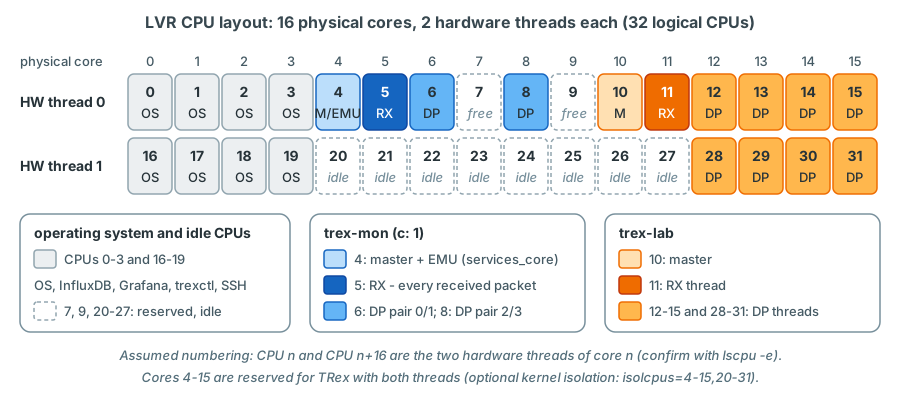
Reading the layout needs one piece of hardware knowledge: with hyper-threading, each physical core runs two logical
CPUs that share its execution units and caches. On a 16-core Intel CPU, Linux usually numbers them so that CPU n and
CPU n+16 are the two threads of core n confirm on device with lscpu -e or
cat /sys/devices/system/cpu/cpu5/topology/thread_siblings_list. Under that assumption:
trex-labuses both hardware threads of cores 12-15 for its DP threads, because line-rate tests need all the transmit power available.trex-monuses one hardware thread of cores 4, 5, 6 and 8. Their siblings 20, 21, 22 and 24 are not given to the OS: a busy process on a sibling would share the core with a measuring thread and appear as latency noise. At a monitoring load of about 20 kpps one thread per core is plenty.- CPUs 7 and 9 and the remaining siblings (23 and 25-27) are not used by TRex. They belong to the reserved cores 4-15 and stay free.
Why the helper processes run on the master CPU
services_core decides where TRex starts its helper processes, among them the EMU server. The TRex helper script
advises placing them "on free core or TRex master thread core", and without the key TRex uses the master thread's
CPU. The master loop sleeps most of the time, so EMU gets CPU time as soon as it has ARP or ICMP work. The other
trex-mon CPUs poll: the DP core of the active pair while it transmits - permanently - and the RX core, which in the
one-queue model reads every received packet in a continuous loop. A helper sharing a polling core would interrupt it
and be interrupted by it - in the worst case delaying latency packets and producing spikes that are not in the
network.
Keeping other processes away: isolcpus
TRex pins its own threads, but by default Linux may still schedule other processes - an InfluxDB compaction, a
Grafana query - on the TRex CPUs. The kernel parameter isolcpus removes CPUs from the general scheduler: only threads
that are explicitly pinned there (as DPDK and taskset do) run on them. Optionally, nohz_full stops the periodic
timer tick on those CPUs and rcu_nocbs moves kernel RCU callbacks away from them. Consistent with the layout above,
the reserved cores are 4-15 with both hardware threads, so that no other process shares a core with a TRex thread:
confirm on the bench The isolation is optional. Its benefit shows in the maxima of
the loopback latency test; measure with and without it during acceptance and keep it only if it helps. Without it,
keep InfluxDB and Grafana on CPUs 0-3 and 16-19 with CPUAffinity= in their systemd units
(chapter 17).
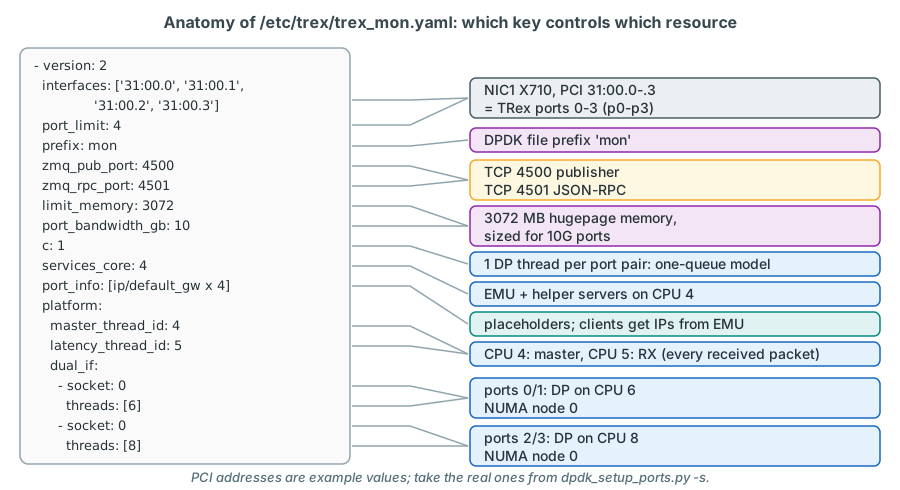
trex_cfg.yaml line by line
Each TRex instance reads its platform configuration from a YAML file given with --cfg (default /etc/trex_cfg.yaml).
The LVR server has two main files, /etc/trex/trex_mon.yaml and /etc/trex/trex_lab.yaml, plus an ASTF variant of the
lab file (see below). The PCI addresses below are example values; the real ones are taken from dpdk_setup_ports.py -s
on the installed server illustrative values (PCI addresses only).
- version: 2                                                  # (1)!
  interfaces: ['31:00.0', '31:00.1', '31:00.2', '31:00.3']    # (2)!
  port_limit: 4                                               # (3)!
  prefix: mon                                                 # (4)!
  zmq_pub_port: 4500                                          # (5)!
  zmq_rpc_port: 4501
  limit_memory: 3072                                          # (6)!
  port_bandwidth_gb: 10                                       # (7)!
  c: 1                                                        # (8)!
  services_core: 4                                            # (9)!
  port_info:                                                  # (10)!
    - ip: 1.1.1.1
      default_gw: 1.1.1.2
    - ip: 1.1.1.2
      default_gw: 1.1.1.1
    - ip: 1.1.2.1
      default_gw: 1.1.2.2
    - ip: 1.1.2.2
      default_gw: 1.1.2.1
  platform:
    master_thread_id: 4                                       # (11)!
    latency_thread_id: 5                                      # (12)!
    dual_if:                                                  # (13)!
      - socket: 0
        threads: [6]
      - socket: 0
        threads: [8]
- The file is a YAML list with one element per configuration;
version: 2is mandatory. - The four ports of NIC1. The order defines the TRex port numbers:
31:00.0becomes port 0 (p0),31:00.3port 3 (p3). The X710 shows its four ports as functions .0-.3 of one PCI device. - Number of ports; must match the
interfaceslist. Mandatory. - DPDK file prefix: this instance's hugepage files and runtime directory are named after it, so two DPDK processes do not collide. Mandatory as soon as two instances run on one server.
- Publisher (4500) and RPC (4501) ports. The second instance must use different ports; TRex refuses to start if its publisher port is already in use ("ZMQ port is used by the following process").
- Hugepage memory in MB that this instance may take on its NUMA node (passed to DPDK as its memory limit).
- Port speed in Gbit/s; TRex uses it to size its packet memory.
- Number of DP threads per port pair. Together with
--software,c: 1selects the one-queue receive model with accurate latency; 2 or more would select the multi-queue model (see Three receive models).-con the command line would override it - never ontrex-mon. Must not exceed the length of thethreadslists below. - CPU for the helper processes (EMU server, Scapy helper). The master CPU, never a polling DP or RX core.
- One entry per port. Placeholders: the real client addresses come from EMU. See below.
- CPU of the master (control-plane) thread.
- CPU of the RX (latency) thread. With
c: 1it reads every received packet. - One entry per port pair, in port order: the first entry serves ports 0 and 1, the second ports 2 and 3.
socketis the NUMA node for the pair's memory,threadsthe CPUs for its DP threads (the firstcof them are used).
- version: 2
  interfaces: ['98:00.0', '98:00.1', '98:00.2', '98:00.3']    # NIC2: p4-p7
  port_limit: 4
  prefix: lab
  zmq_pub_port: 4600
  zmq_rpc_port: 4601
  limit_memory: 3072
  port_bandwidth_gb: 10
  c: 4
  port_info:
    - src_mac: '02:54:52:f0:00:04'                              # (1)!
      ip: 2.1.1.1
      default_gw: 2.1.1.2
    - src_mac: '02:54:52:f0:00:05'
      ip: 2.1.1.2
      default_gw: 2.1.1.1
    - src_mac: '02:54:52:f0:00:06'
      ip: 2.1.2.1
      default_gw: 2.1.2.2
    - src_mac: '02:54:52:f0:00:07'
      ip: 2.1.2.2
      default_gw: 2.1.2.1
  platform:
    master_thread_id: 10
    latency_thread_id: 11
    dual_if:
      - socket: 0
        threads: [12, 13, 28, 29]
      - socket: 0
        threads: [14, 15, 30, 31]
- The fixed MAC address of each lab port (p4
02:54:52:f0:00:04... p7:07), in interface order. TRex answers ARP for a lab port and runs ASTF with this MAC, so it is set here and not derived from the attachment point the port is pinned to; theip/default_gwvalues below it are placeholders (see Port pairs and port_info).
The lab file differs where it must (ports, prefix, ZMQ ports, CPUs) and where its job is different: c: 4 gives each
port pair four DP threads for line-rate generation. In stateless hardware mode the X710 filters steer the latency
packets to the RX core, so latency stays accurate with any c (hardware-filter model). The file has no
services_core, and needs none: trex-lab starts no helper processes - no EMU, and no Scapy helper, because its
units run with --no-scapy-server (see Two instances side by side).
The ASTF unit uses a third file, /etc/trex/trex_lab_astf.yaml, with the same kind of keys but only p4 and p6 in its
interfaces list: ASTF makes even ports the client side and odd ports the server side, so p4 becomes port 0 (client)
and p6 port 1 (server). Chapter 7 shows that file.
Rules TRex enforces
TRex checks the platform section at start and refuses to run if it is inconsistent:
- all
dual_ifentries must list the same number of threads, andc(or-c) must not exceed that number; - a DP thread CPU may appear only once;
- the master and the RX thread must not be one of the DP threads (and belong on two different CPUs themselves).
Port pairs and port_info
The dual_if entries are the port pairs of chapter 2: ports 0 and 1 share the DP threads of the first entry, ports 2 and 3 those
of the second. In trex-mon the active ports p0/p1 form the first pair, so all permanent traffic is transmitted by
CPU 6; CPU 8 serves the reserve ports p2/p3, which carry no traffic. What the four ports receive is read by the RX core
on CPU 5.
port_info gives every port an IP address and a default gateway (alternatively a destination MAC address). The format
requires one of the two per port. In the LVR design these values are placeholders:
- In
trex-monevery stream carries explicit source and destination MAC addresses and all addressing in the production VLANs belongs to the EMU clients (10.3.14.101 and so on, chapter 6). The port's own address is never used for measurement traffic. - In
trex-labthe test procedures set the port addresses per test (port L3 mode with the VLAN of the pinned attachment point), and ASTF profiles bring their own client and server ranges. The one value in the lab file that is not a placeholder issrc_mac: each lab port keeps one fixed MAC address (02:54:52:f0:00:04for p4 to:07for p7) whatever it is pinned to, because TRex answers ARP for a lab port with the port MAC; only the port's lab IP follows the pinned attachment point (chapter 4).
The placeholders are not completely silent: at start-up TRex sends a gratuitous ARP for each port's ip and an ARP
request for its default_gw, untagged (no vlan key is set). On the TX switch such frames stay in the native VLAN of
the TRex-facing port; on a lab port they get the attachment point's S-tag but reach the Leaf without a C-VLAN tag and
match no service instance confirm on the bench. A log line "Failed resolving dest MAC
for default gateway" is harmless in interactive mode - TRex continues.
Command-line options
| Option | Meaning | Used at LVR |
|---|---|---|
-i |
Interactive mode: start without traffic and wait for clients | Both instances |
--cfg <file> |
Platform configuration file (default /etc/trex_cfg.yaml) |
/etc/trex/trex_mon.yaml, /etc/trex/trex_lab.yaml, /etc/trex/trex_lab_astf.yaml |
--software |
Install no hardware rules; process all received packets in software. Needed for QinQ flow statistics, allows 1023 flow-stat streams, lowers the total receive rate | trex-mon |
--emu |
Start the EMU server and open the ZMQ packet channel to it | trex-mon |
--astf |
Advanced stateful mode | trex-lab-astf.service |
--iom 0 |
I/O mode 0 = silent: no live statistics screen on standard output (1 = normal, 2 = short) | All units - keeps the log files readable |
--no-hw-flow-stat |
X710 only: count flow statistics in software instead of hardware, which adds RX byte counters but lowers the countable rate | Optional for trex-lab |
--no-scapy-server |
Do not start the Scapy helper server, and do not stop it when the instance exits. Without it, every interactive stateless start restarts this per-host helper | trex-lab.service, trex-lab-astf.service |
--unbind-unused-ports |
i40e only: unbind the unused ports of the same NIC from the Linux driver instead of exiting with an error | trex-lab-astf.service (uses two of the four NIC2 ports) |
-c <n> |
DP threads per port pair; overrides c from the file |
Not used (the files set c); on trex-mon it would change the receive model |
--prefix <name> |
DPDK file prefix; alternative to the prefix key |
Not used (the files set prefix) |
A related option belongs to dpdk_setup_ports.py, not to the server: --no-ht makes the configuration generator
(-i or -c) use only one hardware thread per core when it proposes the threads lists. Hyper-threading itself stays
enabled in the BIOS; the LVR layout above decides deliberately which siblings TRex uses.
The resulting systemd command lines (the units are listed in chapter 17) confirm on the bench:
# trex-mon.service
t-rex-64 -i --software --emu --cfg /etc/trex/trex_mon.yaml --iom 0
# trex-lab.service
t-rex-64 -i --cfg /etc/trex/trex_lab.yaml --iom 0 --no-scapy-server
# trex-lab-astf.service
t-rex-64 -i --astf --cfg /etc/trex/trex_lab_astf.yaml --iom 0 --no-scapy-server --unbind-unused-ports
Two instances side by side
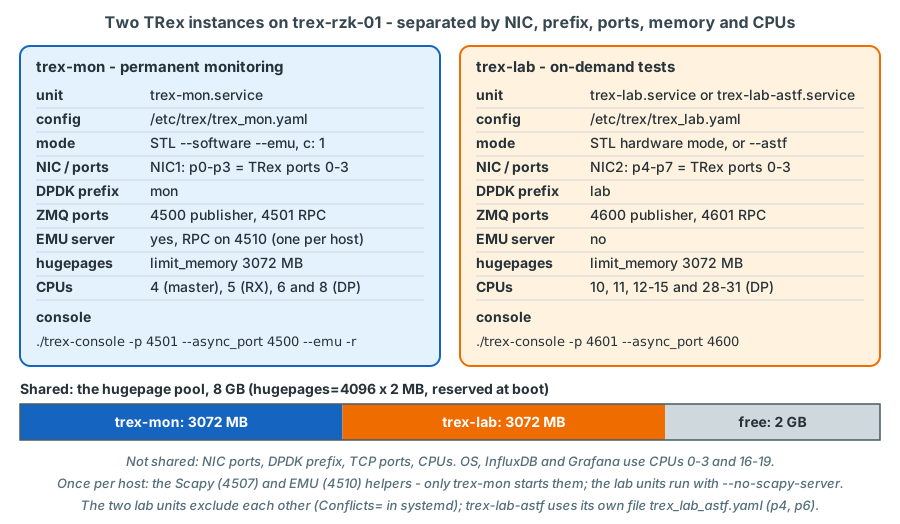
Two TRex processes can share one server as long as they share nothing that DPDK or TRex needs exclusively:
| Resource | trex-mon | trex-lab | What happens if they collide |
|---|---|---|---|
| NIC ports | NIC1 p0-p3 | NIC2 p4-p7 | Both DPDK processes would drive the same device; each instance only touches the PCI addresses in its own file |
| DPDK file prefix | mon |
lab |
Hugepage files and runtime state of the two processes would overwrite each other |
| ZMQ ports | 4500 / 4501 | 4600 / 4601 | The second instance refuses to start (publisher port in use) |
| Hugepage memory | 3072 MB | 3072 MB | The sum must stay below the 8 GB pool, or the second instance fails at start |
| CPUs | 4, 5, 6, 8 | 10-15, 28-31 | Two polling threads on one CPU destroy each other's timing |
| EMU server | yes, TCP 4510 | no | EMU is one named helper service per host with a fixed RPC port; a second instance started with --emu would restart it |
| Scapy helper (TCP 4507) | started when trex-mon starts |
not started: both lab units run with --no-scapy-server |
One named helper per host: every interactive stateless start without --no-scapy-server restarts it, and that instance stops it again when it exits - whichever instance started it |
| systemd unit | trex-mon.service |
trex-lab.service or trex-lab-astf.service (mutually exclusive) |
- |
| Console | ./trex-console -p 4501 --async_port 4500 --emu -r (read-only) |
./trex-console -p 4601 --async_port 4600 |
You would control the wrong instance |
To see which TRex processes and ports are active on the server confirm on the target OS:
systemctl status trex-mon trex-lab trex-lab-astf      # which units are running
ss -ltnp | grep -E ':(4500|4501|4510|4600|4601|4507) '  # who listens on the TRex ports
Port 4507 belongs to the Scapy helper server that interactive stateless instances start for the TRex GUI unless they
run with --no-scapy-server; ASTF starts do not start it at all unless --scapy-server is given. The LVR platform does
not use the GUI. On trex-rzk-01 only trex-mon starts the helper, and both lab units carry --no-scapy-server, so
starting or stopping a lab unit leaves it alone. The same per-host mechanism is the reason why only trex-mon is
started with --emu: a second instance with that option would restart the EMU server and remove every emulated client
of the monitoring.
Production impact
The instances are isolated on the server, but not in the network: both use sw-rzk-TX1, and the TX-to-TX fibre
carries monitoring and lab traffic of all Chorweiler attachment points. A lab test that is safe for the server can
still disturb the monitoring - and production - through shared links (chapter 24).
During lab tests, keep an eye on trex-mon (cpu_util, rx_cpu_util, drops on the monitoring streams).
Linux interfaces and dummy ports - TRex for practice
You do not need DPDK NICs to learn the console. TRex can use ordinary Linux interfaces through DPDK's AF_PACKET driver:
list interface names instead of PCI addresses, and TRex converts them to --vdev=net_af_packet0,iface=<name>. Any
Linux interface works (also virtual ones), no hugepages are needed and the traffic can be captured with tcpdump - but
the rate is limited to about 1 Mpps with a single TX/RX core and the Linux system slows down. On weak machines the
low_end option puts all TRex threads on one core and uses sleeps instead of busy polling.
A practice setup with a veth pair on a separate lab VM - never on trex-rzk-01, where the default ports 4500/4501
belong to trex-mon sketch - validate on the bench:
- version: 2
  port_limit: 2
  interfaces: ['veth0', 'veth1']      # becomes --vdev=net_af_packet0,iface=veth0 ...
  low_end: true                        # optional: one core, sleeps instead of polling
  port_info:
    - ip: 1.1.1.1
      default_gw: 1.1.1.2
    - ip: 1.1.1.2
      default_gw: 1.1.1.1
Start it with sudo ./t-rex-64 -i --cfg /etc/trex/trex_practice.yaml and connect with ./trex-console. Timestamps on
such a setup pass through the kernel and are useless for latency measurement; use it only to learn the commands.
Dummy ports fill a port pair when you have an odd number of interfaces, for example interfaces: ['07:00.0',
'dummy']. Each pair needs at least one real port. They are useful on a lab machine with a single NIC port; the LVR
production instances do not use them.
Seeing what the cores do
TRex measures how much of each core's time goes into real work. The most useful views:
| Where | Shows |
|---|---|
stats -g (global statistics) |
cpu_util: average DP core load, with the number of cores; rx_cpu_util: RX core load and the packet rate it handles; queue_full or queue_drop: transmit queue problems |
stats -c |
Per DP thread: which ports it serves (or IDLE), average and the last 20 one-second values |
stats -m |
mbuf usage per size class and NUMA node |
TUI, key u |
Global statistics, CPU table and mbuf table on one screen |
This is the beginning of a CPU utilisation table (the format of stats -c and of the TUI) from the TRex documentation,
taken from a test in which DP threads were pinned to one port each from TRex docs:
Cpu Util(%)

  Thread   | Avg | Latest | -1  | -2  | -3  | -4  | -5  | -6  | -7  | -8

 0   (0)   |  92 |     92 |  92 |  91 |  91 |  92 |  91 |  92 |  93 |  94
 1 (IDLE)  |   0 |      0 |   0 |   0 |   0 |   0 |   0 |   0 |   0 |   0
 2   (1)   |  96 |     95 |  95 |  96 |  96 |  96 |  96 |  95 |  94 |  95
 3 (IDLE)  |   0 |      0 |   0 |   0 |   0 |   0 |   0 |   0 |   0 |   0
Read it as: DP thread 0 serves port 0 and was 92 % busy on average; thread 1 had nothing to do. The TRex manual
recommends keeping the DP load below 80 % for reliable results. On trex-mon the load TRex reports stays low: its DP
core transmits only about 20 kpps, and its RX core receives the same. Watch cpu_util (the transmit work of the DP
cores) and rx_cpu_util (in the one-queue model all receive work: flow-stat counting, latency, ARP, ICMP and EMU
traffic).
The operating-system view complements it. top -H shows the threads with their TRex names, as in this example from the
TRex manual for a small one-core setup from TRex docs:
%CPU COMMAND
 1.0 _t-rex-64
 0.0  `- eal-intr-thread
13.0  `- Trex DP core 1
 3.0  `- TRex RX
 0.0  `- Trex Publisher
 0.0  `- Trex Publisher
 0.0  `- Trex ZMQ sync
 0.0  `- Trex Watchdog
 0.0  `- Trex ZMQ sync
 0.0  `- Trex ZMQ sync
On the LVR server, select one instance by its configuration file and check that every thread runs on the intended CPU
(column PSR) confirm on the target OS:
top -H -p "$(pgrep -d, -f '_t-rex-64.*trex_mon')"
ps -L -o tid,psr,pcpu,comm -p "$(pgrep -d, -f '_t-rex-64.*trex_mon')"
Expect two "Trex DP core" threads, on CPUs 6 and 8, and "TRex RX" on CPU 5. CPU 6 (transmitting) and CPU 5 (reading
the statistics streams) are near 100 % in top, CPU 8 (reserve pair, nothing to send) close to idle - and stats -c
shows low values confirm on device. A DP or RX thread on an unexpected CPU means the
configuration file was not the one you think.
Key takeaways
- At 10 Gbit/s a minimum-size frame arrives every 67.2 ns; the kernel path (interrupts, system calls, copies, context switches) cannot keep up. DPDK moves the packet path into user space.
- DPDK essentials: NIC detached from the kernel and bound to
vfio-pci, poll-mode driver, mbufs in pre-allocated hugepage memory, descriptor rings and DMA without copies, memory and cores on the NIC's NUMA node. - A polling TRex core shows 100 % in
top; that is normal. Judge the load withstats -g(cpu_util,rx_cpu_util) andstats -c. - The LVR server reserves 8 GB of 2 MB hugepages and enables the IOMMU on the kernel command line; both instances take 3072 MB each.
t-rex-64binds the ports of its configuration file at every start; bound ports vanish fromip link. All four ports of an X710 must stay away from the Linux driver once TRex uses one of them.- Threads: master (control plane), RX core (service packets, EMU path, captures; latency in some receive models), DP
cores per port pair.
trex-monruns in software mode withc: 1, the one-queue model: the RX core reads every received packet and latency is accurate. Withcof 2 or more TRex would switch to the multi-queue model, whose DP cores service their receive queues only every 20 µs while transmitting. The log line "set dpdk queues mode to ONE_QUE" confirms the model after every start. - LVR layout: trex-mon 4 (master), 5 (RX), 6 and 8 (DP); trex-lab 10, 11, 12-15 and 28-31; OS 0-3 and 16-19; cores
4-15 reserved for TRex with both hardware threads (
isolcpus=4-15,20-31); helper processes (EMU) on the master CPU, not on a polling core. - Two instances need distinct NICs, prefixes, ZMQ ports, CPUs and memory shares; the Scapy and EMU helpers exist once
per host, so only
trex-monruns EMU and starts the Scapy helper, and the lab units run with--no-scapy-server(the ASTF unit, which uses only p4 and p6, also with--unbind-unused-ports). port_infoaddresses are placeholders in the LVR design; real addresses come from EMU or the test procedure. The exception issrc_macin the lab files: the fixed MAC of each lab port (p402:54:52:f0:00:04... p7:07).
Check your understanding
1. After a server reboot, ip link shows eight X710 interfaces. An hour later they are gone. Is something broken?
No. After boot the ports belong to the kernel i40e driver. When trex-mon and trex-lab start, t-rex-64 binds
the ports listed in their configuration files to vfio-pci, and the kernel no longer has a network device for
them. Use ./dpdk_setup_ports.py -s to see them under "Network devices using DPDK-compatible driver".
2. top shows CPUs 5 and 6 permanently at 100 %, although the monitoring load is only about 20 kpps. Should you worry?
No. CPU 6 is the DP core of the active pair p0/p1, which transmits all the time, and CPU 5 is the RX core, which in
the one-queue model polls the receive queues without pause while streams with statistics are active. The operating
system reports polling as 100 %. The real load is cpu_util and rx_cpu_util in stats -g; those are the numbers
to watch and to alarm on.
3. Why does services_core of trex-mon point to the master CPU 4 and not to the RX CPU 5?
services_core is the CPU on which TRex starts its helper processes, including the EMU server. CPU 5 is the RX
core: in the one-queue model it polls without pause and handles every received packet, including all latency
packets. A helper sharing a polling core interrupts it and is interrupted by it, which can delay packets and distort
latency values. The master loop sleeps most of the time; TRex itself advises placing the helpers on a free core or
the master thread's core, and uses the master CPU when the key is missing.
4. You start trex-lab and it exits immediately, complaining that the ZMQ port is used by another process. What is the likely cause?
The configuration file it was started with uses a publisher port that is already taken - most likely trex-lab was
started with the monitoring file or a copy of it (port 4500), or a previous trex-lab process is still running.
Check the --cfg argument of the unit and ss -ltnp for ports 4500/4600.
5. What would happen if trex_mon.yaml and trex_lab.yaml both had prefix: trex?
Both DPDK processes would use the same file prefix for their hugepage files and runtime state. The second instance would interfere with the memory of the first - at best it fails to start, at worst it disturbs the running monitoring. The prefix must be unique per instance.
6. A colleague wants to give p3 back to Linux for a quick tcpdump while trex-mon keeps running on p0-p2. What happens?
It does not work as intended: the four ports of NIC1 are functions of one X710 device, and TRex refuses to start
(or restart) when one of them is under the Linux i40e driver while others are used by TRex. Besides, trex-mon
owns p3 through its configuration. Use the TRex capture function instead of tcpdump.
7. Why does trex-lab use CPUs 28-31, while the siblings of the trex-mon CPUs stay idle?
Assuming the usual numbering in which CPU n and n+16 are the two hardware threads of core n, CPUs 28-31 are the
siblings of cores 12-15. trex-lab needs the full transmit capacity of those cores for line-rate tests, so its DP
threads use both hardware threads. trex-mon generates only about 20 kpps; one hardware thread per core is enough.
Its siblings 20, 21, 22 and 24 are reserved with the TRex cores and stay idle, so that no other process shares a
core with a measuring thread.
8. What would happen to the trex-mon latency values if someone set c: 2 in trex_mon.yaml and added a second CPU to each threads list?
TRex would select the multi-queue model instead of the one-queue model; the log would show "set dpdk queues mode to
MULTI_QUE". The DP cores would then receive and time-stamp the packets themselves and, while transmitting, service
their receive queues only every 20 µs. A latency packet could wait up to about 20 µs before it is time-stamped,
which raises average and maximum and adds variation - the trex-core source states that latency is not accurate in
this mode. The baseline and every latency history would shift. That is why trex-mon keeps c: 1 and the log line
is checked after every start.
References
- TRex manual, https://trex-tgn.cisco.com/trex/doc/trex_manual.html - "Hardware recommendations" (supported NICs,
X710 optics, NUMA, memory channels), "Configuring for loopback" / "Identify the ports" (
dpdk_setup_ports.py -sexcerpt,*Active*warning), "Script for creating config file" (-i,-c,--no-ht,--prefix), "Low-end machines" (low_end,topexcerpt), "Linux interfaces" (--vdev=net_af_packet, ~1 Mpps), "Dummy ports", "Platform YAML (--cfg argument)" (all keys,services_core, memory and platform sections), "Command line options" (--software,--iom,--no-hw-flow-stat,-c,--cfg) - TRex stateless guide, https://trex-tgn.cisco.com/trex/doc/trex_stateless.html - "Tutorial: Per stream statistics" (hardware vs software implementation), "Tutorial: Per stream latency/jitter/packet errors" (5 Mpps guidance), "Core masking per interface" / "Predefined modes" (CPU utilisation table excerpt)
- TRex EMU guide, https://trex-tgn.cisco.com/trex/doc/trex_emu.html - "Tutorial: Load TRex server in multi-core", "Tutorial: ZMQ transport layer"
- trex-core source (master):
scripts/t-rex-64,scripts/trex-cfg,scripts/dpdk_setup_ports.py(binding order igb_uio / vfio-pci / uio_pci_generic,check_i40e_bindswith the--unbind-unused-portshandling,check_trex_running,config_hugepages,services_corehandling,run_servers/cleanup_serverswith the named per-host helpers "Scapy" and "Emu",should_scapy_server_run,--cfg,-L,--no-ht),scripts/general_daemon_server(taskset to the services core, helper ports 4507/4509/4510),src/main_dpdk.cpp(command-line options incl.--no-scapy-serverand--unbind-unused-ports, DPDK arguments--file-prefix,--socket-mem, pre-test ARP,run_in_masterloop),src/trex_platform.cpp(platform section checks),src/stx/common/trex_rx_core.cpp(hot and cold RX states),src/stx/common/trex_dp_core.cpp(DP idle loop),src/trex_modes.handsrc/trex_modes.cpp(receive models ONE_QUE / MULTI_QUE / DROP_QUE_FILTER, their selection inchoose_mode(), the log line "set dpdk queues mode to ..." and the comment "latency won't be accurate in this mode"),src/stx/stl/trex_stl_dp_core.cpp(receive handling and hot state of the DP cores,STL_RX_FLUSHtask),src/trex_global.h(STL_RX_FLUSH_SEC= 20 µs),src/stx/stl/trex_stl.cppandsrc/stx/stl/trex_stl_fs.cpp(statistics from the DP cores in multi-queue mode),src/stx/common/trex_latency_counters.cpp(receive timestamp taken at processing time) - TRex release notes, https://trex-tgn.cisco.com/trex/doc/release_notes.html